> ## Documentation Index
> Fetch the complete documentation index at: https://docs.inworld.ai/llms.txt
> Use this file to discover all available pages before exploring further.
# Character Interaction Node Json Demo
A demo that uses all Primitive modules and behaves the same as the [Character Interaction Demo](./character).
That demo compiles by calling the API directly, while this one creates the runtime by supplying a JSON to CreateRuntime.
A well‑formed JSON can speed up compilation, and the JSON file can be reused across other platforms such as Unreal and Node.js.
Creating the runtime from JSON is still experimental.
Behavior may change at any time, and JSON generated by the Graph View Editor may encounter various issues.
## Run the Template
1. Go to `Assets/InworldRuntime/Scenes/Nodes` and play the `CharacterInteractionNodeWithJson` scene.
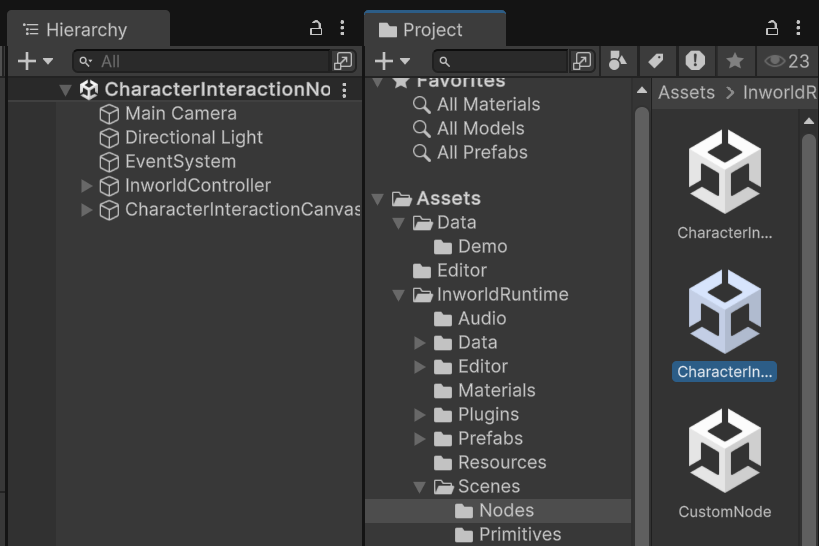 2. After the scene loads, you can enter text and press Enter or click the `SEND` button to submit.
3. You can also hold the `Record` button to record audio, then release it to send.
4. All behavior should be exactly the same as the [Character Interaction Demo](./character).
## Understanding the Graph
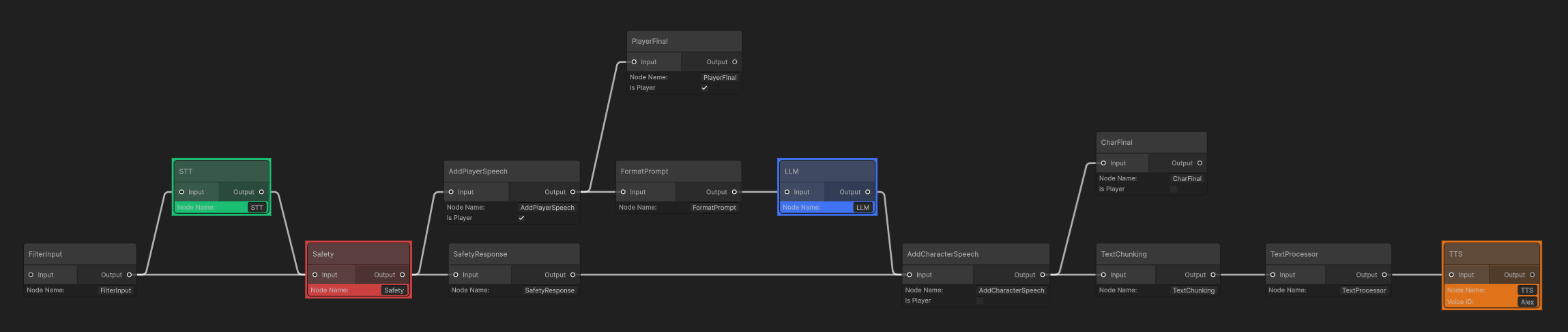
The graph should be exactly the same as the [Character Interaction Demo](./character).
2. After the scene loads, you can enter text and press Enter or click the `SEND` button to submit.
3. You can also hold the `Record` button to record audio, then release it to send.
4. All behavior should be exactly the same as the [Character Interaction Demo](./character).
## Understanding the Graph
The graph should be exactly the same as the [Character Interaction Demo](./character).
 ## JSON structure
A valid JSON contains the following sections: schema\_version, components, and main. In main, provide the id, then list nodes and edges, and finally define start\_nodes and end\_nodes.
```json unity_character_engine.json theme={"system"}
{
"schema_version": "1.0.0",
"components": [
...
{
"id": "stt_component",
"type": "STTInterface",
"creation_config": {
"type": "LocalSTTConfig",
"properties": {
"model_path": "{{STT_MODEL_PATH}}",
"device": {
"type": "CUDA",
"index": -1,
"info": {
"name": "",
"timestamp": 0,
"free_memory_bytes": 0,
"total_memory_bytes": 0
}
},
"default_config": {}
}
}
},
...
{
"id": "text_edge",
"type": "TextEdge"
},
...
],
"main": {
"id": "main_graph",
"nodes": [
{
"id": "FilterInput",
"type": "FilterInputNode"
},
{
"id": "Safety",
"type": "SafetyCheckerNode",
"creation_config": {
"type": "SafetyCheckerNodeCreationConfig",
"properties": {
"embedder_component_id": "bge_embedder_component",
"safety_config": {
"model_weights_path": "{{SAFETY_MODEL_PATH}}"
}
}
},
"execution_config": {
"type": "SafetyCheckerNodeExecutionConfig",
"properties": {
}
}
},
...
],
"edges": [
{
"from_node": "FilterInput",
"to_node": "STT",
"condition_id": "audio_edge",
"optional": true
},
...
],
"start_nodes": [
"FilterInput"
],
"end_nodes": [
"TTS",
"CharFinal",
"PlayerFinal"
]
}
}
```
### schema\_version
For now, use 1.0.0.
### components
## JSON structure
A valid JSON contains the following sections: schema\_version, components, and main. In main, provide the id, then list nodes and edges, and finally define start\_nodes and end\_nodes.
```json unity_character_engine.json theme={"system"}
{
"schema_version": "1.0.0",
"components": [
...
{
"id": "stt_component",
"type": "STTInterface",
"creation_config": {
"type": "LocalSTTConfig",
"properties": {
"model_path": "{{STT_MODEL_PATH}}",
"device": {
"type": "CUDA",
"index": -1,
"info": {
"name": "",
"timestamp": 0,
"free_memory_bytes": 0,
"total_memory_bytes": 0
}
},
"default_config": {}
}
}
},
...
{
"id": "text_edge",
"type": "TextEdge"
},
...
],
"main": {
"id": "main_graph",
"nodes": [
{
"id": "FilterInput",
"type": "FilterInputNode"
},
{
"id": "Safety",
"type": "SafetyCheckerNode",
"creation_config": {
"type": "SafetyCheckerNodeCreationConfig",
"properties": {
"embedder_component_id": "bge_embedder_component",
"safety_config": {
"model_weights_path": "{{SAFETY_MODEL_PATH}}"
}
}
},
"execution_config": {
"type": "SafetyCheckerNodeExecutionConfig",
"properties": {
}
}
},
...
],
"edges": [
{
"from_node": "FilterInput",
"to_node": "STT",
"condition_id": "audio_edge",
"optional": true
},
...
],
"start_nodes": [
"FilterInput"
],
"end_nodes": [
"TTS",
"CharFinal",
"PlayerFinal"
]
}
}
```
### schema\_version
For now, use 1.0.0.
### components
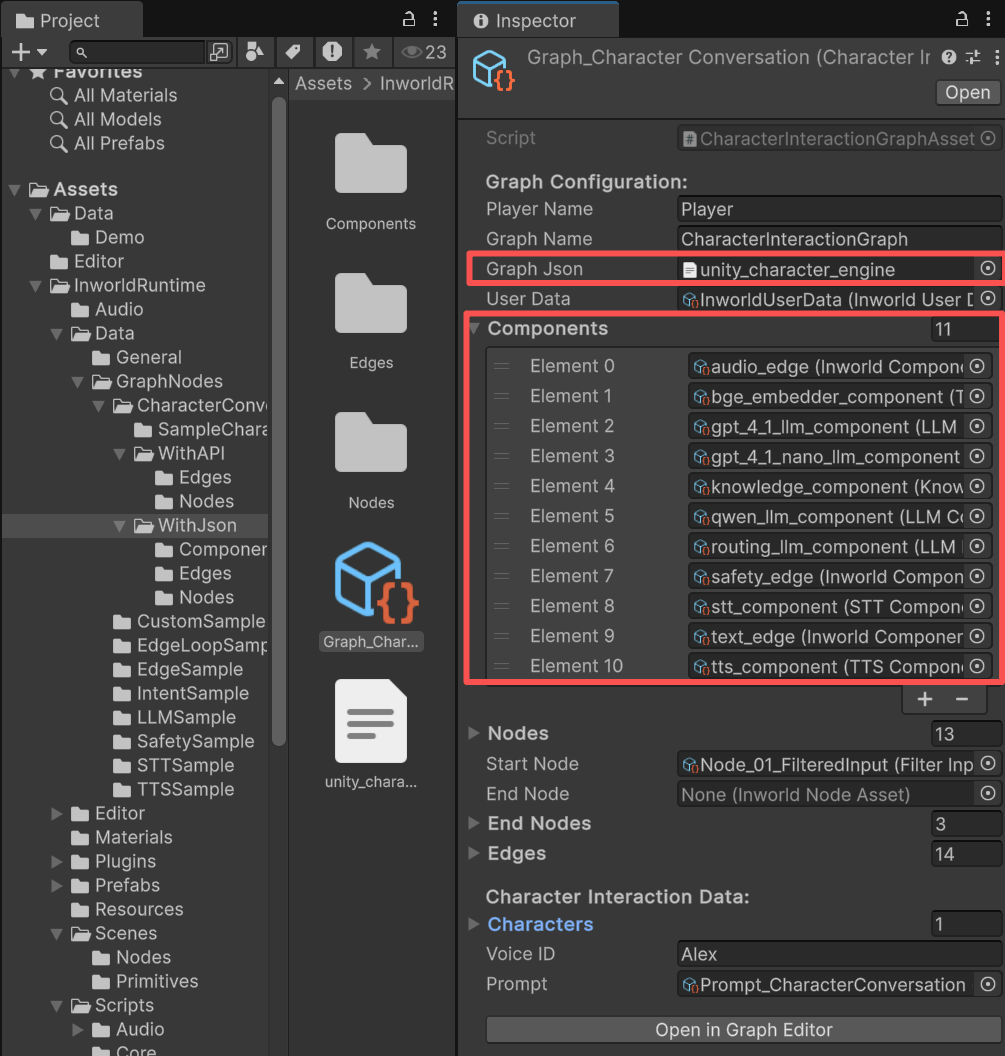 The only difference between the JSON-based approach and the pure API approach is that this ScriptableObject contains a list of components.
This effectively describes the JSON. These components are also ScriptableObjects; they have no effect at Unity AI Runtime.
Their sole purpose is to generate the JSON, because a valid Inworld JSON must include the components field.
```json unity_character_engine.json theme={"system"}
{
"schema_version": "1.0.0",
"components": [
{
"id": "qwen_llm_component",
"type": "LLMInterface",
"creation_config": {
"type": "RemoteLLMConfig",
"properties": {
"provider": "inworld",
"model_name": "Qwen/Qwen2-72B-Instruct",
"api_key": "{{INWORLD_API_KEY}}",
"default_config": {
"max_new_tokens": 160,
"max_prompt_length": 8000,
"temperature": 0.7,
"top_p": 0.95,
"repetition_penalty": 1.0,
"frequency_penalty": 0.0,
"presence_penalty": 0.0,
"stop_sequences": [
"\n\n"
]
}
}
}
},
...
]
}
```
When using the Graph View Editor, whenever you create a node, if it is an Inworld node (LLM, TTS, etc.), a default component will be created for you if one doesn’t already exist.
#### Custom edges and components
All custom edges are also components. When writing JSON, explicitly declare them inside components.
```json unity_character_engine.json theme={"system"}
{
"schema_version": "1.0.0",
"components": [
{
"id": "qwen_llm_component",
"type": "LLMInterface",
"creation_config": {
...
}
},
...
{
"id": "text_edge",
"type": "TextEdge"
},
{
"id": "audio_edge",
"type": "AudioEdge"
},
{
"id": "safety_edge",
"type": "SafetyEdge"
}
],
...
}
```
#### Relationship between nodes and components
When creating the runtime from JSON, the component field in the NodeAsset (if present) must be filled in.
The only difference between the JSON-based approach and the pure API approach is that this ScriptableObject contains a list of components.
This effectively describes the JSON. These components are also ScriptableObjects; they have no effect at Unity AI Runtime.
Their sole purpose is to generate the JSON, because a valid Inworld JSON must include the components field.
```json unity_character_engine.json theme={"system"}
{
"schema_version": "1.0.0",
"components": [
{
"id": "qwen_llm_component",
"type": "LLMInterface",
"creation_config": {
"type": "RemoteLLMConfig",
"properties": {
"provider": "inworld",
"model_name": "Qwen/Qwen2-72B-Instruct",
"api_key": "{{INWORLD_API_KEY}}",
"default_config": {
"max_new_tokens": 160,
"max_prompt_length": 8000,
"temperature": 0.7,
"top_p": 0.95,
"repetition_penalty": 1.0,
"frequency_penalty": 0.0,
"presence_penalty": 0.0,
"stop_sequences": [
"\n\n"
]
}
}
}
},
...
]
}
```
When using the Graph View Editor, whenever you create a node, if it is an Inworld node (LLM, TTS, etc.), a default component will be created for you if one doesn’t already exist.
#### Custom edges and components
All custom edges are also components. When writing JSON, explicitly declare them inside components.
```json unity_character_engine.json theme={"system"}
{
"schema_version": "1.0.0",
"components": [
{
"id": "qwen_llm_component",
"type": "LLMInterface",
"creation_config": {
...
}
},
...
{
"id": "text_edge",
"type": "TextEdge"
},
{
"id": "audio_edge",
"type": "AudioEdge"
},
{
"id": "safety_edge",
"type": "SafetyEdge"
}
],
...
}
```
#### Relationship between nodes and components
When creating the runtime from JSON, the component field in the NodeAsset (if present) must be filled in.
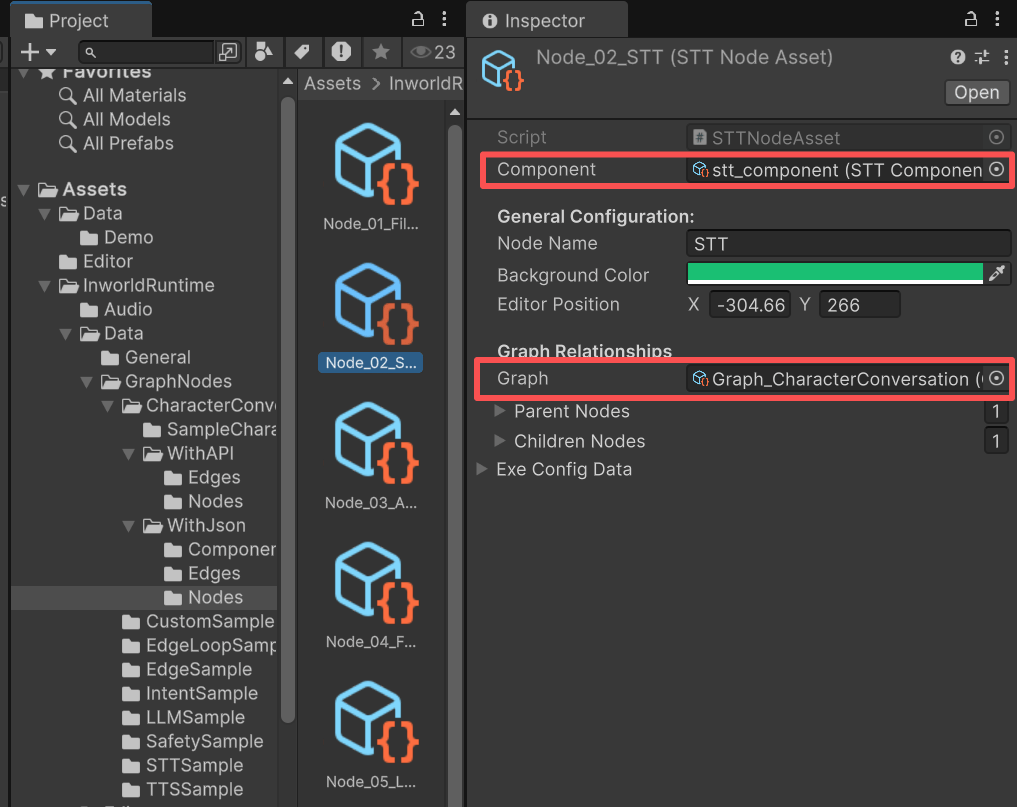 In the nodes section, the id inside properties must match the component id defined above.
```
{
"schema_version": "1.0.0",
"components": [
{
"id": "stt_component", // <=== This is Component ID!
"type": "STTInterface",
"creation_config": {
"type": "LocalSTTConfig",
"properties": {
"model_path": "{{STT_MODEL_PATH}}",
"device": {
"type": "CUDA",
"index": -1,
"info": {
"name": "",
"timestamp": 0,
"free_memory_bytes": 0,
"total_memory_bytes": 0
}
},
"default_config": {}
}
}
},
...
]
"main": {
"id": "main_graph",
"nodes": [
{
"id": "FilterInput",
"type": "FilterInputNode"
},
...
{
"id": "STT",
"type": "STTNode",
"execution_config": {
"type": "STTNodeExecutionConfig",
"properties": {
"stt_component_id": "stt_component" // <=== Here need to be the same!
}
}
},
]
}
}
```
### main
The entire graph—its nodes, edges, start\_nodes, and end\_nodes—must be defined here.
#### node
For user-defined nodes, provide the name of the C# class, for example
```json theme={"system"}
{
"id": "FilterInput",
"type": "FilterInputNode"
},
```
This corresponds to the C# class’s NodeTypeName.
```c# FilterInputNodeAsset.cs theme={"system"}
public class FilterInputNodeAsset : CustomNodeAsset
{
public override string NodeTypeName => "FilterInputNode";
...
}
```
For Inworld nodes, formats vary; follow the sample JSON in this demo.
#### edge
For edges, ensure the ids match.
```json theme={"system"}
{
"from_node": "FilterInput",
"to_node": "STT",
"condition_id": "audio_edge", //<==
"optional": true
},
```
For example, for the edge connecting FilterInputNode to STTNode, the condition\_id must match the id defined in components.
```json theme={"system"}
{
"id": "audio_edge", //<== Here.
"type": "AudioEdge"
},
```
### InworldController
The `InworldController` only provides the `InworldAudioManager` for audio output and does not require any Primitive modules.
In the nodes section, the id inside properties must match the component id defined above.
```
{
"schema_version": "1.0.0",
"components": [
{
"id": "stt_component", // <=== This is Component ID!
"type": "STTInterface",
"creation_config": {
"type": "LocalSTTConfig",
"properties": {
"model_path": "{{STT_MODEL_PATH}}",
"device": {
"type": "CUDA",
"index": -1,
"info": {
"name": "",
"timestamp": 0,
"free_memory_bytes": 0,
"total_memory_bytes": 0
}
},
"default_config": {}
}
}
},
...
]
"main": {
"id": "main_graph",
"nodes": [
{
"id": "FilterInput",
"type": "FilterInputNode"
},
...
{
"id": "STT",
"type": "STTNode",
"execution_config": {
"type": "STTNodeExecutionConfig",
"properties": {
"stt_component_id": "stt_component" // <=== Here need to be the same!
}
}
},
]
}
}
```
### main
The entire graph—its nodes, edges, start\_nodes, and end\_nodes—must be defined here.
#### node
For user-defined nodes, provide the name of the C# class, for example
```json theme={"system"}
{
"id": "FilterInput",
"type": "FilterInputNode"
},
```
This corresponds to the C# class’s NodeTypeName.
```c# FilterInputNodeAsset.cs theme={"system"}
public class FilterInputNodeAsset : CustomNodeAsset
{
public override string NodeTypeName => "FilterInputNode";
...
}
```
For Inworld nodes, formats vary; follow the sample JSON in this demo.
#### edge
For edges, ensure the ids match.
```json theme={"system"}
{
"from_node": "FilterInput",
"to_node": "STT",
"condition_id": "audio_edge", //<==
"optional": true
},
```
For example, for the edge connecting FilterInputNode to STTNode, the condition\_id must match the id defined in components.
```json theme={"system"}
{
"id": "audio_edge", //<== Here.
"type": "AudioEdge"
},
```
### InworldController
The `InworldController` only provides the `InworldAudioManager` for audio output and does not require any Primitive modules.
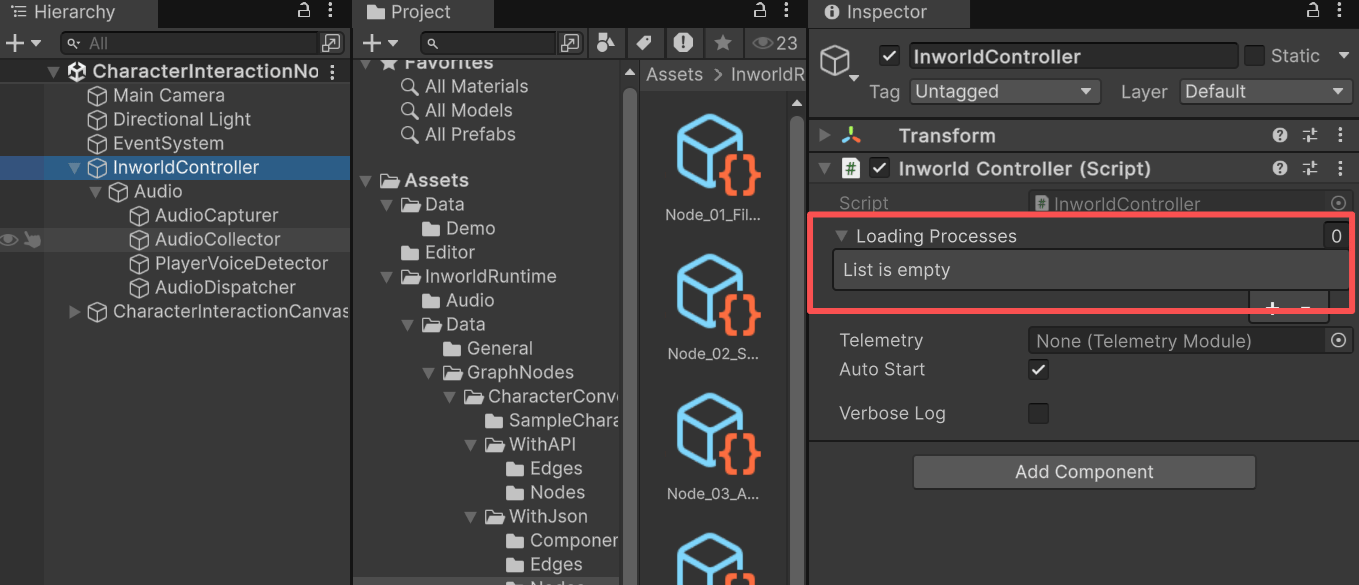 For details about the AudioManager, see the [Speech-to-Text Node Demo](./stt#inworldaudiomanager)
## Workflow
1. When the game starts, `InworldController` initializes immediately because there are no modules.
2. Next, `InworldGraphExecutor` initializes its graph asset by calling each component’s `CreateRuntime()`.
3. When the graph runs `CreateRuntime()`, if a JSON file is present it first runs `ParseJson()`, uses Newtonsoft.Json, and stores all JSON data into dictionaries.
```c# InworldGraphAsset.cs theme={"system"}
public bool CreateRuntime()
{
string graphName = !string.IsNullOrEmpty(m_GraphName) ? m_GraphName : "UnnamedGraph";
if (!m_GraphJson || string.IsNullOrEmpty(m_GraphJson.text))
m_RuntimeGraph ??= new InworldGraph(graphName);
else
ParseJson(); // <============================================= Here
if (!CreateNodesRuntime())
return false;
if (!CreateEdgesRuntime())
return false;
if (!SetupStartNodesRuntime())
return false;
if (!SetupEndNodesRuntime())
return false;
return true;
}
public void ParseJson()
{
if (m_ParsedRoot != null || string.IsNullOrEmpty(m_GraphJson?.text))
return;
m_ParsedRoot = JObject.Parse(m_GraphJson.text);
if (!(m_ParsedRoot["main"] is JObject main))
return;
m_JsonNodeRegistry ??= new Dictionary();
if (main["nodes"] is JArray nodes)
{
foreach (JToken n in nodes)
{
string id = (string)n["id"];
if (!string.IsNullOrEmpty(id))
m_JsonNodeRegistry[id] = false;
}
}
m_JsonEdgeRegistry ??= new Dictionary<(string, string), bool>();
if (main["edges"] is JArray edges)
{
foreach (JToken e in edges)
{
string fromNode = (string)e["from_node"];
string toNode = (string)e["to_node"];
if (!string.IsNullOrEmpty(fromNode) && !string.IsNullOrEmpty(toNode))
m_JsonEdgeRegistry[(fromNode, toNode)] = false;
}
}
}
```
4. When each node/edge creates its runtime, it first calls `RegisterJson()` to apply the values from `m_JsonNodeRegistry` and `m_JsonEdgeRegistry`.
If this succeeds, the subsequent `CreateRuntime()` API calls are skipped.
```c# InworldGraphAsset.cs theme={"system"}
public bool CreateNodesRuntime()
{
foreach (InworldNodeAsset nodeAsset in m_Nodes)
{
if (nodeAsset.IsValid)
continue;
if (nodeAsset.RegisterJson(this)) // <============= Here
continue;
if (m_RuntimeGraph == null)
{
Debug.LogError($"[InworldFramework] Creating Runtime Node Failed. Runtime Graph is Null.");
continue; //return false;
}
if (!nodeAsset.CreateRuntime(this))
{
Debug.LogError($"[InworldFramework] Creating Runtime for Node: {nodeAsset.NodeName} Type: {nodeAsset.NodeTypeName} failed");
return false;
}
...
}
}
public bool RegisterJsonNode(string nodeName)
{
if (m_JsonNodeRegistry == null || !m_JsonNodeRegistry.ContainsKey(nodeName))
return false;
m_JsonNodeRegistry[nodeName] = true;
return true;
}
```
5. During compilation, we call `InitializeRegistries()` to initialize all Primitive modules in a special way.
This function lives inside the Inworld library and is not fully complete.
When called in the Unity Editor, it runs independently of the editor lifecycle; its effects persist even after you stop play mode.
To mitigate this, a hard-coded safeguard ensures it is only called once per Unity Editor session.
If registries change and you need to call `InitializeRegistries()` again, please restart the Unity Editor.
6. After that, run `GraphParser.ParseGraph()` and pass other user data as needed to produce the `CompiledGraph()`
```c# InworldGraphAsset.cs theme={"system"}
public bool CompileRuntime()
{
if (m_CompiledGraph == null || !m_CompiledGraph.IsValid)
{
if (m_ParsedRoot != null)
{
InitializeRegistries();
ConfigParser parser = new ConfigParser();
if (!parser.IsValid)
{
Debug.LogError("[InworldFramework] Graph compiled Error: Unable to create parser.");
return false;
}
m_CompiledGraph = parser.ParseGraph(m_GraphJson.text, m_UserData?.ToHashMap);
}
```
7. The remaining flow is identical to the [Character Interaction Node](./character)
For details about the AudioManager, see the [Speech-to-Text Node Demo](./stt#inworldaudiomanager)
## Workflow
1. When the game starts, `InworldController` initializes immediately because there are no modules.
2. Next, `InworldGraphExecutor` initializes its graph asset by calling each component’s `CreateRuntime()`.
3. When the graph runs `CreateRuntime()`, if a JSON file is present it first runs `ParseJson()`, uses Newtonsoft.Json, and stores all JSON data into dictionaries.
```c# InworldGraphAsset.cs theme={"system"}
public bool CreateRuntime()
{
string graphName = !string.IsNullOrEmpty(m_GraphName) ? m_GraphName : "UnnamedGraph";
if (!m_GraphJson || string.IsNullOrEmpty(m_GraphJson.text))
m_RuntimeGraph ??= new InworldGraph(graphName);
else
ParseJson(); // <============================================= Here
if (!CreateNodesRuntime())
return false;
if (!CreateEdgesRuntime())
return false;
if (!SetupStartNodesRuntime())
return false;
if (!SetupEndNodesRuntime())
return false;
return true;
}
public void ParseJson()
{
if (m_ParsedRoot != null || string.IsNullOrEmpty(m_GraphJson?.text))
return;
m_ParsedRoot = JObject.Parse(m_GraphJson.text);
if (!(m_ParsedRoot["main"] is JObject main))
return;
m_JsonNodeRegistry ??= new Dictionary();
if (main["nodes"] is JArray nodes)
{
foreach (JToken n in nodes)
{
string id = (string)n["id"];
if (!string.IsNullOrEmpty(id))
m_JsonNodeRegistry[id] = false;
}
}
m_JsonEdgeRegistry ??= new Dictionary<(string, string), bool>();
if (main["edges"] is JArray edges)
{
foreach (JToken e in edges)
{
string fromNode = (string)e["from_node"];
string toNode = (string)e["to_node"];
if (!string.IsNullOrEmpty(fromNode) && !string.IsNullOrEmpty(toNode))
m_JsonEdgeRegistry[(fromNode, toNode)] = false;
}
}
}
```
4. When each node/edge creates its runtime, it first calls `RegisterJson()` to apply the values from `m_JsonNodeRegistry` and `m_JsonEdgeRegistry`.
If this succeeds, the subsequent `CreateRuntime()` API calls are skipped.
```c# InworldGraphAsset.cs theme={"system"}
public bool CreateNodesRuntime()
{
foreach (InworldNodeAsset nodeAsset in m_Nodes)
{
if (nodeAsset.IsValid)
continue;
if (nodeAsset.RegisterJson(this)) // <============= Here
continue;
if (m_RuntimeGraph == null)
{
Debug.LogError($"[InworldFramework] Creating Runtime Node Failed. Runtime Graph is Null.");
continue; //return false;
}
if (!nodeAsset.CreateRuntime(this))
{
Debug.LogError($"[InworldFramework] Creating Runtime for Node: {nodeAsset.NodeName} Type: {nodeAsset.NodeTypeName} failed");
return false;
}
...
}
}
public bool RegisterJsonNode(string nodeName)
{
if (m_JsonNodeRegistry == null || !m_JsonNodeRegistry.ContainsKey(nodeName))
return false;
m_JsonNodeRegistry[nodeName] = true;
return true;
}
```
5. During compilation, we call `InitializeRegistries()` to initialize all Primitive modules in a special way.
This function lives inside the Inworld library and is not fully complete.
When called in the Unity Editor, it runs independently of the editor lifecycle; its effects persist even after you stop play mode.
To mitigate this, a hard-coded safeguard ensures it is only called once per Unity Editor session.
If registries change and you need to call `InitializeRegistries()` again, please restart the Unity Editor.
6. After that, run `GraphParser.ParseGraph()` and pass other user data as needed to produce the `CompiledGraph()`
```c# InworldGraphAsset.cs theme={"system"}
public bool CompileRuntime()
{
if (m_CompiledGraph == null || !m_CompiledGraph.IsValid)
{
if (m_ParsedRoot != null)
{
InitializeRegistries();
ConfigParser parser = new ConfigParser();
if (!parser.IsValid)
{
Debug.LogError("[InworldFramework] Graph compiled Error: Unable to create parser.");
return false;
}
m_CompiledGraph = parser.ParseGraph(m_GraphJson.text, m_UserData?.ToHashMap);
}
```
7. The remaining flow is identical to the [Character Interaction Node](./character)