> ## Documentation Index
> Fetch the complete documentation index at: https://docs.inworld.ai/llms.txt
> Use this file to discover all available pages before exploring further.
# Loop Edge Demo
This demo shows how Edge conditions and loops work in the graph node system.
## Run the Template
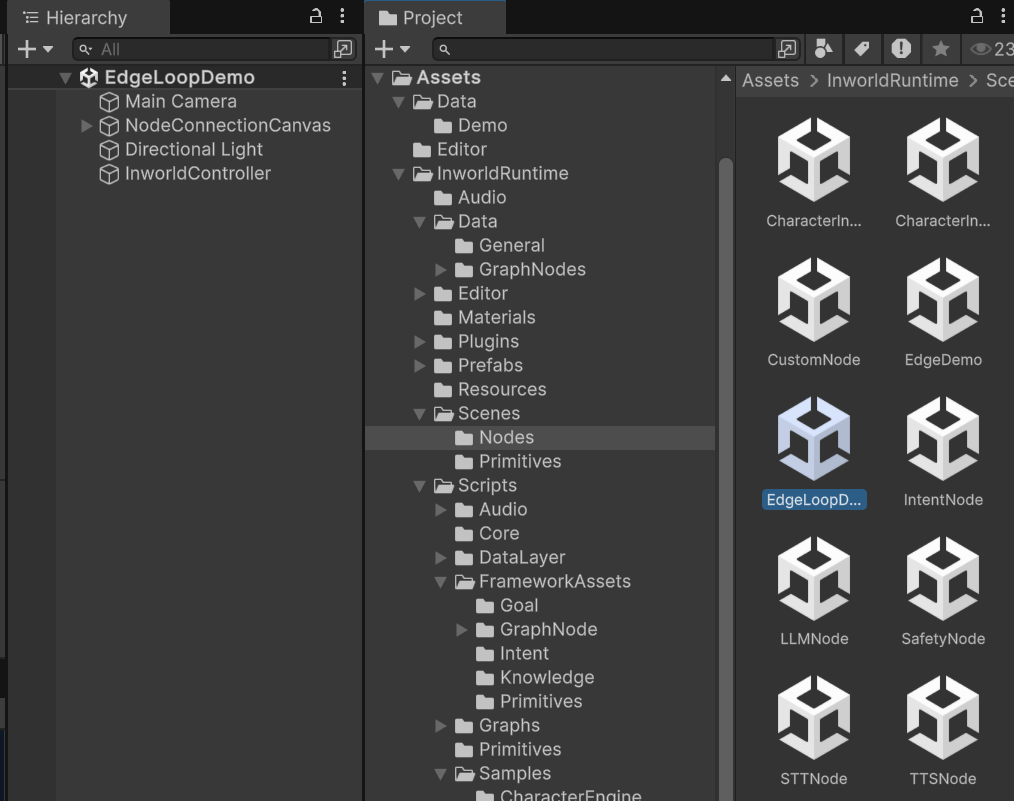
1. Go to `Assets/InworldRuntime/Scenes/Nodes` and play the `EdgeLoopDemo` scene.
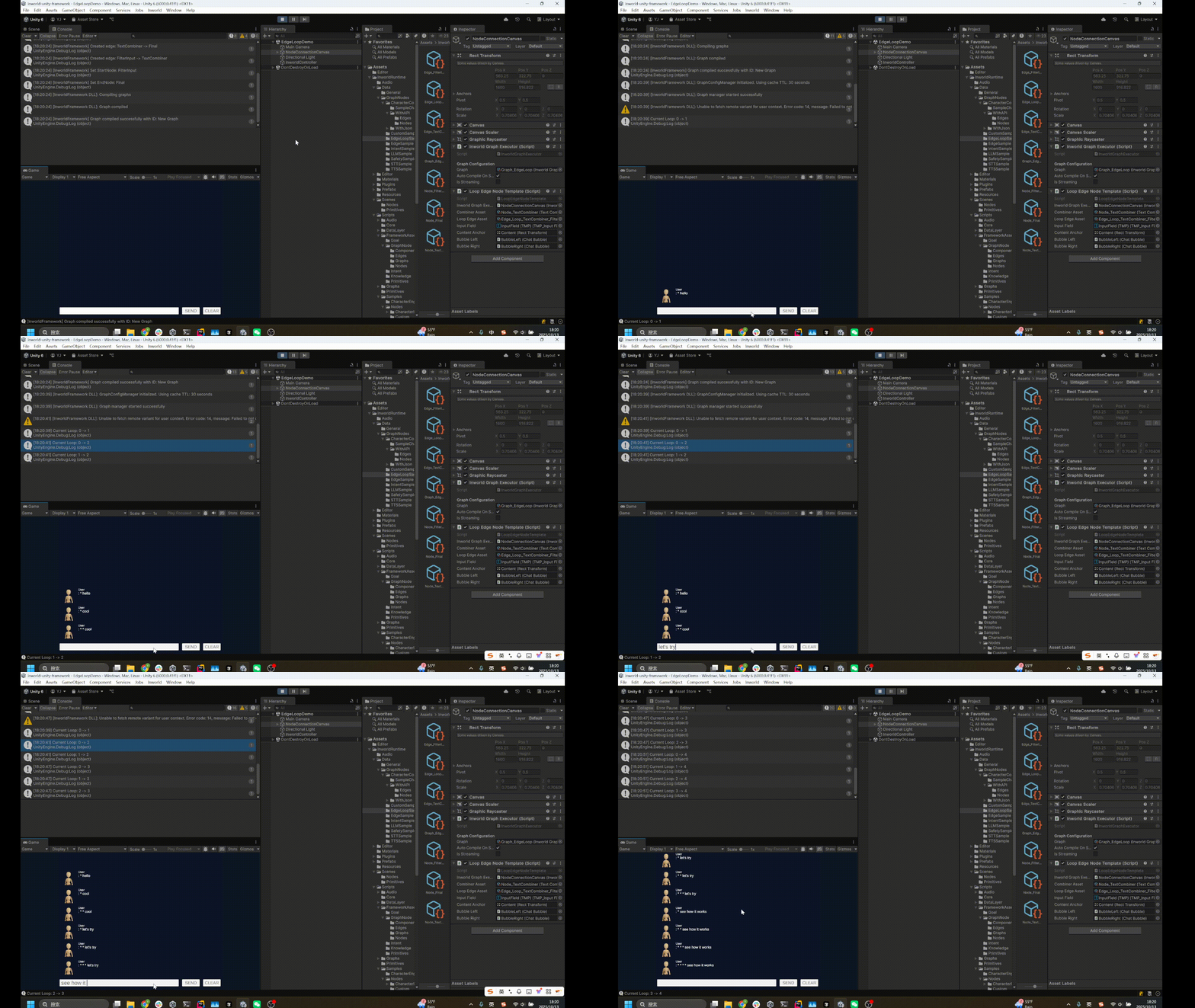
 2. Whenever you type something, it responds with the input prefixed by `*` characters on the left.
 ## Understanding the Graph
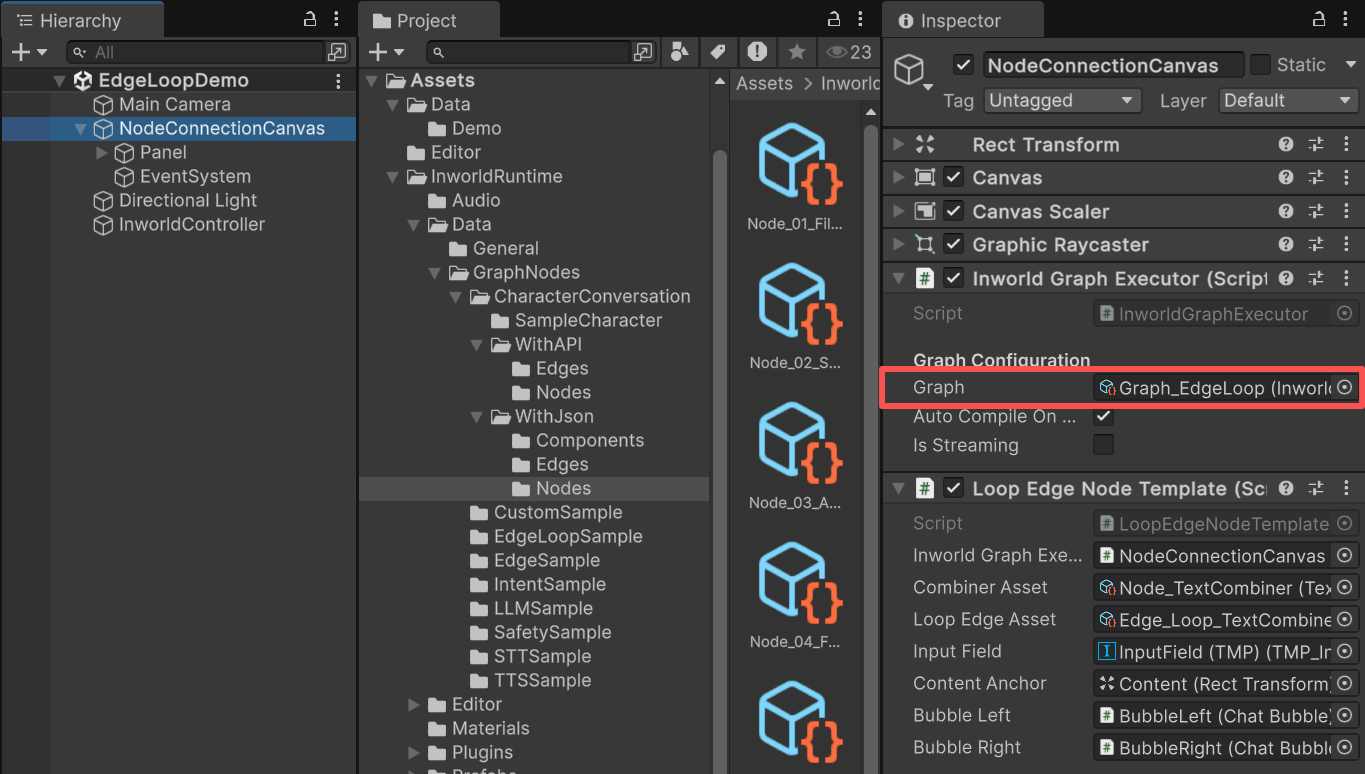
`NodeConnectionCanvas` contains an `InworldGraphExecutor`.
## Understanding the Graph
`NodeConnectionCanvas` contains an `InworldGraphExecutor`.
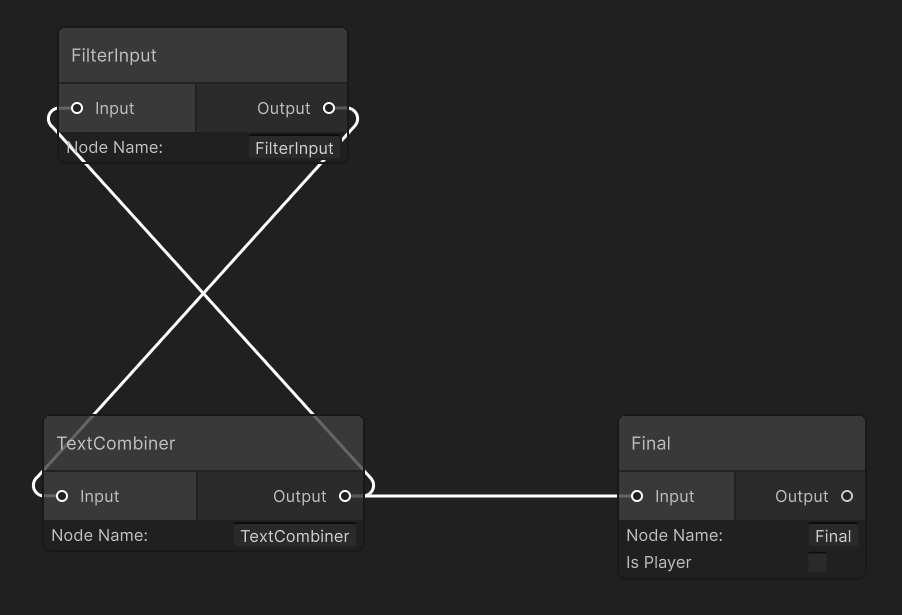
 The graph contains three nodes:
* `TextCombiner`: A custom node that adds `*` in front of sentences.
* `NodeFinal`: A custom conversation‑endpoint node that prints the text.
* `FilterInput`: The start node, a custom node that filters out mismatched input types.
There are three edges:
* `FilterInput` to `TextCombiner`
* `TextCombiner` to `FilterInput`: This is a customized LoopEdge, with `IsLoop` toggled.
* `FilterInput` to `NodeFinal`.
`FilterInput` is the `StartNode` and `NodeFinal` is the `EndNode`.
The graph contains three nodes:
* `TextCombiner`: A custom node that adds `*` in front of sentences.
* `NodeFinal`: A custom conversation‑endpoint node that prints the text.
* `FilterInput`: The start node, a custom node that filters out mismatched input types.
There are three edges:
* `FilterInput` to `TextCombiner`
* `TextCombiner` to `FilterInput`: This is a customized LoopEdge, with `IsLoop` toggled.
* `FilterInput` to `NodeFinal`.
`FilterInput` is the `StartNode` and `NodeFinal` is the `EndNode`.
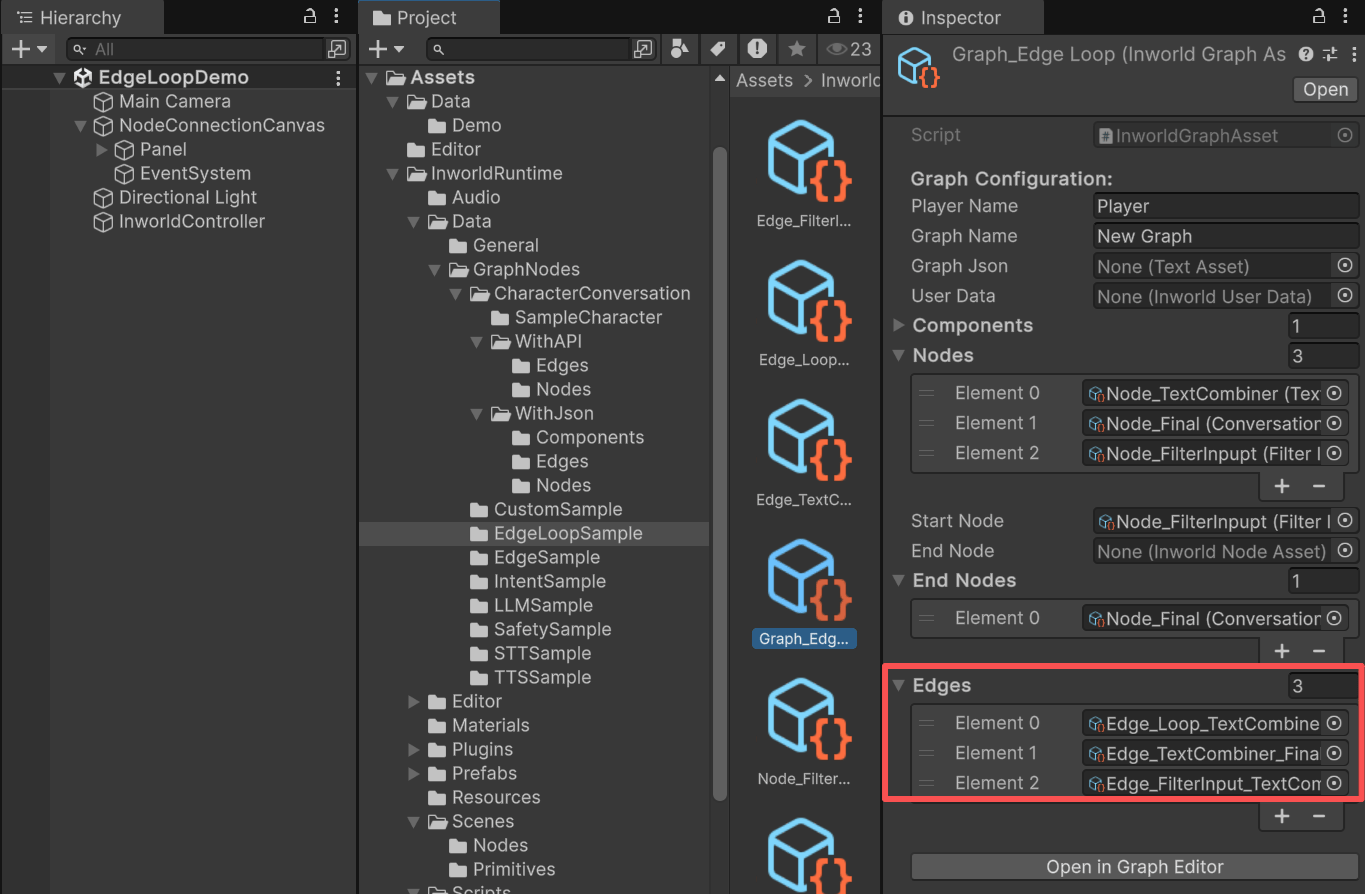 You can also see this connection in the Graph Editor. It's clearer.
 ## CustomNode details
### TextCombiner
In its overridden `ProcessBaseData()`, it adds `*` to the left of the input text and sets it as the output.
```c# TextCombinerNodeAsset.cs theme={"system"}
public class TextCombinerNodeAsset : CustomNodeAsset
{
public override string NodeTypeName => "TextCombinerNode";
public string currentText = "";
protected override InworldBaseData ProcessBaseData(InworldVector inputs)
{
if (inputs.Size == 0)
{
return new InworldError("No input data", StatusCode.DataLoss);
}
InworldBaseData inputData = inputs[0];
InworldText textResult = new InworldText(inputData);
if (textResult.IsValid)
currentText = $"* {textResult.Text}";
return new InworldText(currentText);
}
void OnEnable()
{
currentText = "";
}
}
```
### FilterInput
This is a custom node used in the [Character Interaction](./character).
It filters out input `InworldBaseData` that are neither `InworldText` nor `InworldAudio`.
```c# FilterInputNodeAsset.cs theme={"system"}
public class FilterInputNodeAsset : CustomNodeAsset
{
public override string NodeTypeName => "FilterInputNode";
protected override InworldBaseData ProcessBaseData(InworldVector inputs)
{
if (inputs.Size == 0)
{
return new InworldError("No input data", StatusCode.DataLoss);
}
InworldBaseData inputData = inputs[0]; // YAN: Let's only process the last single input.
InworldText textResult = new InworldText(inputData);
if (textResult.IsValid)
return textResult;
InworldAudio audioResult = new InworldAudio(inputData);
if (audioResult.IsValid)
return audioResult;
return new InworldError($"Unsupported data type: {inputData.GetType()}", StatusCode.Unimplemented);
}
}
```
### NodeFinal
`NodeFinal` uses the custom node `ConversationEndpointNodeAsset`.
During `CreateRuntime()`, it stores the speaker's name and later returns output text containing both the speaker's name and the result.
It is typically used as the end node in [Character Interaction](./character).
```c# ConversationEndpointNodeAsset.cs theme={"system"}
public override bool CreateRuntime(InworldGraphAsset graphAsset)
{
if (graphAsset is CharacterInteractionGraphAsset charGraph)
m_SpeakerName = m_IsPlayer ? InworldFrameworkUtil.PlayerName : charGraph.characters[0].characterName;
return base.CreateRuntime(graphAsset);
}
protected override InworldBaseData ProcessBaseData(InworldVector inputs)
{
if (inputs.Size <= 0)
return inputs[0];
InworldText text = new InworldText(inputs[0]);
if (text.IsValid)
{
return new InworldText($"{m_SpeakerName}: {text.Text}");
}
return inputs[0];
}
```
## Edge
The loop edge from `TextCombiner` to `FilterInput` is a customized edge with `IsLoop` toggled.
## CustomNode details
### TextCombiner
In its overridden `ProcessBaseData()`, it adds `*` to the left of the input text and sets it as the output.
```c# TextCombinerNodeAsset.cs theme={"system"}
public class TextCombinerNodeAsset : CustomNodeAsset
{
public override string NodeTypeName => "TextCombinerNode";
public string currentText = "";
protected override InworldBaseData ProcessBaseData(InworldVector inputs)
{
if (inputs.Size == 0)
{
return new InworldError("No input data", StatusCode.DataLoss);
}
InworldBaseData inputData = inputs[0];
InworldText textResult = new InworldText(inputData);
if (textResult.IsValid)
currentText = $"* {textResult.Text}";
return new InworldText(currentText);
}
void OnEnable()
{
currentText = "";
}
}
```
### FilterInput
This is a custom node used in the [Character Interaction](./character).
It filters out input `InworldBaseData` that are neither `InworldText` nor `InworldAudio`.
```c# FilterInputNodeAsset.cs theme={"system"}
public class FilterInputNodeAsset : CustomNodeAsset
{
public override string NodeTypeName => "FilterInputNode";
protected override InworldBaseData ProcessBaseData(InworldVector inputs)
{
if (inputs.Size == 0)
{
return new InworldError("No input data", StatusCode.DataLoss);
}
InworldBaseData inputData = inputs[0]; // YAN: Let's only process the last single input.
InworldText textResult = new InworldText(inputData);
if (textResult.IsValid)
return textResult;
InworldAudio audioResult = new InworldAudio(inputData);
if (audioResult.IsValid)
return audioResult;
return new InworldError($"Unsupported data type: {inputData.GetType()}", StatusCode.Unimplemented);
}
}
```
### NodeFinal
`NodeFinal` uses the custom node `ConversationEndpointNodeAsset`.
During `CreateRuntime()`, it stores the speaker's name and later returns output text containing both the speaker's name and the result.
It is typically used as the end node in [Character Interaction](./character).
```c# ConversationEndpointNodeAsset.cs theme={"system"}
public override bool CreateRuntime(InworldGraphAsset graphAsset)
{
if (graphAsset is CharacterInteractionGraphAsset charGraph)
m_SpeakerName = m_IsPlayer ? InworldFrameworkUtil.PlayerName : charGraph.characters[0].characterName;
return base.CreateRuntime(graphAsset);
}
protected override InworldBaseData ProcessBaseData(InworldVector inputs)
{
if (inputs.Size <= 0)
return inputs[0];
InworldText text = new InworldText(inputs[0]);
if (text.IsValid)
{
return new InworldText($"{m_SpeakerName}: {text.Text}");
}
return inputs[0];
}
```
## Edge
The loop edge from `TextCombiner` to `FilterInput` is a customized edge with `IsLoop` toggled.
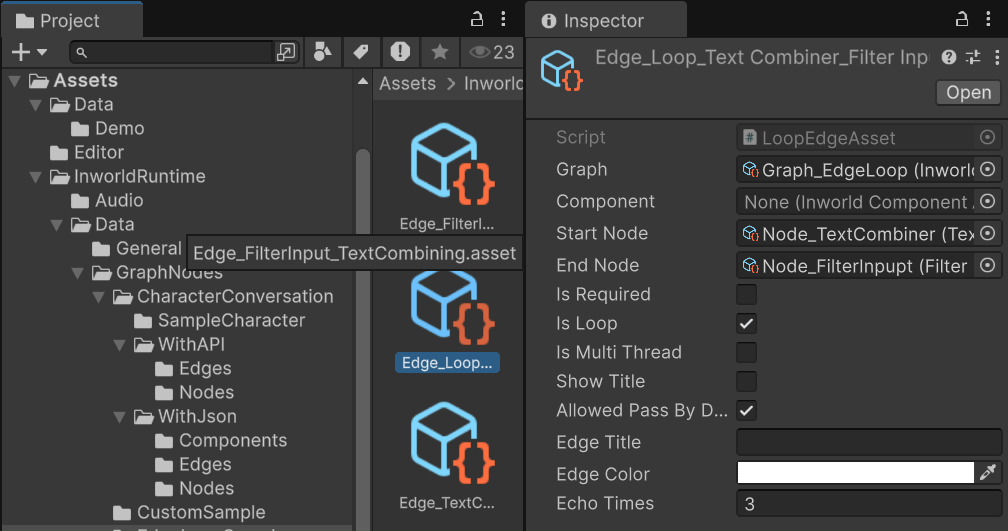 In its overridden checking function `MeetsCondition()`:
if the current loop count exceeds the limit, the edge blocks passage;
otherwise, it allows passage (sending control back to the loop start `FilterInput`).
Because each iteration prefixes another `*` before passing the result back to `FilterInput`, you will see the number of `*` increase with each loop.
```
public class LoopEdgeAsset : InworldEdgeAsset
{
public int echoTimes = 3;
int m_CurrentLoop = 0;
public override string EdgeTypeName => "LoopEdge";
protected override bool MeetsCondition(InworldBaseData inputData)
{
Debug.Log($"Current Loop: {m_CurrentLoop} -> {echoTimes}");
m_CurrentLoop++;
if (m_CurrentLoop < echoTimes)
return m_AllowedPassByDefault;
m_CurrentLoop = 0;
return !m_AllowedPassByDefault;
}
void OnEnable()
{
m_CurrentLoop = 0;
}
}
```
Be mindful of memory allocation when using Loop Edges.
Because the graph node system executes inside C++, each iteration may allocate new memory.
Other edges use the default behavior: they simply forward all output from the previous node to the next node.
### InworldController
The `InworldController` contains no primitive modules.
## Workflow
1. When the game starts, `InworldController` initializes immediately because there are no primitives.
2. Next, `InworldGraphExecutor` initializes its graph asset by calling each component’s `CreateRuntime()`.
For how `CreateRuntime` works on custom nodes, see the [CustomNode Demo](./custom).
For edges, during `CreateRuntime()` the system calls `SetEdgeCondition()` and registers `OnConditionCheck` as the function pointer for the condition.
Inside `OnConditionCheck`, the system calls the overridden `MeetsCondition()` virtual function implemented by each edge subclass.
```c# InworldEdgeAsset.cs theme={"system"}
public bool CreateRuntime(EdgeWrapper wrapper)
{
if (wrapper == null || !wrapper.IsValid)
return false;
m_RuntimeWrapper = wrapper;
if (IsLoop)
m_RuntimeWrapper.SetToLoop();
if (!IsRequired)
m_RuntimeWrapper.SetToOptional();
SetEdgeCondition(); // <==
m_RuntimeWrapper.SetCondition(m_Executor);
m_RuntimeWrapper.Build();
return true;
}
protected void SetEdgeCondition(string customEdgeName = "")
{
if (!m_IsMultiThread)
{
EdgeConditionExecutor executor = new EdgeConditionExecutor(OnConditionCheck, this);
if (!string.IsNullOrEmpty(customEdgeName))
InworldComponentManager.RegisterCustomEdgeCondition(customEdgeName, executor);
m_Executor = executor;
}
else
{
EdgeConditionThreadedExecutor executor = new EdgeConditionThreadedExecutor(OnConditionCheck);
if (!string.IsNullOrEmpty(customEdgeName))
InworldComponentManager.RegisterCustomEdgeCondition(customEdgeName, executor);
m_Executor = executor;
}
}
static void OnConditionCheck(IntPtr data)
{
InworldEdgeAsset edgeAsset = GCHandle.FromIntPtr(data).Target as InworldEdgeAsset;
if (edgeAsset == null)
return;
InworldBaseData inputData = new InworldBaseData(InworldInterop.inworld_EdgeConditionExecutor_GetLastInput());
InworldInterop.inworld_EdgeConditionExecutor_SetNextOutput(edgeAsset.MeetsCondition(inputData));
}
```
3. After initialization, the graph calls `Compile()` and returns the executor handle.
4. After compilation, the `OnGraphCompiled` event is invoked.
In this demo, `NodeConnectionTemplate` subscribes to it and enables the UI components.
Users can then interact with the graph system.
```c# LoopEdgeNodeTemplate.cs theme={"system"}
protected override void OnGraphCompiled(InworldGraphAsset obj)
{
foreach (InworldUIElement element in m_UIElements)
element.Interactable = true;
}
```
5. After the UI is initialized, send the input text to the graph.
6. Calling `ExecuteGraphAsync()` causes the graph to loop, sending the `TextCombiner` result back to `FilterInput` until the loop count configured by `LoopEdge` is reached.
It then produces a result and invokes `OnGraphResult()`, which `NodeConnectionTemplate` subscribes to in order to receive the data.
```c# LoopEdgeNodeTemplate.cs theme={"system"}
protected override void OnGraphResult(InworldBaseData obj)
{
InworldText response = new InworldText(obj);
if (response.IsValid)
{
string message = response.Text;
InsertBubble(m_BubbleLeft, Role.User.ToString(), message);
}
}
```
In its overridden checking function `MeetsCondition()`:
if the current loop count exceeds the limit, the edge blocks passage;
otherwise, it allows passage (sending control back to the loop start `FilterInput`).
Because each iteration prefixes another `*` before passing the result back to `FilterInput`, you will see the number of `*` increase with each loop.
```
public class LoopEdgeAsset : InworldEdgeAsset
{
public int echoTimes = 3;
int m_CurrentLoop = 0;
public override string EdgeTypeName => "LoopEdge";
protected override bool MeetsCondition(InworldBaseData inputData)
{
Debug.Log($"Current Loop: {m_CurrentLoop} -> {echoTimes}");
m_CurrentLoop++;
if (m_CurrentLoop < echoTimes)
return m_AllowedPassByDefault;
m_CurrentLoop = 0;
return !m_AllowedPassByDefault;
}
void OnEnable()
{
m_CurrentLoop = 0;
}
}
```
Be mindful of memory allocation when using Loop Edges.
Because the graph node system executes inside C++, each iteration may allocate new memory.
Other edges use the default behavior: they simply forward all output from the previous node to the next node.
### InworldController
The `InworldController` contains no primitive modules.
## Workflow
1. When the game starts, `InworldController` initializes immediately because there are no primitives.
2. Next, `InworldGraphExecutor` initializes its graph asset by calling each component’s `CreateRuntime()`.
For how `CreateRuntime` works on custom nodes, see the [CustomNode Demo](./custom).
For edges, during `CreateRuntime()` the system calls `SetEdgeCondition()` and registers `OnConditionCheck` as the function pointer for the condition.
Inside `OnConditionCheck`, the system calls the overridden `MeetsCondition()` virtual function implemented by each edge subclass.
```c# InworldEdgeAsset.cs theme={"system"}
public bool CreateRuntime(EdgeWrapper wrapper)
{
if (wrapper == null || !wrapper.IsValid)
return false;
m_RuntimeWrapper = wrapper;
if (IsLoop)
m_RuntimeWrapper.SetToLoop();
if (!IsRequired)
m_RuntimeWrapper.SetToOptional();
SetEdgeCondition(); // <==
m_RuntimeWrapper.SetCondition(m_Executor);
m_RuntimeWrapper.Build();
return true;
}
protected void SetEdgeCondition(string customEdgeName = "")
{
if (!m_IsMultiThread)
{
EdgeConditionExecutor executor = new EdgeConditionExecutor(OnConditionCheck, this);
if (!string.IsNullOrEmpty(customEdgeName))
InworldComponentManager.RegisterCustomEdgeCondition(customEdgeName, executor);
m_Executor = executor;
}
else
{
EdgeConditionThreadedExecutor executor = new EdgeConditionThreadedExecutor(OnConditionCheck);
if (!string.IsNullOrEmpty(customEdgeName))
InworldComponentManager.RegisterCustomEdgeCondition(customEdgeName, executor);
m_Executor = executor;
}
}
static void OnConditionCheck(IntPtr data)
{
InworldEdgeAsset edgeAsset = GCHandle.FromIntPtr(data).Target as InworldEdgeAsset;
if (edgeAsset == null)
return;
InworldBaseData inputData = new InworldBaseData(InworldInterop.inworld_EdgeConditionExecutor_GetLastInput());
InworldInterop.inworld_EdgeConditionExecutor_SetNextOutput(edgeAsset.MeetsCondition(inputData));
}
```
3. After initialization, the graph calls `Compile()` and returns the executor handle.
4. After compilation, the `OnGraphCompiled` event is invoked.
In this demo, `NodeConnectionTemplate` subscribes to it and enables the UI components.
Users can then interact with the graph system.
```c# LoopEdgeNodeTemplate.cs theme={"system"}
protected override void OnGraphCompiled(InworldGraphAsset obj)
{
foreach (InworldUIElement element in m_UIElements)
element.Interactable = true;
}
```
5. After the UI is initialized, send the input text to the graph.
6. Calling `ExecuteGraphAsync()` causes the graph to loop, sending the `TextCombiner` result back to `FilterInput` until the loop count configured by `LoopEdge` is reached.
It then produces a result and invokes `OnGraphResult()`, which `NodeConnectionTemplate` subscribes to in order to receive the data.
```c# LoopEdgeNodeTemplate.cs theme={"system"}
protected override void OnGraphResult(InworldBaseData obj)
{
InworldText response = new InworldText(obj);
if (response.IsValid)
{
string message = response.Text;
InsertBubble(m_BubbleLeft, Role.User.ToString(), message);
}
}
```