> ## Documentation Index
> Fetch the complete documentation index at: https://docs.inworld.ai/llms.txt
> Use this file to discover all available pages before exploring further.
# STT(Speech-to-text) Node Demo
This demo showcases how to use the `STTNode`.
## Run the Template
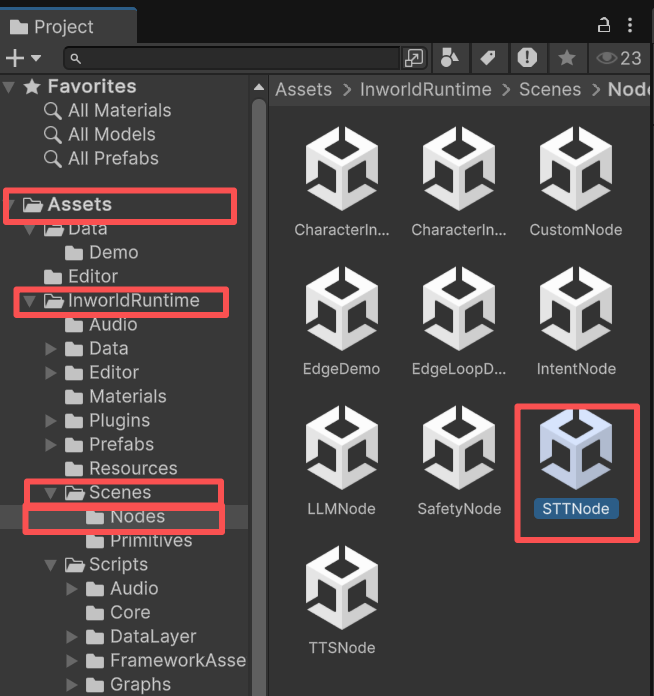
1. Go to `Assets/InworldRuntime/Scenes/Nodes` and play the `STTNode` scene.
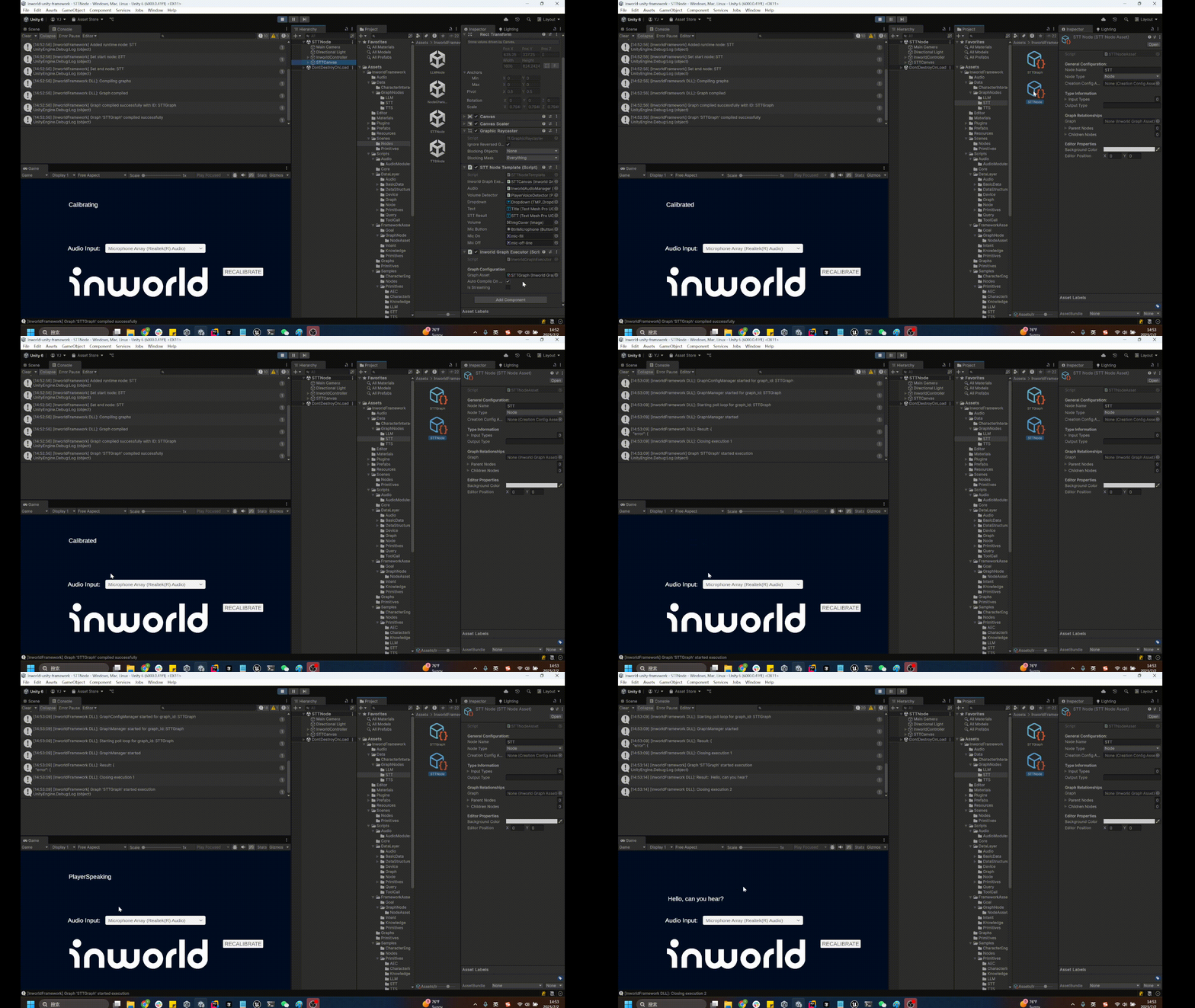
 2. Once the graph is compiled, speak into the microphone to generate text.
 ## Understanding the Graph
You can find the graph on the `InworldGraphExecutor` of `STTCanvas`.
## Understanding the Graph
You can find the graph on the `InworldGraphExecutor` of `STTCanvas`.
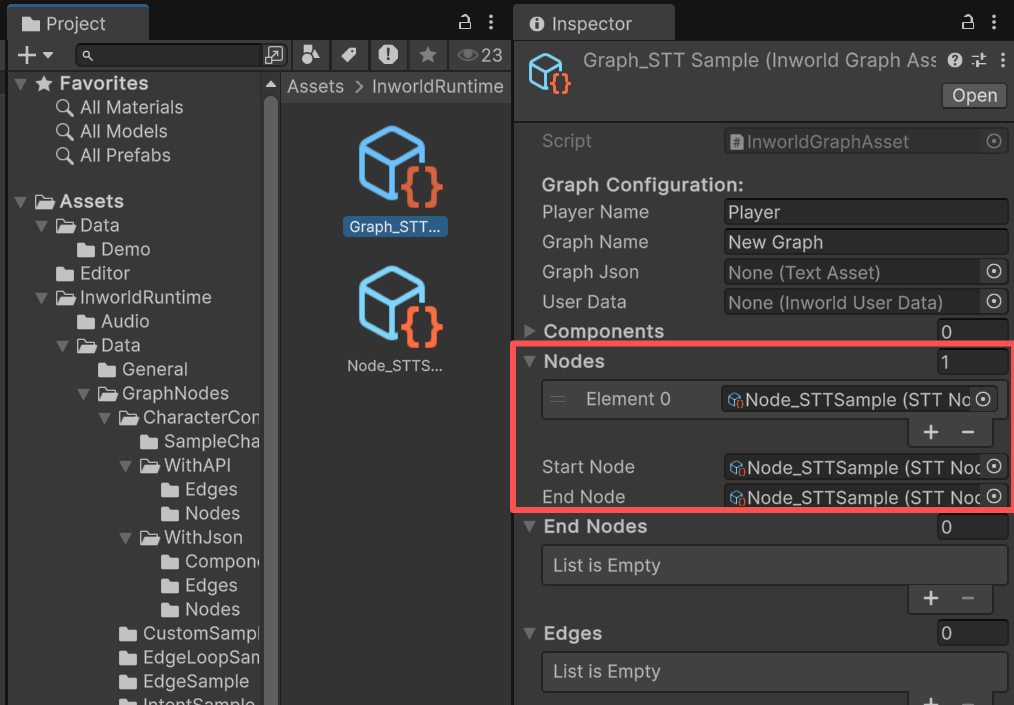
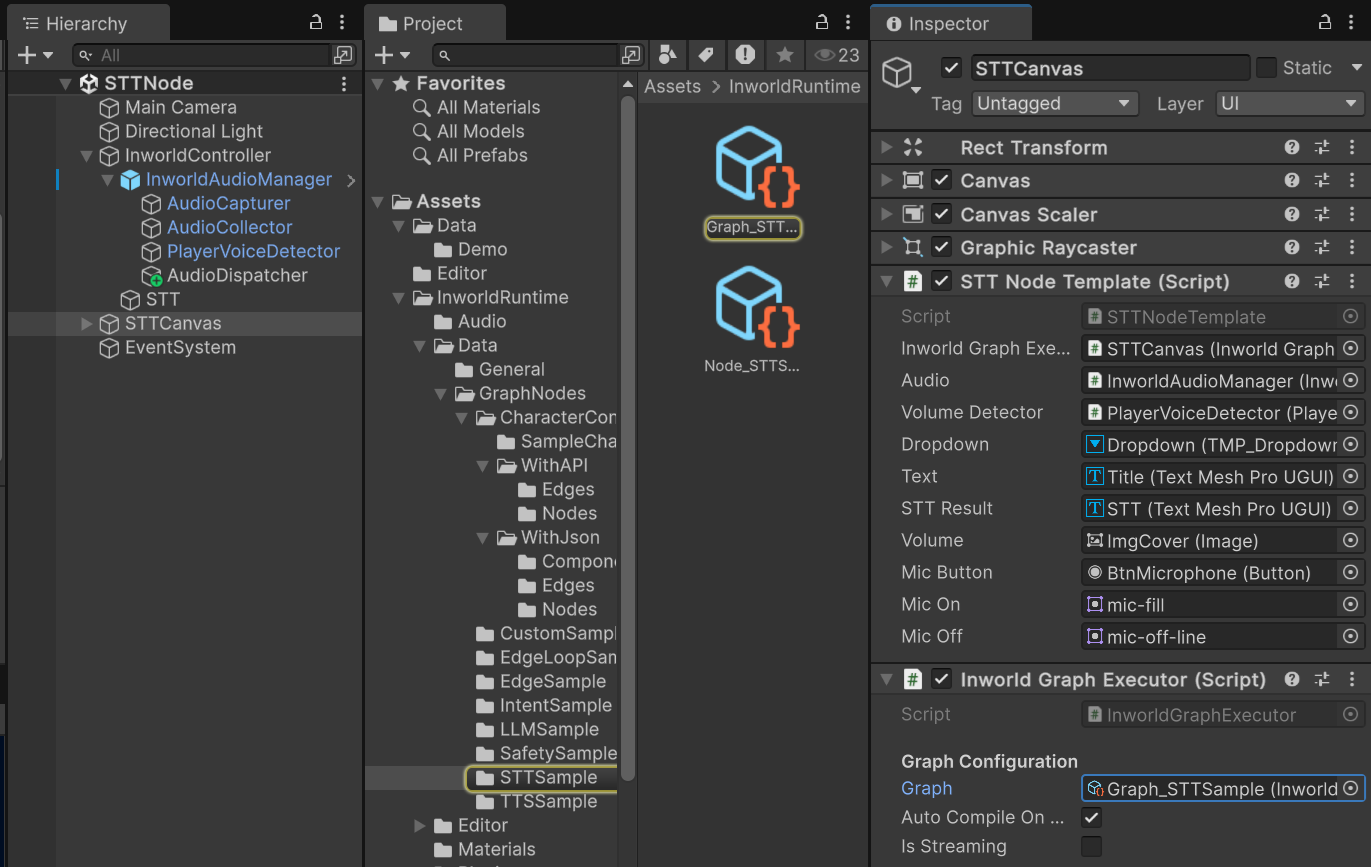 The graph is very simple. It contains a single node, `STTNode`, with no edges.
`STTNode` is both the `StartNode` and the `EndNode`.
The graph is very simple. It contains a single node, `STTNode`, with no edges.
`STTNode` is both the `StartNode` and the `EndNode`.
 ### InworldController
The `InworldController` is also simple; it contains only one primitive module: `STT`.
### InworldController
The `InworldController` is also simple; it contains only one primitive module: `STT`.
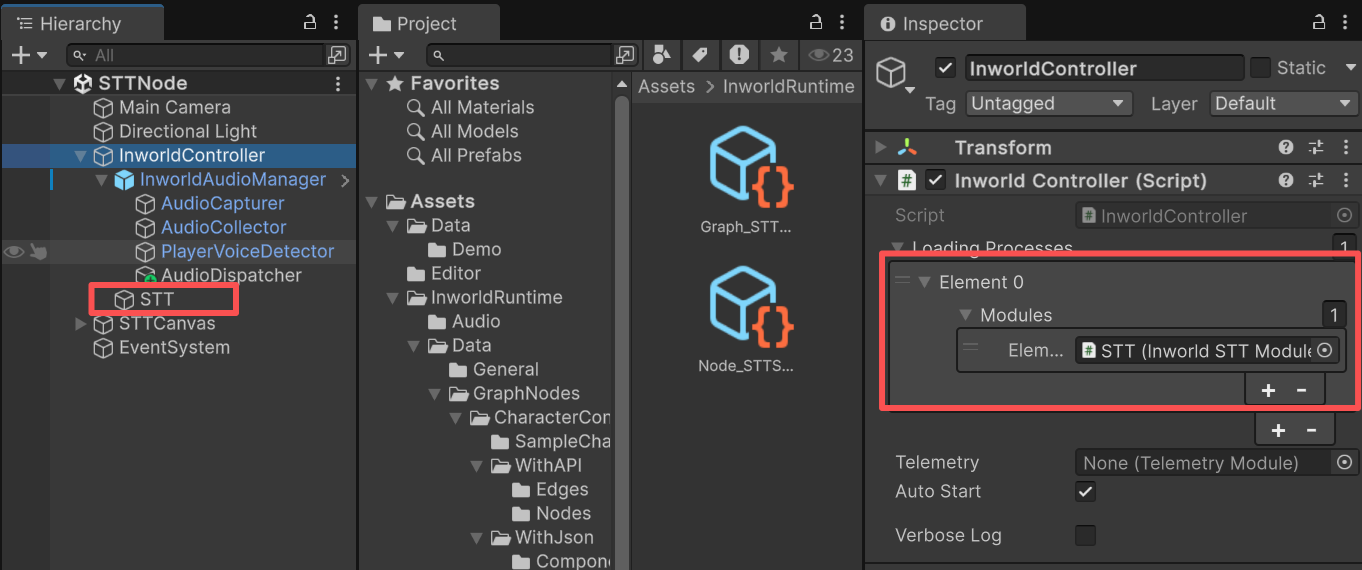 For details about the primitive module, see the [STT Primitive Demo](../primitives/stt).
### InworldAudioManager
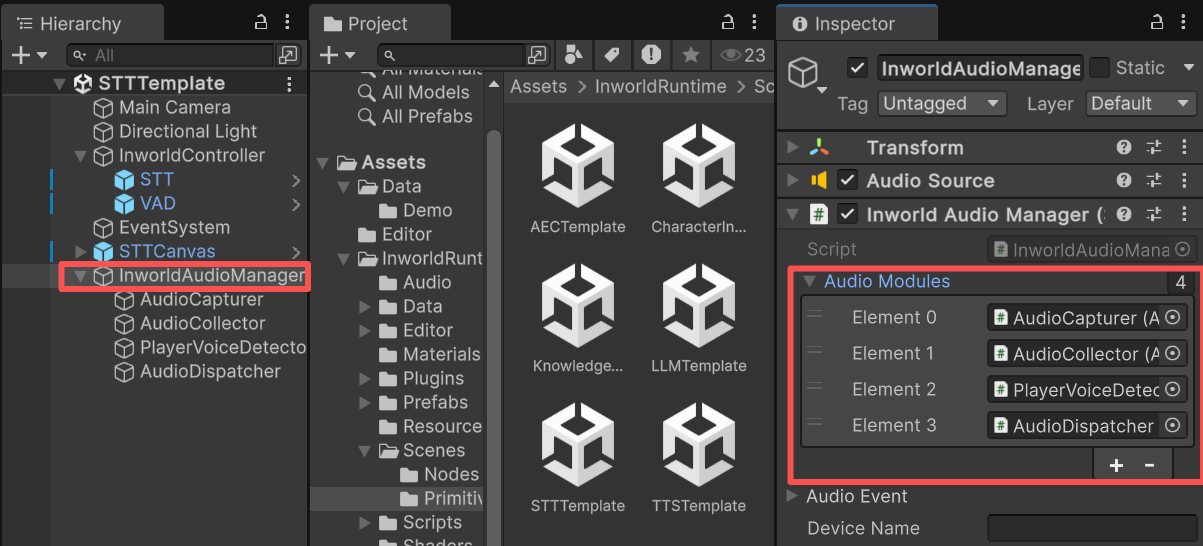
`InworldAudioManager` handles audio processing and is also modular.
In this demo, it uses four components:
* **AudioCapturer**: Manages microphone on/off and input devices. Uses Unity's `Microphone` by default, and can be extended via third‑party plugins.
* **AudioCollector**: Collects raw samples from the microphone.
* **PlayerVoiceDetector**: Implements `IPlayerAudioEventHandler` and `ICalibrateAudioHandler` to emit player audio events and decide which timestamped segments to keep from the stream.
* **AudioDispatcher**: Sends the captured microphone data for downstream processing.
For details about the primitive module, see the [STT Primitive Demo](../primitives/stt).
### InworldAudioManager
`InworldAudioManager` handles audio processing and is also modular.
In this demo, it uses four components:
* **AudioCapturer**: Manages microphone on/off and input devices. Uses Unity's `Microphone` by default, and can be extended via third‑party plugins.
* **AudioCollector**: Collects raw samples from the microphone.
* **PlayerVoiceDetector**: Implements `IPlayerAudioEventHandler` and `ICalibrateAudioHandler` to emit player audio events and decide which timestamped segments to keep from the stream.
* **AudioDispatcher**: Sends the captured microphone data for downstream processing.
 ### Workflow
**Audio Thread:**
At startup, the microphone calibrates to background noise.
`PlayerVoiceDetector` listens for speech using SNR (Signal‑to‑Noise Ratio).
When it exceeds the threshold, `AudioDispatcher` streams audio frames to `InworldAudio`.
**Main Thread:**
1. When the game starts, `InworldController` initializes its only module, `STTModule`, which creates the `STTInterface`.
2. Next, `InworldGraphExecutor` initializes its graph asset by calling each component’s `CreateRuntime()`. In this case, only `STTNode.CreateRuntime()` is called, using the created `STTInterface` as input.
3. After initialization, the graph calls `Compile()` and returns the executor handle.
4. After compilation, the `OnGraphCompiled` event is invoked. In this demo, `STTNodeTemplate` subscribes to it and enables the UI components. Users can then interact with the graph system.
```c# STTNodeTemplate.cs theme={"system"}
protected override void OnGraphCompiled(InworldGraphAsset obj)
{
foreach (InworldUIElement element in m_UIElements)
element.Interactable = true;
}
```
5. When `AudioDispatcher` sends data, `STTNodeTemplate` handles its `OnAudioSent` event with the `SendAudio()` function, converting the `List` audio data into `InworldAudio`.
```c# STTNodeTemplate.cs theme={"system"}
protected override void OnEnable()
{
base.OnEnable();
if (!m_Audio)
return;
m_Audio.Event.onStartCalibrating.AddListener(()=>Title("Calibrating"));
m_Audio.Event.onStopCalibrating.AddListener(Calibrated);
m_Audio.Event.onPlayerStartSpeaking.AddListener(()=>Title("PlayerSpeaking"));
m_Audio.Event.onPlayerStopSpeaking.AddListener(()=>
{
Title("");
if (m_STTResult)
m_STTResult.text = "";
});
m_Audio.Event.onAudioSent.AddListener(SendAudio);
}
void SendAudio(List audioData)
{
if (!m_ModuleInitialized)
return;
InworldVector wave = new InworldVector();
wave.AddRange(audioData);
_ = m_InworldGraphExecutor.ExecuteGraphAsync("STT", new InworldAudio(wave, wave.Size));
}
```
6. Calling `ExecuteGraphAsync()` eventually produces a result and invokes `OnGraphResult()`, which `STTNodeTemplate` subscribes to in order to receive the data.
```c# STTNodeTemplate.cs theme={"system"}
protected override void OnGraphResult(InworldBaseData obj)
{
InworldText outputStream = new InworldText(obj);
if (outputStream.IsValid && m_STTResult)
m_STTResult.text += outputStream;
}
```
### Workflow
**Audio Thread:**
At startup, the microphone calibrates to background noise.
`PlayerVoiceDetector` listens for speech using SNR (Signal‑to‑Noise Ratio).
When it exceeds the threshold, `AudioDispatcher` streams audio frames to `InworldAudio`.
**Main Thread:**
1. When the game starts, `InworldController` initializes its only module, `STTModule`, which creates the `STTInterface`.
2. Next, `InworldGraphExecutor` initializes its graph asset by calling each component’s `CreateRuntime()`. In this case, only `STTNode.CreateRuntime()` is called, using the created `STTInterface` as input.
3. After initialization, the graph calls `Compile()` and returns the executor handle.
4. After compilation, the `OnGraphCompiled` event is invoked. In this demo, `STTNodeTemplate` subscribes to it and enables the UI components. Users can then interact with the graph system.
```c# STTNodeTemplate.cs theme={"system"}
protected override void OnGraphCompiled(InworldGraphAsset obj)
{
foreach (InworldUIElement element in m_UIElements)
element.Interactable = true;
}
```
5. When `AudioDispatcher` sends data, `STTNodeTemplate` handles its `OnAudioSent` event with the `SendAudio()` function, converting the `List` audio data into `InworldAudio`.
```c# STTNodeTemplate.cs theme={"system"}
protected override void OnEnable()
{
base.OnEnable();
if (!m_Audio)
return;
m_Audio.Event.onStartCalibrating.AddListener(()=>Title("Calibrating"));
m_Audio.Event.onStopCalibrating.AddListener(Calibrated);
m_Audio.Event.onPlayerStartSpeaking.AddListener(()=>Title("PlayerSpeaking"));
m_Audio.Event.onPlayerStopSpeaking.AddListener(()=>
{
Title("");
if (m_STTResult)
m_STTResult.text = "";
});
m_Audio.Event.onAudioSent.AddListener(SendAudio);
}
void SendAudio(List audioData)
{
if (!m_ModuleInitialized)
return;
InworldVector wave = new InworldVector();
wave.AddRange(audioData);
_ = m_InworldGraphExecutor.ExecuteGraphAsync("STT", new InworldAudio(wave, wave.Size));
}
```
6. Calling `ExecuteGraphAsync()` eventually produces a result and invokes `OnGraphResult()`, which `STTNodeTemplate` subscribes to in order to receive the data.
```c# STTNodeTemplate.cs theme={"system"}
protected override void OnGraphResult(InworldBaseData obj)
{
InworldText outputStream = new InworldText(obj);
if (outputStream.IsValid && m_STTResult)
m_STTResult.text += outputStream;
}
```