> ## Documentation Index
> Fetch the complete documentation index at: https://docs.inworld.ai/llms.txt
> Use this file to discover all available pages before exploring further.
# Acoustic Echo Cancellation (AEC) Primitive Demo
The Acoustic Echo Cancellation (AEC) template demonstrates how to use our AEC primitive to filter out speaker echo.
Without AEC, if you're not using headphones, the character's voice may be fed back into the STT input.
The AEC module works only with the local model and uses CPU processing only.
## Run the Template
1. Go to `Assets/InworldRuntime/Scenes/Primitives` and play the `AECTemplate` scene.
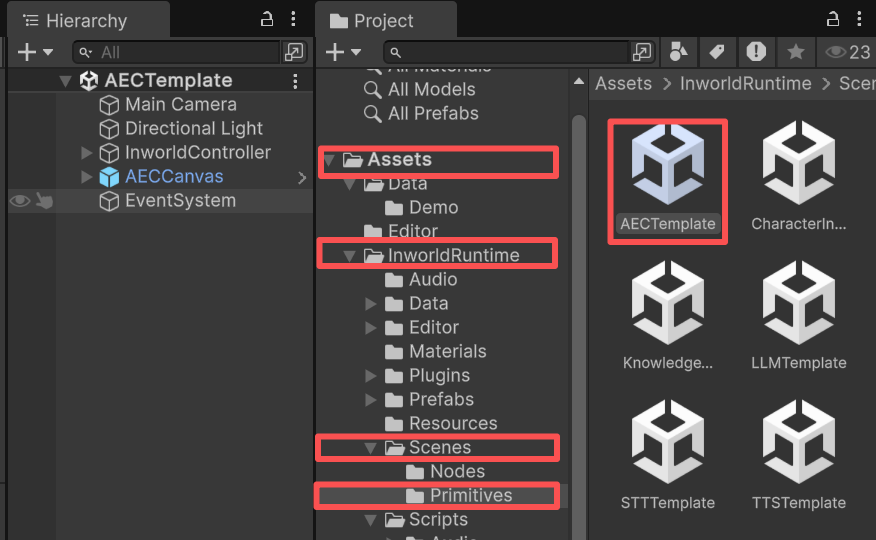 2. When the game starts, play the two example audio clips (`Farend` and `Nearend`).
The far-end audio comes from the speaker; the near-end audio is captured by the microphone.
3. Press `Generate` to produce the filtered audio.
4. Then press `Play` to hear the result.
## Understanding the Template
### Structure
* This demo has only one prefab under `InworldController`: `AEC`. It contains `InworldAECModule`.
* When `InworldController` initializes, it calls `InitializeAsync()` on the AEC module (see [Primitives Overview](./overview)).
* This creates an `AECFactory`, which then creates an `AECInterface` based on the current `AECConfig`.
2. When the game starts, play the two example audio clips (`Farend` and `Nearend`).
The far-end audio comes from the speaker; the near-end audio is captured by the microphone.
3. Press `Generate` to produce the filtered audio.
4. Then press `Play` to hear the result.
## Understanding the Template
### Structure
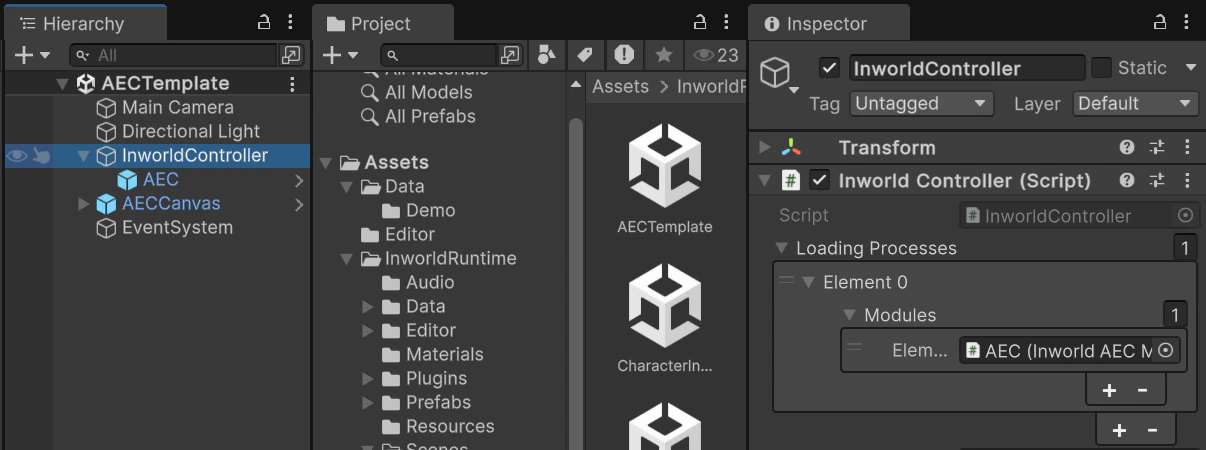
* This demo has only one prefab under `InworldController`: `AEC`. It contains `InworldAECModule`.
* When `InworldController` initializes, it calls `InitializeAsync()` on the AEC module (see [Primitives Overview](./overview)).
* This creates an `AECFactory`, which then creates an `AECInterface` based on the current `AECConfig`.
 ### Workflow
Pressing the `Generate` button invokes `AECCanvas.FilterAudio()`.
It first converts the two audio clips (`Farend` and `Nearend`) into `AudioChunks`, then calls `InworldController.AEC.FilterAudio()` to generate the filtered audio.
```c# AECCanvas.cs theme={"system"}
public void FilterAudio()
{
AudioChunk farendChunk = WavUtility.GenerateAudioChunk(m_Farend);
AudioChunk nearendChunk = WavUtility.GenerateAudioChunk(m_Nearend);
m_FilteredChunk = InworldController.AEC.FilterAudio(nearendChunk, farendChunk);
if (m_FilteredChunk == null)
return;
if (m_CompleteText)
m_CompleteText.text = "Audio Generated!";
if (m_PlayFilteredButton)
m_PlayFilteredButton.interactable = true;
}
```
## Tips for Better AEC Performance
When filtering audio, always use the data taken directly from the speaker output rather than the recorded raw audio.
Playback characteristics vary by device, and even small timing or amplitude differences can significantly affect the AEC algorithm's output.
This is especially noticeable on laggy devices: the output audio may be delayed or slightly retimed.
That retimed version is exactly what you should use as the far-end reference, not the original raw file.
### Workflow
Pressing the `Generate` button invokes `AECCanvas.FilterAudio()`.
It first converts the two audio clips (`Farend` and `Nearend`) into `AudioChunks`, then calls `InworldController.AEC.FilterAudio()` to generate the filtered audio.
```c# AECCanvas.cs theme={"system"}
public void FilterAudio()
{
AudioChunk farendChunk = WavUtility.GenerateAudioChunk(m_Farend);
AudioChunk nearendChunk = WavUtility.GenerateAudioChunk(m_Nearend);
m_FilteredChunk = InworldController.AEC.FilterAudio(nearendChunk, farendChunk);
if (m_FilteredChunk == null)
return;
if (m_CompleteText)
m_CompleteText.text = "Audio Generated!";
if (m_PlayFilteredButton)
m_PlayFilteredButton.interactable = true;
}
```
## Tips for Better AEC Performance
When filtering audio, always use the data taken directly from the speaker output rather than the recorded raw audio.
Playback characteristics vary by device, and even small timing or amplitude differences can significantly affect the AEC algorithm's output.
This is especially noticeable on laggy devices: the output audio may be delayed or slightly retimed.
That retimed version is exactly what you should use as the far-end reference, not the original raw file.