> ## Documentation Index
> Fetch the complete documentation index at: https://docs.inworld.ai/llms.txt
> Use this file to discover all available pages before exploring further.
# Knowledge Primitive Demo
The Knowledge template shows how to use the Knowledge primitive.
Before running this demo, you must compile your knowledge entries to the remote server from the Unity Editor. Select your `KnowledgeData` asset and use the **Knowledge Remote Management** buttons in the Inspector (e.g. **Compile All**). If you skip this step, knowledge retrieval will fail with:
`[InworldFramework DLL]: Error: gRPC call failed: Failed to retrieve knowledge due to validation errors`
See [KnowledgeData — Editor-Only Knowledge Management](/Unity/runtime/runtime-reference/DataClasses/KnowledgeData#usage-editor-only-knowledge-management) for details.
## Run the Template
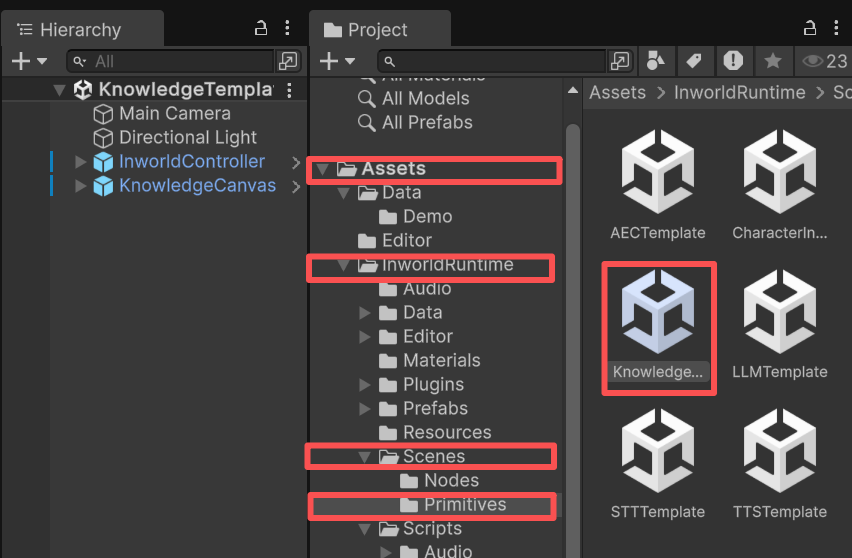
1. Go to `Assets/InworldRuntime/Scenes/Primitives` and play the `KnowledgeTemplate` scene.
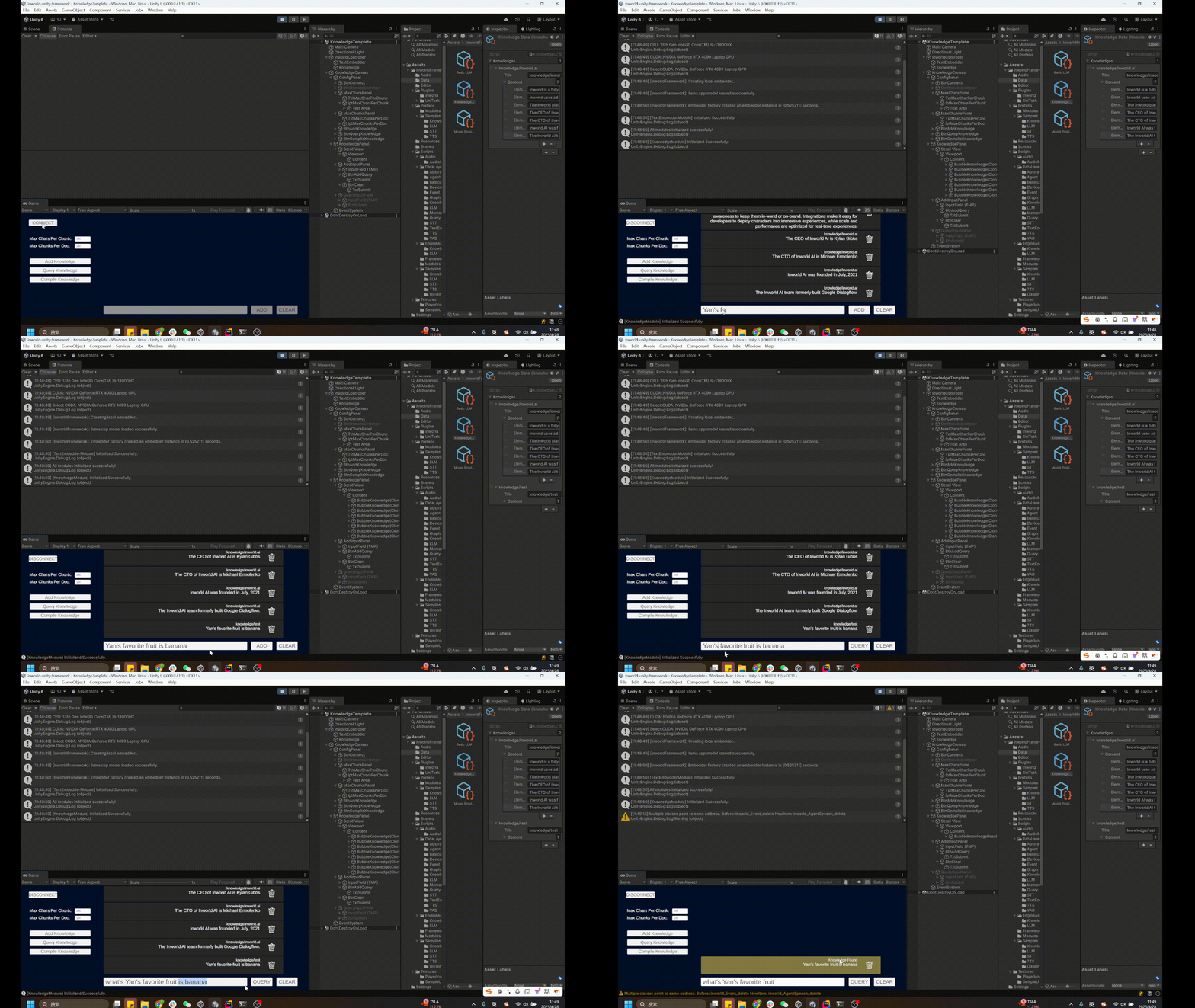
 2. After pressing Play, click `Connect`.
All currently available knowledge records will be displayed on the screen.
3. Click `Add Knowledge` to add more records.
Enter the content you want to add and click `Add`.
In this demo, all added records go to the `knowledge/test` collection.
4. Click `Query Knowledge` to search the knowledge records.
Enter your query and click `Query`.
Matching records will be displayed on the screen.
5. Clicking the trash icon next to a knowledge record deletes all records in that knowledge collection for this game session.
Click the GIF to expand.
2. After pressing Play, click `Connect`.
All currently available knowledge records will be displayed on the screen.
3. Click `Add Knowledge` to add more records.
Enter the content you want to add and click `Add`.
In this demo, all added records go to the `knowledge/test` collection.
4. Click `Query Knowledge` to search the knowledge records.
Enter your query and click `Query`.
Matching records will be displayed on the screen.
5. Clicking the trash icon next to a knowledge record deletes all records in that knowledge collection for this game session.
Click the GIF to expand.
 ## Understanding the Template
### Structure
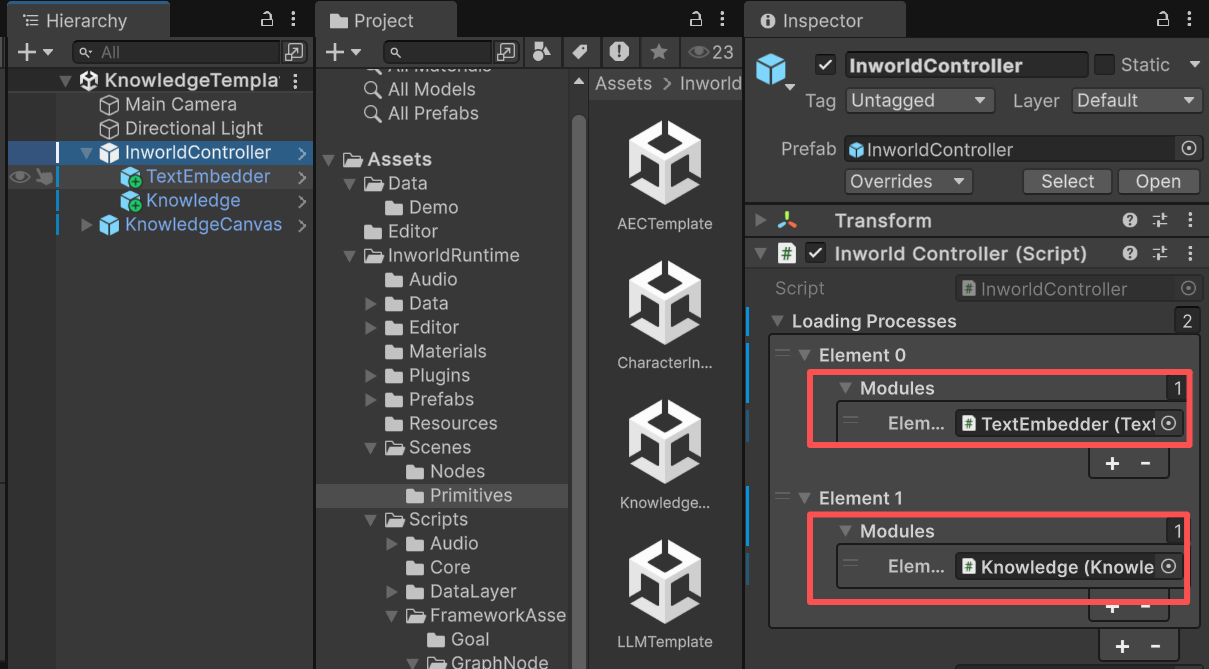
* This demo has two prefabs under `InworldController`: `TextEmbedder` (contains `TextEmbedderModule`) and `Knowledge` (contains `KnowledgeModule`).
* These modules create `TextEmbedderFactory` and `KnowledgeFactory`, and each factory creates a `TextEmbedderInterface` or `KnowledgeInterface` based on the current `TextEmbedder/KnowledgeConfig`.
## Understanding the Template
### Structure
* This demo has two prefabs under `InworldController`: `TextEmbedder` (contains `TextEmbedderModule`) and `Knowledge` (contains `KnowledgeModule`).
* These modules create `TextEmbedderFactory` and `KnowledgeFactory`, and each factory creates a `TextEmbedderInterface` or `KnowledgeInterface` based on the current `TextEmbedder/KnowledgeConfig`.
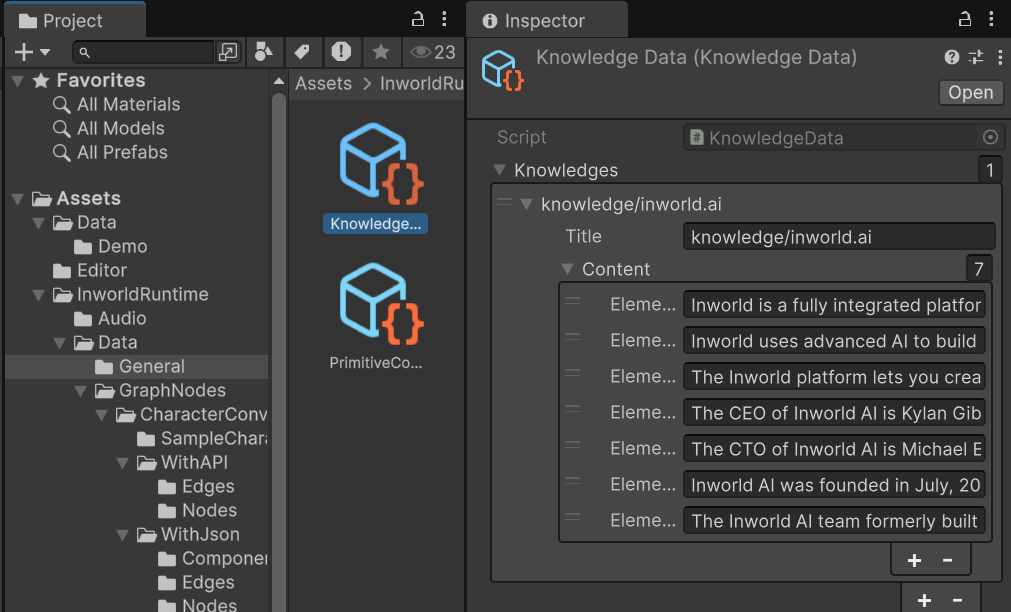
 ### KnowledgeData
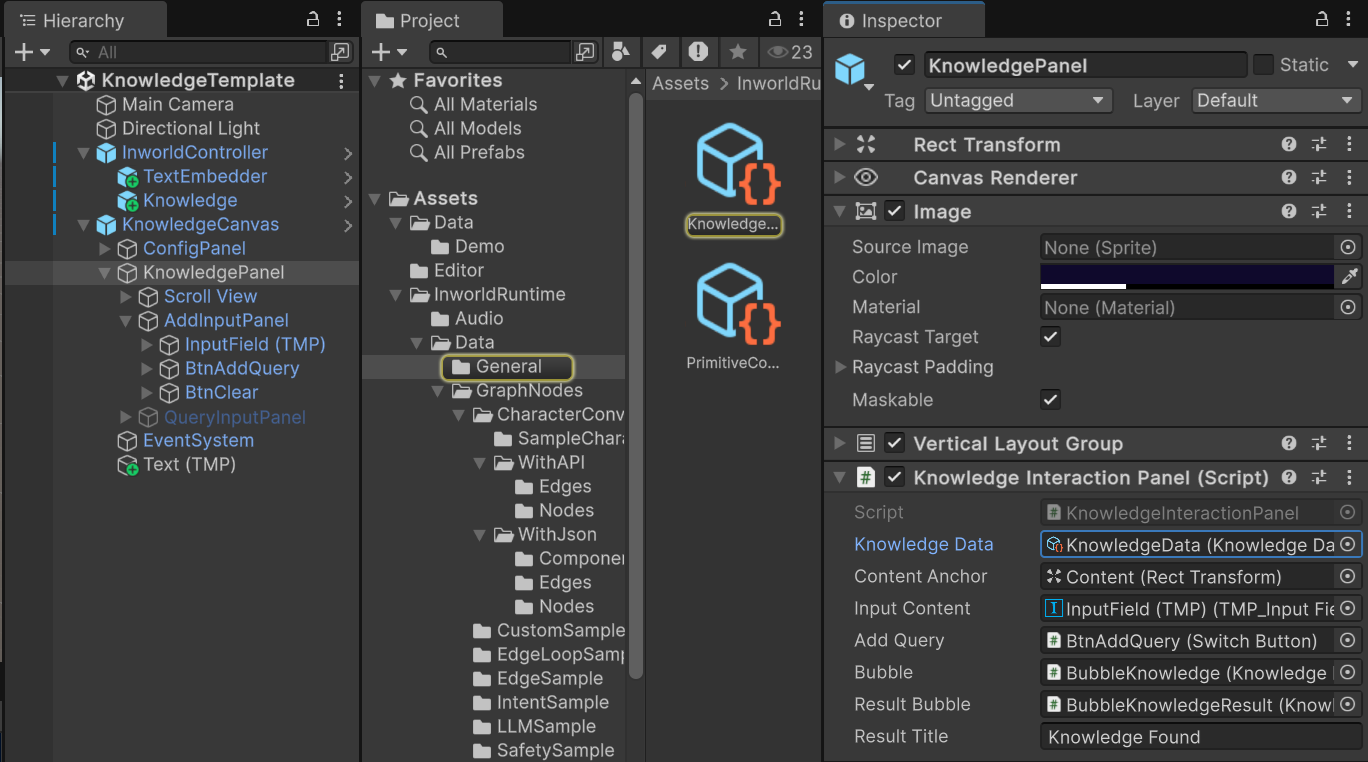
KnowledgeData is the asset this demo interacts with.
After the text embedder initializes, whenever you submit a query, the AI module batches this KnowledgeData and tries to retrieve the most relevant pieces of knowledge.
By default, it's stored under `Assets/InworldRuntime/Data/General`.
### KnowledgeData
KnowledgeData is the asset this demo interacts with.
After the text embedder initializes, whenever you submit a query, the AI module batches this KnowledgeData and tries to retrieve the most relevant pieces of knowledge.
By default, it's stored under `Assets/InworldRuntime/Data/General`.
 Knowledge is stored in groups.
Each group can contain multiple pieces of information.
Each group ID should always start with `knowledge/`.
See the example data in our Unity project.
Knowledge is stored in groups.
Each group can contain multiple pieces of information.
Each group ID should always start with `knowledge/`.
See the example data in our Unity project.
 ### Workflow
* Initialization is sequenced because `Knowledge` depends on `InworldController`.
* When `InworldController` initializes, it calls `InitializeAsync()` on `TextEmbedderModule`.
When that finishes, `InworldController` invokes `OnProcessInitialized`, which triggers `KnowledgeModule` initialization (see [Primitives Overview](./overview)).
* Once `KnowledgePanel` is initialized, `InworldController` invokes `OnFrameworkInitialized`.
In this demo, the `KnowledgeConfigPanel` on `KnowledgeCanvas > ConfigPanel` is registered to this event, which enables the UI for interaction.
Knowledge entries must already be compiled to the remote before the demo is run. The demo itself does not compile knowledge at runtime — see the [prerequisite warning](#knowledge-primitive-demo) above.
#### Add Knowledge
* When you press `Add Knowledge` and submit the input text, the data is added to the current `KnowledgeData`.
* In this demo, this invokes `KnowledgeInteractionPanel._AddKnowledge()`.
* It adds a new entry to the `knowledge/test` group.
```c# KnowledgeInteractionPanel.cs theme={"system"}
void _AddKnowledge()
{
if (m_KnowledgeData)
m_KnowledgeData.AddKnowledge("test", m_InputContent.text);
}
```
Entries added at runtime are local to the current session. To make them available for future sessions, add them to the `KnowledgeData` asset in the Inspector and compile to remote from the editor.
#### Query Knowledge
* As long as `InworldController` is connected and each module is initialized, you can click `Query Knowledge`.
* Enter any question; if it matches the knowledge database above, related entries are listed.
* More relevant entries appear higher in the list.
* When you press Enter or click `Query`, it first triggers `KnowledgeInteractionPanel._QueryKnowledge()`.
* This calls `InworldController.Knowledge.GetKnowledges()`, which in turn calls `KnowledgeInterface.GetKnowledge()`.
```c# theme={"system"}
void _QueryKnowledge()
{
InworldEvent inworldEvent = new InworldEvent();
InworldAgentSpeech speech = inworldEvent.Speech;
speech.AgentName = InworldFrameworkUtil.PlayerName;
speech.Utterance = m_InputContent.text;
if (InworldController.Knowledge)
InworldController.Knowledge.GetKnowledges(m_KnowledgeData.IDs, new List{inworldEvent});
}
```
```c# InworldController.cs theme={"system"}
public List GetKnowledges(List knowledgeIDs, List eventHistory = null)
{
if (!Initialized || !(m_Interface is KnowledgeInterface knowledgeInterface))
return null;
InworldVector inputKnowledges = new InworldVector();
inputKnowledges.AddRange(knowledgeIDs);
InworldVector inputEvents = new InworldVector();
if (eventHistory != null && eventHistory.Count != 0)
inputEvents.AddRange(eventHistory);
InworldVector output = knowledgeInterface.GetKnowledge(inputKnowledges, inputEvents);
int nSize = output?.Size ?? -1;
List result = new List();
for (int i = 0; i < nSize; i++)
result.Add(output?[i]);
OnKnowledgeRespond?.Invoke(result);
return result;
}
```
### Workflow
* Initialization is sequenced because `Knowledge` depends on `InworldController`.
* When `InworldController` initializes, it calls `InitializeAsync()` on `TextEmbedderModule`.
When that finishes, `InworldController` invokes `OnProcessInitialized`, which triggers `KnowledgeModule` initialization (see [Primitives Overview](./overview)).
* Once `KnowledgePanel` is initialized, `InworldController` invokes `OnFrameworkInitialized`.
In this demo, the `KnowledgeConfigPanel` on `KnowledgeCanvas > ConfigPanel` is registered to this event, which enables the UI for interaction.
Knowledge entries must already be compiled to the remote before the demo is run. The demo itself does not compile knowledge at runtime — see the [prerequisite warning](#knowledge-primitive-demo) above.
#### Add Knowledge
* When you press `Add Knowledge` and submit the input text, the data is added to the current `KnowledgeData`.
* In this demo, this invokes `KnowledgeInteractionPanel._AddKnowledge()`.
* It adds a new entry to the `knowledge/test` group.
```c# KnowledgeInteractionPanel.cs theme={"system"}
void _AddKnowledge()
{
if (m_KnowledgeData)
m_KnowledgeData.AddKnowledge("test", m_InputContent.text);
}
```
Entries added at runtime are local to the current session. To make them available for future sessions, add them to the `KnowledgeData` asset in the Inspector and compile to remote from the editor.
#### Query Knowledge
* As long as `InworldController` is connected and each module is initialized, you can click `Query Knowledge`.
* Enter any question; if it matches the knowledge database above, related entries are listed.
* More relevant entries appear higher in the list.
* When you press Enter or click `Query`, it first triggers `KnowledgeInteractionPanel._QueryKnowledge()`.
* This calls `InworldController.Knowledge.GetKnowledges()`, which in turn calls `KnowledgeInterface.GetKnowledge()`.
```c# theme={"system"}
void _QueryKnowledge()
{
InworldEvent inworldEvent = new InworldEvent();
InworldAgentSpeech speech = inworldEvent.Speech;
speech.AgentName = InworldFrameworkUtil.PlayerName;
speech.Utterance = m_InputContent.text;
if (InworldController.Knowledge)
InworldController.Knowledge.GetKnowledges(m_KnowledgeData.IDs, new List{inworldEvent});
}
```
```c# InworldController.cs theme={"system"}
public List GetKnowledges(List knowledgeIDs, List eventHistory = null)
{
if (!Initialized || !(m_Interface is KnowledgeInterface knowledgeInterface))
return null;
InworldVector inputKnowledges = new InworldVector();
inputKnowledges.AddRange(knowledgeIDs);
InworldVector inputEvents = new InworldVector();
if (eventHistory != null && eventHistory.Count != 0)
inputEvents.AddRange(eventHistory);
InworldVector output = knowledgeInterface.GetKnowledge(inputKnowledges, inputEvents);
int nSize = output?.Size ?? -1;
List result = new List();
for (int i = 0; i < nSize; i++)
result.Add(output?[i]);
OnKnowledgeRespond?.Invoke(result);
return result;
}
```