> ## Documentation Index
> Fetch the complete documentation index at: https://docs.inworld.ai/llms.txt
> Use this file to discover all available pages before exploring further.
# LLM Primitive Demo
The LLM template demonstrates how to make a simple call to an LLM using the LLM primitive.
## Run the Template
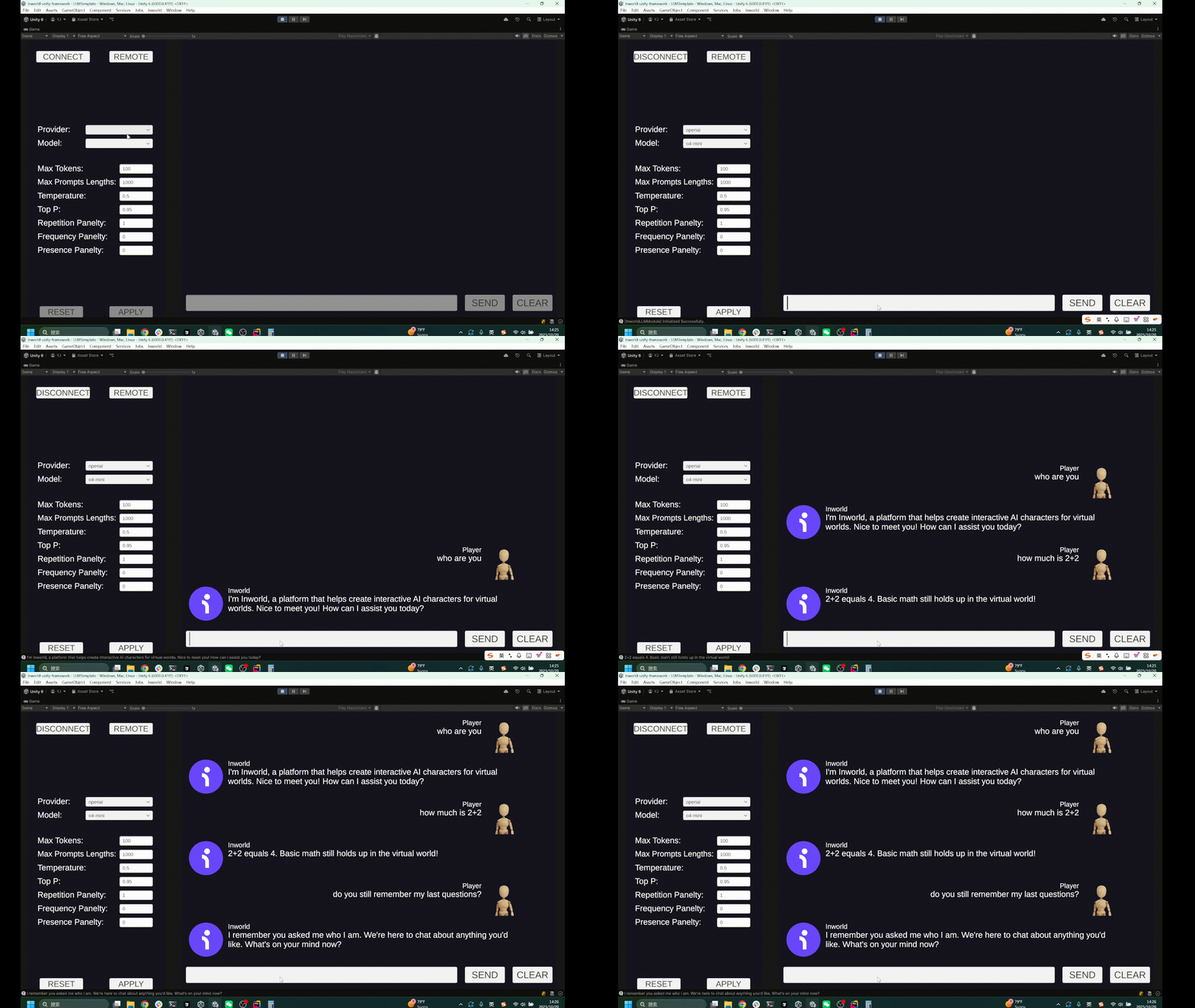
1. Go to Assets/InworldRuntime/Scenes/Primitives and play the `LLMTemplate` Scene.
2. Switch LLM models, configure the parameters, then press the `Connect` button.
3. Type messages to the agent.
The agent remembers the chat history within the current conversation.
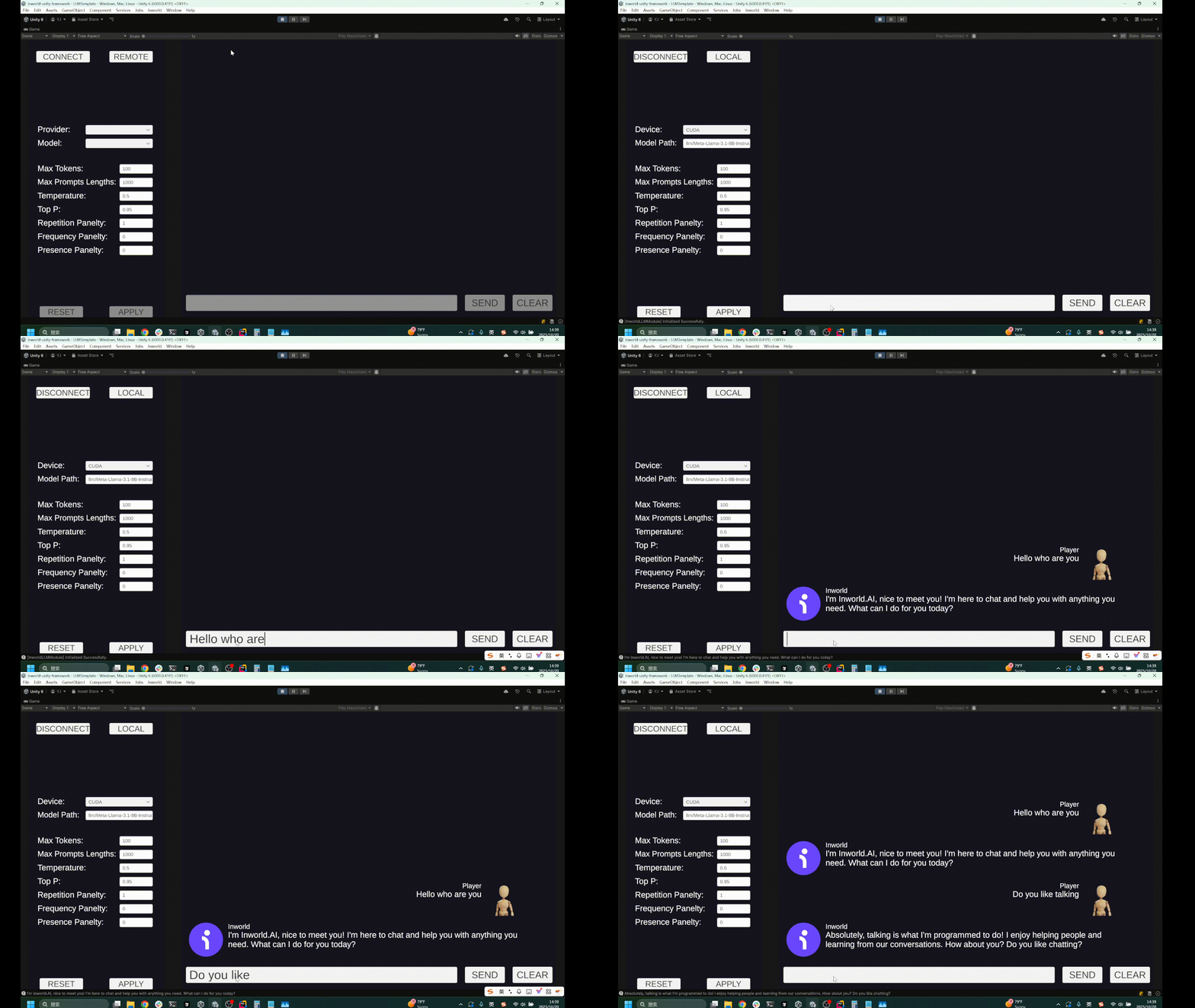
 4. You can also switch to local models by toggling the `Remote` button.
By default it uses `StreamingAssets/llm/Meta-Llama-3.1-8B-Instruct-Q8_0.gguf`, but you can also use your own models.
If you're using the `Local` models, we recommend setting the `Device` to `CUDA` for better performance.
4. You can also switch to local models by toggling the `Remote` button.
By default it uses `StreamingAssets/llm/Meta-Llama-3.1-8B-Instruct-Q8_0.gguf`, but you can also use your own models.
If you're using the `Local` models, we recommend setting the `Device` to `CUDA` for better performance.
 ## Understanding the Template
### Structure
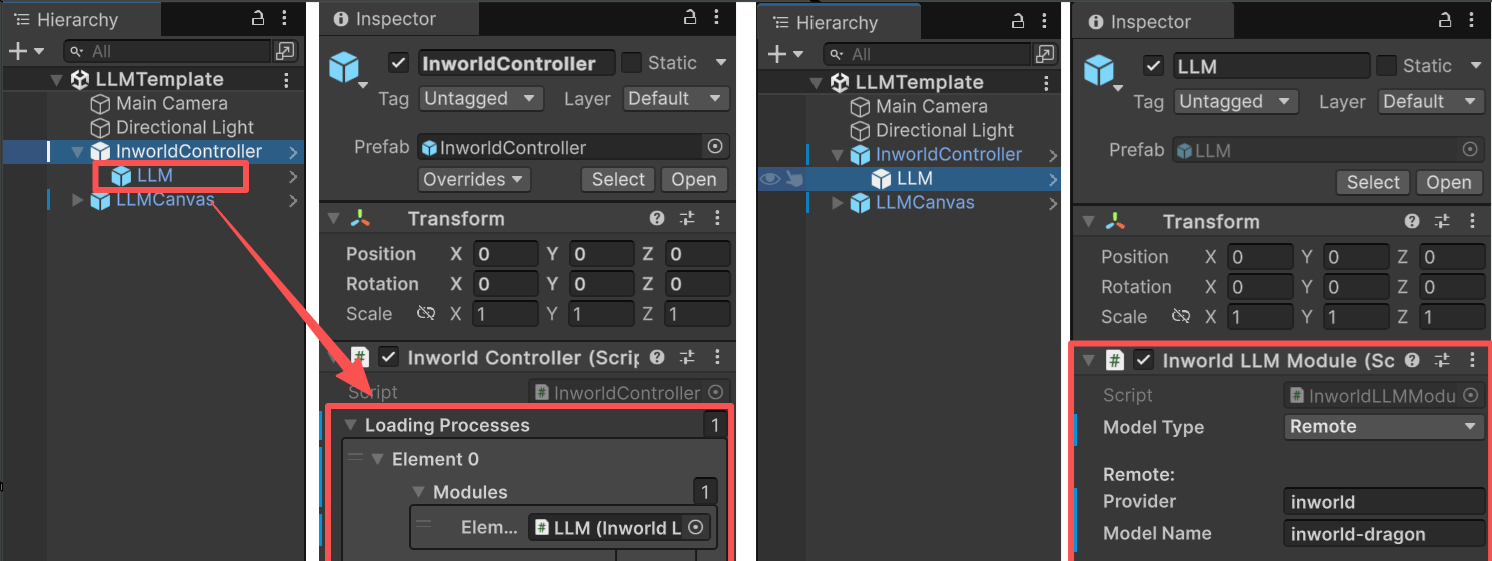
* This demo has a single prefab under `InworldController`, `LLM`, which contains `InworldLLMModule`.
* When `InworldController` initializes, it calls `InworldLLMModule.InitializeAsync()` (see [Primitives Overview](./overview)).
* This function creates an `LLMFactory`, then creates an `LLMInterface` based on the current `LLMConfig`.
## Understanding the Template
### Structure
* This demo has a single prefab under `InworldController`, `LLM`, which contains `InworldLLMModule`.
* When `InworldController` initializes, it calls `InworldLLMModule.InitializeAsync()` (see [Primitives Overview](./overview)).
* This function creates an `LLMFactory`, then creates an `LLMInterface` based on the current `LLMConfig`.
 #### Parameters
* **Max Tokens:** Maximum number of tokens to generate. Longer outputs may cost more and are truncated at this limit.
* **Max Prompt Length:** Maximum tokens allowed in the prompt. Total context window = input + output, so available output ≈ window − input.
* **Temperature:** Controls randomness/creativity. Lower = more deterministic; higher = more diverse.
* **Top P:** Nucleus sampling. Samples only from tokens within cumulative probability P. Usually tune this or Temperature, not both.
* **Repetition Penalty:** Down-weights previously generated tokens to reduce loops and verbosity.
* **Frequency Penalty:** Penalizes tokens the more frequently they appear to curb repetition.
* **Presence Penalty:** Penalizes tokens after their first appearance to encourage introducing new topics.
```c# theme={"system"}
public override InworldInterface CreateInterface(InworldConfig config)
{
if (config is LLMRemoteConfig remoteConfig)
return CreateInterface(remoteConfig);
if (config is LLMLocalConfig localConfig)
return CreateInterface(localConfig);
return null;
}
public InworldInterface CreateInterface(LLMRemoteConfig config)
{
IntPtr result = InworldFrameworkUtil.Execute(
InworldInterop.inworld_LLMFactory_CreateLLM_rcinworld_RemoteLLMConfig(m_DLLPtr, config.ToDLL),
InworldInterop.inworld_StatusOr_LLMInterface_status,
InworldInterop.inworld_StatusOr_LLMInterface_ok,
InworldInterop.inworld_StatusOr_LLMInterface_value,
InworldInterop.inworld_StatusOr_LLMInterface_delete
);
return result != IntPtr.Zero ? new LLMInterface(result) : null;
}
public InworldInterface CreateInterface(LLMLocalConfig config)
{
Debug.Log("ModelPath: " + config.ModelPath);
Debug.Log("Device: " + config.Device.Info.Name);
IntPtr result = InworldFrameworkUtil.Execute(
InworldInterop.inworld_LLMFactory_CreateLLM_rcinworld_LocalLLMConfig(m_DLLPtr, config.ToDLL),
InworldInterop.inworld_StatusOr_LLMInterface_status,
InworldInterop.inworld_StatusOr_LLMInterface_ok,
InworldInterop.inworld_StatusOr_LLMInterface_value,
InworldInterop.inworld_StatusOr_LLMInterface_delete
);
return result != IntPtr.Zero ? new LLMInterface(result) : null;
}
```
### Workflow
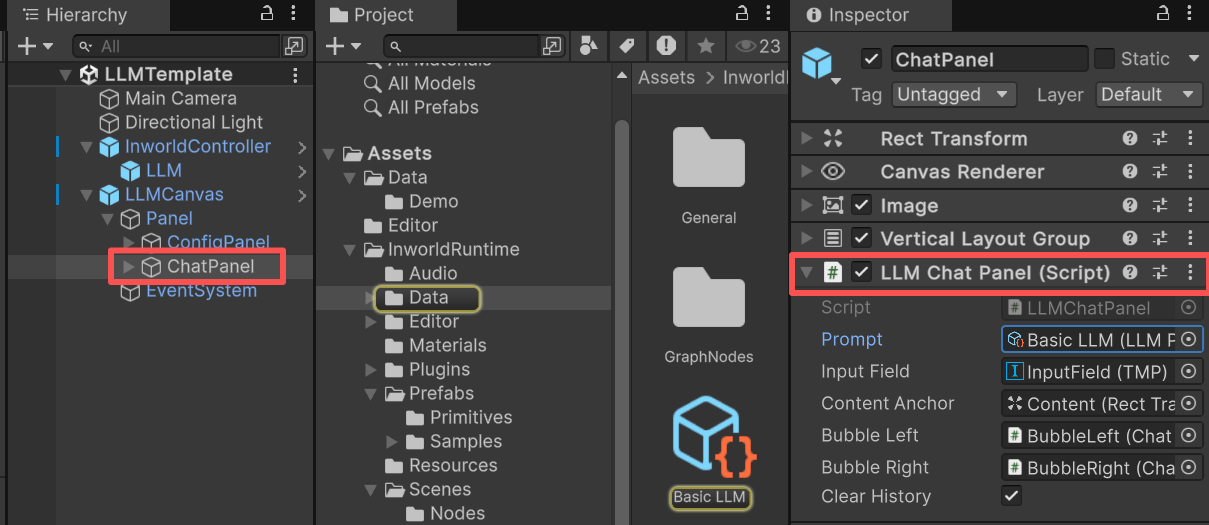
At runtime, when `InworldController` invokes `OnFrameworkInitialized`, the demo's `LLMChatPanel` listens to this event and enables the previously disabled UI.
When the user presses `Enter` or clicks `SEND`, `LLMChatPanel` first builds the chat history and inserts it into the prompt.
#### Prompt
This example uses the prompt asset at `Assets/InworldRuntime/Data/BasicLLM.asset`.
#### Parameters
* **Max Tokens:** Maximum number of tokens to generate. Longer outputs may cost more and are truncated at this limit.
* **Max Prompt Length:** Maximum tokens allowed in the prompt. Total context window = input + output, so available output ≈ window − input.
* **Temperature:** Controls randomness/creativity. Lower = more deterministic; higher = more diverse.
* **Top P:** Nucleus sampling. Samples only from tokens within cumulative probability P. Usually tune this or Temperature, not both.
* **Repetition Penalty:** Down-weights previously generated tokens to reduce loops and verbosity.
* **Frequency Penalty:** Penalizes tokens the more frequently they appear to curb repetition.
* **Presence Penalty:** Penalizes tokens after their first appearance to encourage introducing new topics.
```c# theme={"system"}
public override InworldInterface CreateInterface(InworldConfig config)
{
if (config is LLMRemoteConfig remoteConfig)
return CreateInterface(remoteConfig);
if (config is LLMLocalConfig localConfig)
return CreateInterface(localConfig);
return null;
}
public InworldInterface CreateInterface(LLMRemoteConfig config)
{
IntPtr result = InworldFrameworkUtil.Execute(
InworldInterop.inworld_LLMFactory_CreateLLM_rcinworld_RemoteLLMConfig(m_DLLPtr, config.ToDLL),
InworldInterop.inworld_StatusOr_LLMInterface_status,
InworldInterop.inworld_StatusOr_LLMInterface_ok,
InworldInterop.inworld_StatusOr_LLMInterface_value,
InworldInterop.inworld_StatusOr_LLMInterface_delete
);
return result != IntPtr.Zero ? new LLMInterface(result) : null;
}
public InworldInterface CreateInterface(LLMLocalConfig config)
{
Debug.Log("ModelPath: " + config.ModelPath);
Debug.Log("Device: " + config.Device.Info.Name);
IntPtr result = InworldFrameworkUtil.Execute(
InworldInterop.inworld_LLMFactory_CreateLLM_rcinworld_LocalLLMConfig(m_DLLPtr, config.ToDLL),
InworldInterop.inworld_StatusOr_LLMInterface_status,
InworldInterop.inworld_StatusOr_LLMInterface_ok,
InworldInterop.inworld_StatusOr_LLMInterface_value,
InworldInterop.inworld_StatusOr_LLMInterface_delete
);
return result != IntPtr.Zero ? new LLMInterface(result) : null;
}
```
### Workflow
At runtime, when `InworldController` invokes `OnFrameworkInitialized`, the demo's `LLMChatPanel` listens to this event and enables the previously disabled UI.
When the user presses `Enter` or clicks `SEND`, `LLMChatPanel` first builds the chat history and inserts it into the prompt.
#### Prompt
This example uses the prompt asset at `Assets/InworldRuntime/Data/BasicLLM.asset`.
 ```jinja Simple Dialogue Prompt Template theme={"system"}
<|begin_of_text|><|start_header_id|>system<|end_header_id|>
You are Inworld.AI, in conversation with the user, who is the Player.
# Context for the conversation
## Overview
The conversation is a live dialogue between Inworld.AI and Player. It should NOT include any actions, nonverbal cues, or stage directions—ONLY dialogue.
## Inworld.AI's Dialogue Style
Shorter, natural response lengths and styles are encouraged. Inworld.AI should respond engagingly to Player in a natural manner.
# Response Instructions
Respond as Inworld.AI while maintaining consistency with the provided profile and context. Use the specified dialect, tone, and style.
<|eot_id|>
```
Both the user's messages and the agent's replies are stored in the prompt's `Conversation` list (`List`).
When `InworldController.LLM.GenerateTextAsync()` is invoked, the prompt is rendered via Jinja into the following format:
```jinja Simple Dialogue Prompt Template theme={"system"}
<|begin_of_text|><|start_header_id|>system<|end_header_id|>
You are Inworld.AI, in conversation with the user, who is the Player.
# Context for the conversation
## Overview
The conversation is a live dialogue between Inworld.AI and Player. It should NOT include any actions, nonverbal cues, or stage directions—ONLY dialogue.
## Inworld.AI's Dialogue Style
Shorter, natural response lengths and styles are encouraged. Inworld.AI should respond engagingly to Player in a natural manner.
# Response Instructions
Respond as Inworld.AI while maintaining consistency with the provided profile and context. Use the specified dialect, tone, and style.
<|eot_id|>
<|start_header_id|>Player<|end_header_id|>
how is it going
<|start_header_id|>Inworld<|end_header_id|>
It's going well, thanks for asking! How about you?
<|start_header_id|>Player<|end_header_id|>
sure things
<|start_header_id|>Inworld.AI<|end_header_id|>
```
```jinja Simple Dialogue Prompt Template theme={"system"}
<|begin_of_text|><|start_header_id|>system<|end_header_id|>
You are Inworld.AI, in conversation with the user, who is the Player.
# Context for the conversation
## Overview
The conversation is a live dialogue between Inworld.AI and Player. It should NOT include any actions, nonverbal cues, or stage directions—ONLY dialogue.
## Inworld.AI's Dialogue Style
Shorter, natural response lengths and styles are encouraged. Inworld.AI should respond engagingly to Player in a natural manner.
# Response Instructions
Respond as Inworld.AI while maintaining consistency with the provided profile and context. Use the specified dialect, tone, and style.
<|eot_id|>
```
Both the user's messages and the agent's replies are stored in the prompt's `Conversation` list (`List`).
When `InworldController.LLM.GenerateTextAsync()` is invoked, the prompt is rendered via Jinja into the following format:
```jinja Simple Dialogue Prompt Template theme={"system"}
<|begin_of_text|><|start_header_id|>system<|end_header_id|>
You are Inworld.AI, in conversation with the user, who is the Player.
# Context for the conversation
## Overview
The conversation is a live dialogue between Inworld.AI and Player. It should NOT include any actions, nonverbal cues, or stage directions—ONLY dialogue.
## Inworld.AI's Dialogue Style
Shorter, natural response lengths and styles are encouraged. Inworld.AI should respond engagingly to Player in a natural manner.
# Response Instructions
Respond as Inworld.AI while maintaining consistency with the provided profile and context. Use the specified dialect, tone, and style.
<|eot_id|>
<|start_header_id|>Player<|end_header_id|>
how is it going
<|start_header_id|>Inworld<|end_header_id|>
It's going well, thanks for asking! How about you?
<|start_header_id|>Player<|end_header_id|>
sure things
<|start_header_id|>Inworld.AI<|end_header_id|>
```