> ## Documentation Index
> Fetch the complete documentation index at: https://docs.inworld.ai/llms.txt
> Use this file to discover all available pages before exploring further.
# Text-to-Speech (TTS) Primitive Demo
The Text-to-Speech (TTS) template shows how to make a simple TTS call using the TTS primitive.
The TTS primitive module uses the legacy TTS system.
This module supports both remote and local models.
However, newer versions of Inworld TTS can only be used remotely and as a Node in the Graph system.
## Run the Template
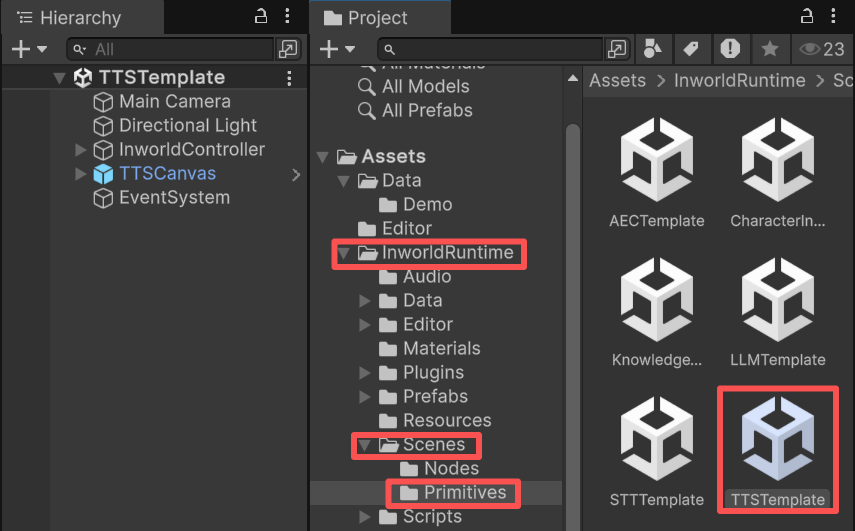
1. Go to `Assets/InworldRuntime/Scenes/Primitives` and play the `TTSTemplate` scene.
 2. Toggle between `Remote` and `Local`, then press `Connect`.
3. Once connected, select a voice ID, then press `Preview` to listen.
4. You can also type any text and press `SEND` to generate the TTS result.
## Understanding the Template
### Structure
* This demo has a single prefab under `InworldController`: `TTS`, which contains `InworldTTSModule`.
* When `InworldController` initializes, it calls `InitializeAsync()` on the TTS module (see [Primitives Overview](./overview)).
* It creates a `TTSFactory`, which then creates a `TTSInterface` or `VADInterface` based on `TTSConfig`.
### Workflow
At runtime, when `InworldController` invokes `OnFrameworkInitialized`, the demo's `TTSConfigPanel` in `TTSCanvas` listens for this event and enables the previously disabled UI.
When the user switches the voice ID, the system terminates the current `TTSInterface` and creates a new one with the updated voice ID.
When the user clicks the `Preview` button, the `TTSConfigPanel` calls `InworldController.TTS.TextToSpeechAsync()` with "Hello" as the parameter.
When the user presses Enter or clicks `Send`, `TTSConfigPanel` calls `InworldController.TTS.TextToSpeechAsync()` with the input text.
### VoiceID
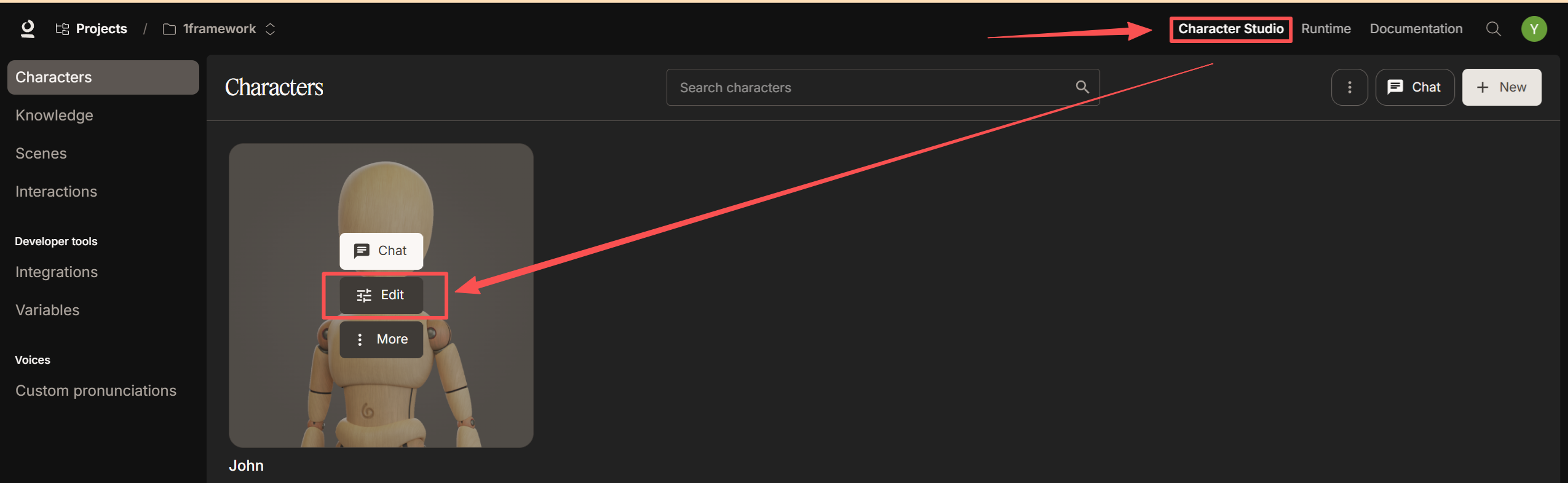
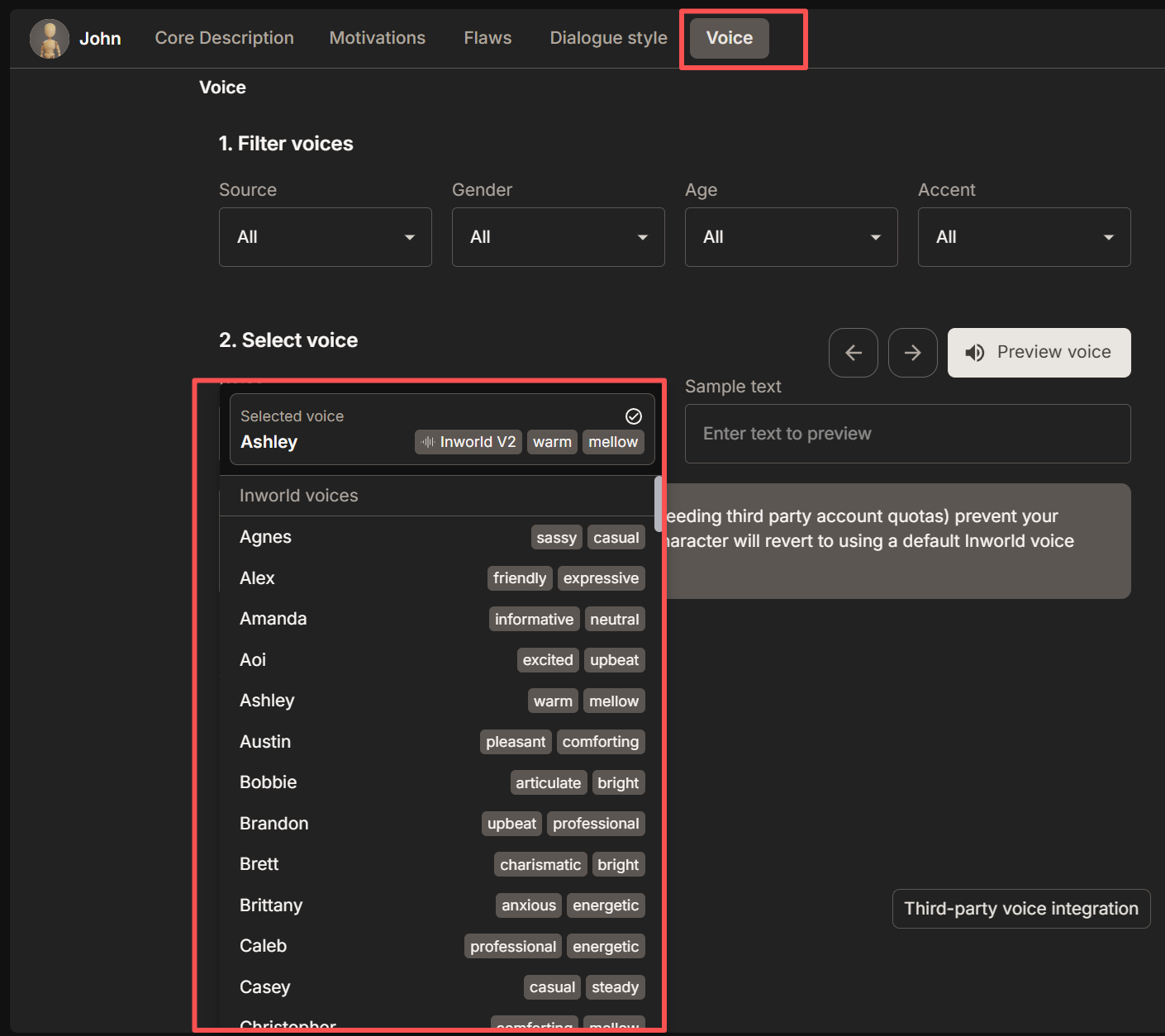
The voice ID identifies which voice is speaking. You can find the full list on the character page in `Character Studio`.
The primitive TTS module uses our legacy model. Voice IDs may differ from those in the `TTS Playground`.
To find available voices, open `Character Studio`, go to the character editing page, and select voices there.
2. Toggle between `Remote` and `Local`, then press `Connect`.
3. Once connected, select a voice ID, then press `Preview` to listen.
4. You can also type any text and press `SEND` to generate the TTS result.
## Understanding the Template
### Structure
* This demo has a single prefab under `InworldController`: `TTS`, which contains `InworldTTSModule`.
* When `InworldController` initializes, it calls `InitializeAsync()` on the TTS module (see [Primitives Overview](./overview)).
* It creates a `TTSFactory`, which then creates a `TTSInterface` or `VADInterface` based on `TTSConfig`.
### Workflow
At runtime, when `InworldController` invokes `OnFrameworkInitialized`, the demo's `TTSConfigPanel` in `TTSCanvas` listens for this event and enables the previously disabled UI.
When the user switches the voice ID, the system terminates the current `TTSInterface` and creates a new one with the updated voice ID.
When the user clicks the `Preview` button, the `TTSConfigPanel` calls `InworldController.TTS.TextToSpeechAsync()` with "Hello" as the parameter.
When the user presses Enter or clicks `Send`, `TTSConfigPanel` calls `InworldController.TTS.TextToSpeechAsync()` with the input text.
### VoiceID
The voice ID identifies which voice is speaking. You can find the full list on the character page in `Character Studio`.
The primitive TTS module uses our legacy model. Voice IDs may differ from those in the `TTS Playground`.
To find available voices, open `Character Studio`, go to the character editing page, and select voices there.
 The `TTSInterface` in the current Inworld Agent Runtime DLL does not support changing voice IDs at runtime.
Therefore, changing the voice ID terminates the current `TTSInterface` and creates a new interface with the selected voice ID.
The `TTSInterface` in the current Inworld Agent Runtime DLL does not support changing voice IDs at runtime.
Therefore, changing the voice ID terminates the current `TTSInterface` and creates a new interface with the selected voice ID.