

InworldAudioManager | Inherits from: MonoBehaviour | Requires: AudioSource
Manages audio recording, processing, and playback for the Inworld framework. Coordinates multiple audio modules and handles microphone input, voice detection, and audio streaming. Requires an AudioSource component for audio playback functionality.
Properties
- InputBuffer
- DeviceName
- RecordingSource
- RecordingClip
- Event
- IsPlayerSpeaking
- IsCalibrating
- Volume
- IsMicRecording
Methods
- StartMicrophone
- StopMicrophone
- StartAudioThread
- StopAudioThread
- ResetPointer
- CollectAudio
- StartVoiceDetecting
- StopVoiceDetecting
- StartCalibrate
- StopCalibrate
- PreProcess
- PostProcess
- PushAudio
- OnSendAudio
- TryDeleteModule
- AddModule
- GetModule
- GetUniqueModule
- GetModules
Reference
The InworldAudioManager component manages all audio-related functionality in the Inworld framework. It coordinates multiple audio modules and handles microphone input, voice detection, and audio streaming.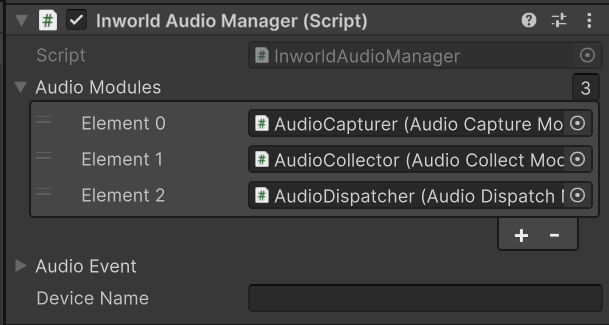
Serialized Fields
The following fields are configurable in the Unity Inspector:- Audio Modules (
m_AudioModules) - List of InworldAudioModule components that handle different aspects of audio processing. Depending on the interface they implement, their processing function are called at different times. - Audio Event (
m_AudioEvent) - AudioEvent component for handling audio-related events and callbacks - Device Name (
m_DeviceName) - Name of the microphone device to use for audio recording (empty for default device)
InputBuffer
Gets or sets the circular buffer used for storing input audio data. This buffer holds microphone input samples for processing by audio modules.Returns
Type:CircularBuffer<float>
DeviceName
Gets or sets the name of the microphone device to use for audio recording. If empty, the system default microphone will be used.Returns
Type:string
RecordingSource
Gets the AudioSource component attached to this AudioManager. Creates a new AudioSource if one doesn’t exist. Used for audio playback and recording.Returns
Type:AudioSource
RecordingClip
Get the current AudioClip (Used for microphone input)Returns
Type:AudioClip
Event
Gets the AudioEvent component for handling audio-related events.Returns
Type:AudioEvent
IsPlayerSpeaking
Gets or sets whether the player is currently speaking. When set, triggers appropriate events and notifies audio handlers.Returns
Type:bool
IsCalibrating
Gets or sets whether the audio system is currently calibrating. When set, triggers appropriate calibration events.Returns
Type:bool
Volume
Gets or sets the volume of the recording source.Returns
Type:float
IsMicRecording
Gets whether the microphone is currently recording.Returns
Type:bool
StartMicrophone
Start microphone handling.Returns
Type:bool
Description: False if there’s no active Microphone Handler. True otherwise.
StopMicrophone
Stop microphone handling.Returns
Type:bool
Description: False if there’s no active Microphone Handler. True otherwise.
StartAudioThread
Should be called after the handler setup buffers and clips for data. This function will kickstart the coroutine to collect audio, which gets constantly sent to the handler.Returns
Type:void
StopAudioThread
Stop the audio coroutine for audio collection. Note that this function does not touch the buffers (more like pause than stop).Returns
Type:void
ResetPointer
Resets the pointer for audio collection.Returns
Type:void
CollectAudio
Collects audio from all registered audio collection handlers.Returns
Type:void
StartVoiceDetecting
Starts voice detection for player audio events.Returns
Type:void
StopVoiceDetecting
Stops voice detection for player audio events.Returns
Type:void
StartCalibrate
Starts calibration for all registered audio calibration handlers.Returns
Type:void
StopCalibrate
Stops calibration for all registered audio calibration handlers.Returns
Type:void
PreProcess
Runs pre-processing on all registered audio processing handlers.Returns
Type:void
PostProcess
Runs post-processing on all registered audio processing handlers.Returns
Type:void
PushAudio
Manually push the audio wave data to server.Returns
Type:IEnumerator
OnSendAudio
Sends audio data and triggers the audio sent event.Returns
Type:void
TryDeleteModule
Attempts to delete modules of the specified type from the audio modules list.Parameters
| Parameter | Type | Description |
|---|---|---|
| T | Type | The type of module to delete. |
Returns
Type:bool
Description: True if any modules were deleted, false otherwise.
AddModule
Adds an audio module to the manager’s module list.Parameters
| Parameter | Type | Description |
|---|---|---|
| module | InworldAudioModule | The audio module to add. |
Returns
Type:void
GetModule
Gets the first module of the specified type from the audio modules list.Parameters
| Parameter | Type | Description |
|---|---|---|
| T | Type | The type of module to retrieve. |
Returns
Type:T
Description: The first module of the specified type, or null if none found.
GetUniqueModule
Gets a unique module of the specified type. Throws an exception if no module is found or if multiple modules exist.Parameters
| Parameter | Type | Description |
|---|---|---|
| T | Type | The type of module to retrieve. |
Returns
Type:T
Description: The unique module of the specified type.
GetModules
Gets all modules of the specified type from the audio modules list.Parameters
| Parameter | Type | Description |
|---|---|---|
| T | Type | The type of modules to retrieve. |
Returns
Type:List<T>
Description: A list of all modules of the specified type.