

TextProcessorNodeAsset | Inherits from: CustomNodeAsset
Node asset for applying common text filtering and cleaning operations to LLM input/outputs within conversation flows. Provides configurable text processing capabilities including bracket removal, substring filtering, sentence streaming, and emoji removal.
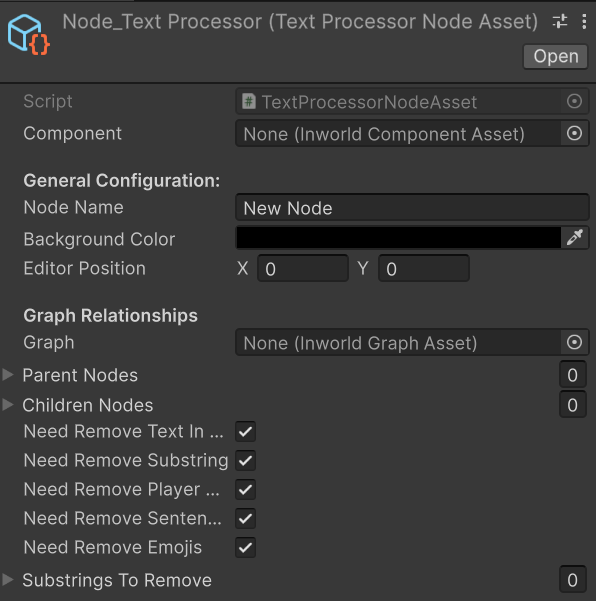
Properties
- NodeTypeName
- NeedRemoveTextInBrackets
- NeedRemoveSubstring
- NeedRemovePlayerName
- NeedRemoveSentenceStream
- NeedRemoveEmojis
- SubstringsToRemove
Methods
Reference
NodeTypeName
Gets the type name for this text processor node. Returns “TextProcessorNode” to identify this as a text processing node type.Returns
Type:string
NeedRemoveTextInBrackets
Gets or sets whether to remove text enclosed in brackets from the input. When enabled, content within [], (), brackets will be filtered out.Returns
Type:bool
NeedRemoveSubstring
Gets or sets whether to remove specified substrings from the input. When enabled, strings listed in substringsToRemove will be filtered out.Returns
Type:bool
NeedRemovePlayerName
Gets or sets whether to remove the player name from the input text. When enabled, the current player name will be added to the removal list.Returns
Type:bool
NeedRemoveSentenceStream
Gets or sets whether to process the input as sentence streams. When enabled, text will be broken down into individual sentences for processing.Returns
Type:bool
NeedRemoveEmojis
Gets or sets whether to remove emoji characters from the input text. When enabled, all emoji symbols will be filtered out from the text.Returns
Type:bool
SubstringsToRemove
Gets or sets the list of specific substrings to remove from the input text. Contains custom strings that should be filtered out during text processing.Returns
Type:List<string>
ProcessBaseData
Processes the input data through various text filtering and cleaning operations. Applies the configured text processing operations in sequence based on the enabled options.Parameters
| Parameter | Type | Description |
|---|---|---|
| inputs | InworldVector<InworldBaseData> | The vector of input data to process |
Returns
Type:InworldBaseData - The processed text data as an InworldDataStream, or an error if processing fails
Serialized Fields
The following fields are configurable in the Unity Inspector:- needRemoveTextInBrackets (
bool) - Whether to remove text enclosed in brackets (default: true) - needRemoveSubstring (
bool) - Whether to remove specified substrings (default: true) - needRemovePlayerName (
bool) - Whether to remove the player name (default: true) - needRemoveSentenceStream (
bool) - Whether to process as sentence streams (default: true) - needRemoveEmojis (
bool) - Whether to remove emoji characters (default: true) - substringsToRemove (
List<string>) - List of specific substrings to remove
Important Notes
Text Processing Operations
- Bracket Removal: Filters out content within [], (), brackets
- Substring Filtering: Removes custom strings and optionally the player name
- Sentence Streaming: Breaks text into individual sentences for processing
- Emoji Removal: Filters out all emoji symbols from text
- Sequential Processing: Operations are applied in order based on enabled options
Configuration
- Default Settings: All processing options are enabled by default
- Custom Substrings: Use
substringsToRemovelist for additional filtering - Player Name Integration: Automatically adds player name to removal list when enabled
- Error Handling: Returns appropriate error data if input validation fails