
Invalid authorization credentials

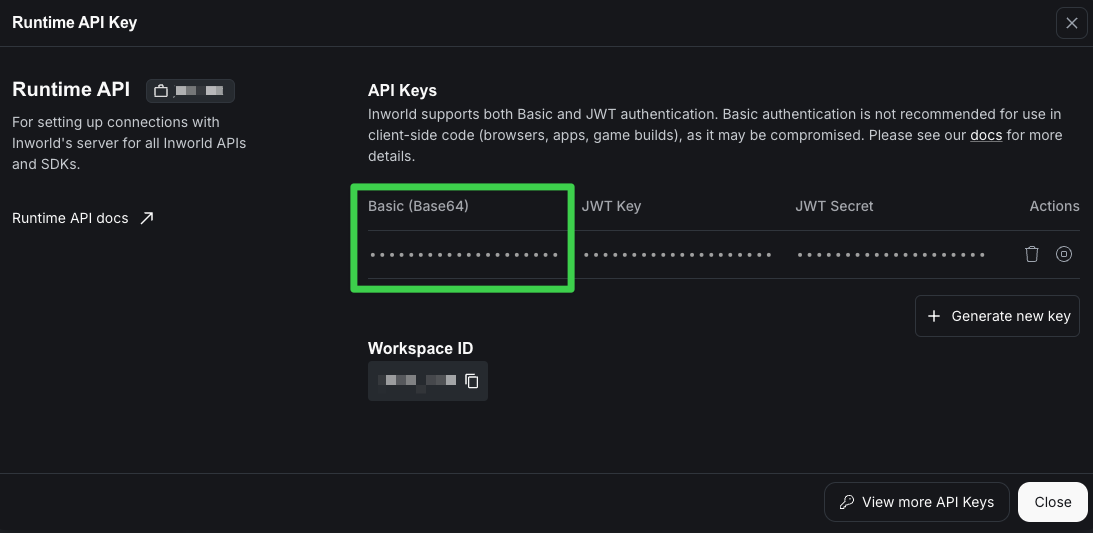
You may get an error similar to the following if you haven’t provided your API key:
 {
  message: 'Failed to read input stream. INTERNAL: gRPC read failed: Invalid authorization credentials',
  context: 'INTERNAL: gRPC read failed: Invalid authorization credentials'
}
Please make sure you have set your environment variable INWORLD_API_KEY to your Runtime API key, and are using the Base64 API key.
Graph not found in Graph Registry

You will see the following messages if you have not yet registered your graph in the Graph Registry, but you have set enableRemoteConfig: true. This means your graph will use the graph as defined in your code, but will not use any remote variants. If that is the desired behavior, you can ignore the warning. Otherwise, to take advantage of the Runtime’s experimentation and targeting features, register your graph and create variants.
W0818 16:11:58.658435 11591985 graph_executor.cc:113] Graph not found in Graph Registry, using local graph configuration. If local configuration is intended, no action is needed. Otherwise, to enable features like A/B testing and remote configuration, register your graph: https://platform.inworld.ai/v2/documentation/docs/portal/graph-registry#register-your-graph

Failed to load shared library (cblas)

You may get this error if you are using an older version of macOS. Please make sure you have macOS 14+.
Error: Failed to load shared library: dlopen(/Users/USERNAME/getting-started-0.6.0/node_modules/@inworld/runtime/bin/darwin_arm64/lib/libinworld.dylib, 0x0006): Symbol not found: _cblas_sdot$NEWLAPACK$ILP64