> ## Documentation Index
> Fetch the complete documentation index at: https://docs.inworld.ai/llms.txt
> Use this file to discover all available pages before exploring further.
# Decisions
> Get typed answers your code can branch on (yes/no probabilities, picks from your options, and scores) in one request
**Preview.** The `/alpha` path and the request and response shape may change before this API is marked stable. See [release stages](https://docs.inworld.ai/portal/support.md#what-do-experimental-preview-and-stable-mean).
The Decisions API runs a decision model that gives your code a structured answer instead of generated text. You send a `state` (the content to evaluate) and a map of named, typed `questions`. You get back one typed answer per question: a probability of yes for a `noul` question, one of your options for a `choice` question, or a position on your scale for a `score` question. Answers are never free text, so there is no output to parse or validate.
Use it when your code needs to branch on a judgment: classify or route a request, check a message against a policy, score a passage for relevance, or gate an action on the model's certainty. For free-form text, use [chat completions](https://docs.inworld.ai/api-reference/routerAPI/chat-completions.md) or the [Responses API](https://docs.inworld.ai/router/responses.md) instead.
Requests use your Inworld API key and are billed to your Inworld account.
| | |
|:--|:--|
| Endpoint | `POST https://api.inworld.ai/alpha/decisions` |
| Models | Browse [Decision models](https://inworld.ai/models) in the public catalog |
| Streaming | Not supported: the whole answer set comes back in one response |
| Pricing | See the selected model in the [model catalog](https://inworld.ai/models) |
## Choose a model
Browse [inworld.ai/models](https://inworld.ai/models) and select **Decisions** for model IDs and pricing. Choose a decision model for typed judgments; a chat model that supports JSON output is not interchangeable with a Decisions API model. For images, choose a decision model with image input support. In the Decisions playground, compatible models have an **Images** label; the text-only `typesafe/jev-latest` example below cannot evaluate images.
## How it works
1. Select a decision model and set `model` to its API model ID.
2. Send the content to evaluate in `state` and your named questions in `questions`.
3. Read each answer under the same question ID and use it in your application logic.
## Question types
Each entry in `questions` is keyed by an id you choose, and its answer comes back under the same id. Every question has a `type` and `instructions`. Each type defines its own `criteria`.
| `type` | Asks | `criteria` | Answer fields |
|:--|:--|:--|:--|
| `noul` | A yes/no question | Optional. `{"true": "...", "false": "..."}` describes what yes and no mean | `noul`: the probability of yes, from 0 to 1 |
| `choice` | Pick one option from a set | Required. An object mapping each option to its description, or to `null` | `choice`, `probabilities` (sums to 1), `confidence` |
| `score` | Rate on ordered levels | Required. An array of level descriptions, lowest first | `score` (probability-weighted level index from 0, which can land between levels), `legend`, `probabilities`, `confidence` |
All questions in a request are evaluated against the same `state`.
## Quickstart
This example uses `typesafe/jev-latest`.
Run these examples on your server. Set `INWORLD_API_KEY` to the Base64 credentials copied from Portal or the CLI; see [authentication](https://docs.inworld.ai/api-reference/introduction.md).
```bash curl
curl -X POST https://api.inworld.ai/alpha/decisions \
-H "Authorization: Basic $INWORLD_API_KEY" \
-H "Content-Type: application/json" \
-d '{
"model": "typesafe/jev-latest",
"state": "Help! My payouts have been failing for 3 days.",
"questions": {
"is_urgent": {
"type": "noul",
"instructions": "Does this convey urgency?"
},
"department": {
"type": "choice",
"instructions": "Which team should handle this?",
"criteria": {
"billing": "Payments, invoicing, refunds",
"technical": "Bugs, outages, integrations",
"sales": "Pricing, upgrades, new accounts"
}
}
}
}'
```
```python Python
import os
import requests
response = requests.post(
"https://api.inworld.ai/alpha/decisions",
headers={"Authorization": f"Basic {os.environ['INWORLD_API_KEY']}"},
json={
"model": "typesafe/jev-latest",
"state": "Help! My payouts have been failing for 3 days.",
"questions": {
"is_urgent": {"type": "noul", "instructions": "Does this convey urgency?"},
"department": {
"type": "choice",
"instructions": "Which team should handle this?",
"criteria": {
"billing": "Payments, invoicing, refunds",
"technical": "Bugs, outages, integrations",
"sales": "Pricing, upgrades, new accounts",
},
},
},
},
timeout=60,
)
response.raise_for_status()
answers = response.json()["answers"]
print(answers["is_urgent"]["noul"], answers["department"]["choice"])
```
```javascript Node
const response = await fetch('https://api.inworld.ai/alpha/decisions', {
method: 'POST',
headers: {
Authorization: `Basic ${process.env.INWORLD_API_KEY}`,
'Content-Type': 'application/json',
},
body: JSON.stringify({
model: 'typesafe/jev-latest',
state: 'Help! My payouts have been failing for 3 days.',
questions: {
is_urgent: { type: 'noul', instructions: 'Does this convey urgency?' },
department: {
type: 'choice',
instructions: 'Which team should handle this?',
criteria: {
billing: 'Payments, invoicing, refunds',
technical: 'Bugs, outages, integrations',
sales: 'Pricing, upgrades, new accounts',
},
},
},
}),
});
if (!response.ok) throw new Error(`${response.status}: ${await response.text()}`);
const { answers } = await response.json();
console.log(answers.is_urgent.noul, answers.department.choice);
```
Response:
```json
{
"model": "typesafe/jev-1.13.0",
"answers": {
"is_urgent": { "type": "noul", "noul": 0.95 },
"department": {
"type": "choice",
"choice": "billing",
"probabilities": { "billing": 0.88, "technical": 0.12, "sales": 0.0 },
"confidence": 0.81
}
},
"usage": { "input_tokens": 318, "output_tokens": 34 },
"metadata": {
"attempts": [
{ "model": "typesafe/jev-1.13.0", "status_code": 200, "duration_ms": 212.4, "success": true }
],
"generation_id": "0f5d3c4e-8f0b-4a53-9a55-2f3a6f0d8a1b",
"total_duration_ms": 212
}
}
```
## Evaluate an image
Use image input to check a screenshot, classify a photo, or score visible evidence. The image is part of the shared `state`, so every question evaluates the same text and image.
In Portal's Decisions playground, select a model labeled **Images**, then load **Screenshot check**. Add, paste or drop a screenshot into the content area and run the example. It asks whether the checkout shows an error and which next step the application should consider.
For an API integration, encode the image as a data URL and include it directly in the `state` array beside the text, as in the example below. Remote image URLs are not accepted. See the [image input contract](https://docs.inworld.ai/api-reference/routerAPI/create-decision.md#image-input) for supported formats and fields.
### Check a checkout screenshot
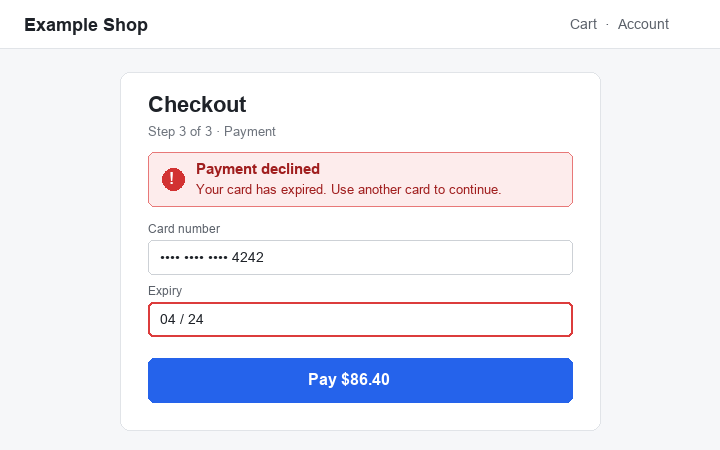
Save the screenshot above as `checkout-declined.png`. In the same directory, install the Python dependency and set your API key:
```bash
python -m pip install requests
export INWORLD_API_KEY=""
```
Save the following as `check_screenshot.py`. It uses `inworld/clef`, an image-capable decision model; replace it only with another model that supports image input.
```python
import base64
import os
from pathlib import Path
import requests
image = base64.b64encode(Path("checkout-declined.png").read_bytes()).decode("ascii")
response = requests.post(
"https://api.inworld.ai/alpha/decisions",
headers={"Authorization": f"Basic {os.environ['INWORLD_API_KEY']}"},
json={
"model": "inworld/clef",
"state": [
"A shopping agent took this screenshot right after it clicked Pay.",
{"type": "image_url", "image_url": {"url": f"data:image/png;base64,{image}"}},
],
"questions": {
"error_shown": {
"type": "noul",
"instructions": "Does the screenshot show an error that must be fixed before continuing?",
},
"next_step": {
"type": "choice",
"instructions": "What should the agent do next?",
"criteria": {
"continue": "The step succeeded: go on",
"retry": "A temporary problem: try again",
"change_payment": "The payment method was refused: use another",
"ask_user": "Needs information only the user knows",
},
},
},
},
timeout=60,
)
response.raise_for_status()
answers = response.json()["answers"]
print(answers["error_shown"]["noul"])
print(answers["next_step"]["choice"])
```
Run it from the directory containing both files:
```bash
python check_screenshot.py
```
The script prints a probability between 0 and 1, then one of the four `next_step` options. This screenshot shows a payment declined because the card expired: a useful answer should recognize the error and select `change_payment`. The exact probability can vary; evaluate the model on your own screenshots before choosing a threshold.
`error_shown.noul` is a probability, and `next_step.choice` is one of your supplied options. Your application defines thresholds and decides what action to take; the API does not execute the selected action.
Before sending larger images, resize or compress them: base64 increases request size, and accepted image counts and request sizes depend on the selected model. The playground accepts up to four images and may resize large photos. When copying its generated code, replace the `` placeholders with your encoded image bytes.
## Use the answers in your application
The response's `model` is the provider-qualified model that answered: a specific version such as `typesafe/jev-1.13.0`, or the model family such as `typesafe/jev` when no version is reported. `metadata` reports `attempts`, `generation_id` and `total_duration_ms`.
The example returns `answers.is_urgent.noul` as a probability and `answers.department.choice` as one of the options you supplied. Your application decides what action to take: for example, send a request classified as `billing` to the billing queue, and flag it for priority review when the urgency probability exceeds your chosen threshold.
Choose thresholds using examples from your own workload. The model supplies the judgment; your code defines the action and any review or escalation rules.
## Errors
Check the HTTP status and response content type before parsing the body. Decisions errors use `{"error": {"message": "...", "type": "..."}}`. Request validation returns `400` before sending the request to a model; these errors can also include `error.param`, which names the field to fix. See the [error example](https://docs.inworld.ai/api-reference/routerAPI/create-decision.md#errors).
Model errors relayed to your application keep their HTTP status, including `422`, and use the same error format. Rate-limit and server errors use generic messages. Authentication, account, and API-key rate-limit errors can use a different body, so check the content type and preserve the status and body when reporting a failure.
The following describes error handling for the model used in the quickstart:
| Status | Meaning | What to do |
|:--|:--|:--|
| `400` | Invalid request, such as invalid JSON, a missing `state` or `questions`, an unknown question type, missing criteria, too many options, or an image the model cannot accept. Also returned when the workspace has [zero data retention](https://docs.inworld.ai/portal/zero-data-retention.md) and the model cannot serve it | Fix the request as the error describes. For zero data retention, choose another model or use a workspace without it |
| `401` | Missing or invalid Inworld API key | Check the `Authorization` header |
| `413` | Request body exceeds the accepted size | Send less `state`, or split the questions across requests |
| `422` | The model rejected input that passed request validation | Fix the request as the error describes |
| `429`, `503`, `529` | Rate limited, at capacity or overloaded | Retry with exponential backoff and honor `Retry-After` when present |
| `502` | The model could not be reached or is unavailable | Retry with exponential backoff |
| `504` | No answer within the request timeout | Retry, or send fewer or smaller questions |
## Billing
Check the [model catalog](https://inworld.ai/models) for the selected model's rates and billing units. The response reports `usage.input_tokens` and `usage.output_tokens`; reported usage does not mean every token category is billed. The documented billing units for the example model are listed below.
## Model capabilities and limits
Use the catalog to discover models. The table records documented limits for the example model; these limits do not define the contract for every decision model.
| Model | Question types | Input formats | Question limits | Request limits | Billing |
|:--|:--|:--|:--|:--|:--|
| `typesafe/jev-latest` | `noul`, `choice`, `score` | `state`, `instructions` and criteria accept strings, objects or arrays | Up to 255 choice options; 2 to 10 score levels | 10 MiB body; 60-second timeout | Input tokens only; failed or cut-off answers are not billed |