Capabilities
Language support
Inworld TTS built for multilingual applications.
Synthesize speech in many languages with the same voice.
The Realtime TTS-2 models — inworld-tts-2 and inworld-tts-2-flash — share the same language support. For multilingual applications, inworld-tts-2 is the most capable choice, with the most accurate pronunciation and intonation; inworld-tts-2-flash offers the same language coverage at the lowest latency and cost.
Supported languages
The Realtime TTS-2 models accept 623 language and locale codes (BCP-47) in the language field, covering 470 languages — from broad languages like es (Spanish) to regional locales like es-MX (Mexican Spanish). They fall into three tiers: Tier 1 and Tier 2 cover 94 languages (241 codes), and Tier 3 covers the other 376 (382 codes).
Tier 1
Tier 1 languages are the most extensively evaluated, offering the highest, most consistent quality and the most natural pronunciation. The Default locale is the regional code a short code is treated as (see Language codes and default locales):
| Language | Code | Default locale |
|---|---|---|
| Arabic | ar | ar-SA |
| Chinese | zh | zh-CN |
| Dutch | nl | nl-NL |
| English | en | en-US |
| French | fr | fr-FR |
| German | de | de-DE |
| Hebrew | he | he-IL |
| Hindi | hi | hi-IN |
| Italian | it | it-IT |
| Japanese | ja | ja-JP |
| Korean | ko | ko-KR |
| Polish | pl | pl-PL |
| Portuguese | pt | pt-BR |
| Russian | ru | ru-RU |
| Spanish | es | es-ES |
Tier 2
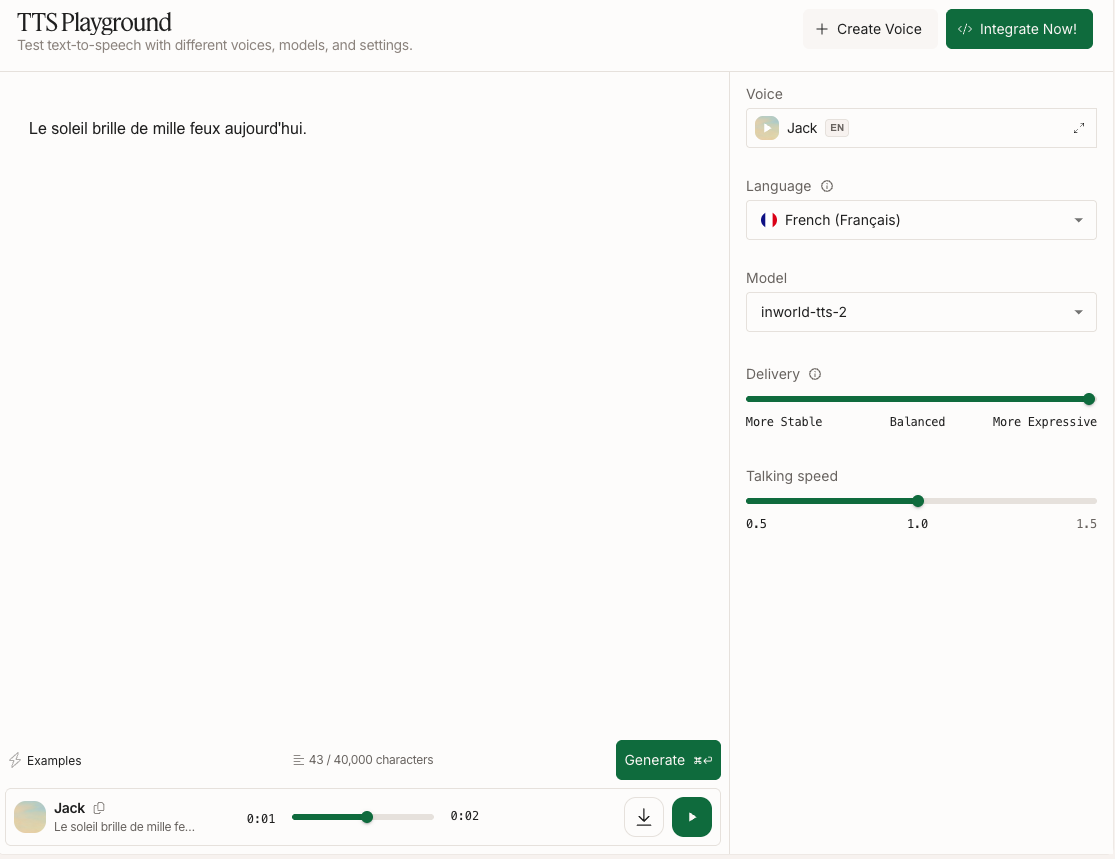
Tier 2 languages are fully supported for synthesis, but results can vary more by language and voice than in Tier 1. Try your target language in the TTS Playground. For best results, design or clone a voice in that language.
Tier 2 languages (79)
| Language | Code * | Default locale |
|---|---|---|
| Afrikaans | af | af-ZA |
| Albanian | sq | sq-AL |
| Amharic | am | am-ET |
| Armenian | hy | hy-AM |
| Assamese | as | as-IN |
| Azerbaijani | az | az-AZ |
| Basque | eu | eu-ES |
| Belarusian | be | be-BY |
| Bengali | bn | bn-IN |
| Bulgarian | bg | bg-BG |
| Burmese | my | my-MM |
| Cantonese | yue | yue-HK |
| Catalan | ca | — |
| Cebuano | ceb | ceb-PH |
| Croatian | hr | hr-HR |
| Czech | cs | cs-CZ |
| Danish | da | da-DK |
| Eastern Yiddish | ydd | — |
| Egyptian Arabic | arz | — |
| Estonian | et | et-EE |
| Filipino | fil | fil-PH |
| Finnish | fi | — |
| Galician | gl | gl-ES |
| Garhwali | gbm | — |
| Georgian | ka | ka-GE |
| Greek | el | el-GR |
| Gujarati | gu | gu-IN |
| Gulf Arabic | afb | — |
| Haitian Creole | ht | ht-HT |
| Hijazi Arabic | acw | — |
| Hungarian | hu | hu-HU |
| Icelandic | is | is-IS |
| Indonesian | id | id-ID |
| Javanese | jv | jv-ID |
| Kannada | kn | kn-IN |
| Kazakh | kk | kk-KZ |
| Konkani | kok | kok-IN |
| Lao | lo | lo-LA |
| Latvian | lv | lv-LV |
| Libyan Arabic | ayl | — |
| Lithuanian | lt | lt-LT |
| Luxembourgish | lb | lb-LU |
| Macedonian | mk | mk-MK |
| Maithili | mai | mai-IN |
| Malagasy | mg | mg-MG |
| Malay | ms | ms-MY |
| Malayalam | ml | ml-IN |
| Marathi | mr | mr-IN |
| Mongolian | mn | mn-MN |
| Najdi Arabic | ars | — |
| Nepali | ne | ne-NP |
| Northern Uzbek | uzn | — |
| Norwegian Bokmål | nb | nb-NO |
| Norwegian Nynorsk | nn | nn-NO |
| Odia | or | or-IN |
| Omani Arabic | acx | — |
| Pashto | ps | ps-AF |
| Persian | fa | fa-IR |
| Piedmontese | pms | — |
| Punjabi | pa | pa-IN |
| Romanian | ro | ro-RO |
| Serbian | sr | sr-RS |
| Sindhi | sd | — |
| Sinhala | si | — |
| Slovak | sk | sk-SK |
| Slovenian | sl | sl-SI |
| Swahili | sw | sw-KE |
| Swedish | sv | sv-SE |
| Tamil | ta | ta-IN |
| Telugu | te | te-IN |
| Thai | th | th-TH |
| Tunisian Arabic | aeb | — |
| Turkish | tr | tr-TR |
| Ukrainian | uk | uk-UA |
| Urdu | ur | ur-PK |
| Uzbek | uz | uz-UZ |
| Vietnamese | vi | vi-VN |
| Võro | vro | — |
| Welsh | cy | — |
* Codes are base language subtags (ISO 639-1, or ISO 639-3 for less common languages). A dash (—) means the code has no default locale and is used as is.
Tier 3
Tier 3 covers every other language the language field accepts. These languages are not evaluated: the model makes a best-effort attempt, and quality can vary widely by language and voice, including pronunciation that doesn't sound native. Text normalization isn't applied, so write numbers, dates, and currency amounts out as words. Test your target language in the TTS Playground before you rely on it, and design or clone a voice in that language for the best results.
Tier 3 languages (376)
| Language | Code | Default locale |
|---|---|---|
| Abadi | kbt | — |
| Abron | abr | — |
| Abua | abn | — |
| Afade | aal | — |
| Agwagwune | yay | — |
| Akebu | keu | — |
| Alago | ala | — |
| Algerian Arabic | arq | — |
| Algerian Saharan Arabic | aao | — |
| Ambonese Malay | abs | — |
| Anaang | anw | — |
| Angika | anp | — |
| Antankarana Malagasy | xmv | — |
| Arbereshe Albanian | aae | — |
| Ashe | ahs | — |
| Askopan | eiv | — |
| Asturian | ast | — |
| Avaric | av | — |
| Awak | awo | — |
| Bacama | bcy | — |
| Bade | bde | — |
| Bagirmi Fulfulde | fui | — |
| Bago-Kusuntu | bqg | — |
| Baharna Arabic | abv | — |
| Balanta-Ganja | bjt | — |
| Bangwinji | bsj | — |
| Banjar | bjn | — |
| Bara Malagasy | bhr | — |
| Barok | bjk | — |
| Basa | bzw | — |
| Bashkir | ba | — |
| Batak Mandailing | btm | — |
| Bavarian | bar | — |
| Bayot | bda | — |
| Betawi | bew | — |
| Bhili | bhb | — |
| Bhojpuri | bho | — |
| Bilur | bxf | — |
| Bima | bhp | — |
| Bodo | brx | brx-IN |
| Boghom | bux | — |
| Bokyi | bky | — |
| Bomu | bmq | — |
| Bondei | bou | — |
| Borgu Fulfulde | fue | — |
| Bosnian | bs | — |
| Brahui | brh | — |
| Braj | bra | — |
| Buduma | bdm | — |
| Buginese | bug | — |
| Bukharic | bhh | — |
| Bundeli | bns | — |
| Bura-Pabir | bwr | — |
| Burak | bys | — |
| Cacaloxtepec Mixtec | miu | — |
| Cakfem-Mushere | cky | — |
| Campidanese Sardinian | sro | — |
| Cen | cen | — |
| Central Nahuatl | nhn | — |
| Central Pame | pbs | — |
| Central Pashto | pst | — |
| Central-Eastern Niger Fulfulde | fuq | — |
| Chadian Arabic | shu | — |
| Chhattisgarhi | hne | hne-IN |
| Chichicapan Zapotec | zpv | — |
| Chiga | cgg | — |
| Chimalapa Zoque | zoh | — |
| Chimborazo Highland Quichua | qug | — |
| Chitwania Tharu | the | — |
| Chuvash | cv | — |
| Cibak | ckl | — |
| Coastal Konjo | kjc | — |
| Cornish | kw | — |
| Cross River Mbembe | mfn | — |
| Cuyamecalco Mixtec | xtu | — |
| Dadiya | dbd | — |
| Dazaga | dzg | — |
| Deccan | dcc | — |
| Degema | deg | — |
| Dera | kna | — |
| Dghwede | dgh | — |
| Dhofari Arabic | adf | — |
| Dijim-Bwilim | cfa | — |
| Dogri | doi | doi-IN |
| Dotyali | dty | — |
| Duya | ldb | — |
| Eastern Bolivian Guarani | gui | — |
| Eastern Egyptian Bedawi Arabic | avl | — |
| Eastern Krahn | kqo | — |
| Eastern Mari | mhr | — |
| Eggon | ego | — |
| Ejagham | etu | — |
| Eleme | elm | — |
| Eloyi | afo | — |
| Embu | ebu | — |
| Esan | ish | — |
| Esperanto | eo | — |
| Extremaduran | ext | — |
| Fanti | fat | — |
| Farefare | gur | — |
| Filomena Mata-Coahuitlan Totonac | tlp | — |
| Fipa | fip | — |
| Gambian Wolof | wof | — |
| Gbagyi | gbr | — |
| Gbari | gby | — |
| Geser-Gorom | ges | — |
| Gheg Albanian | aln | — |
| Glavda | glw | — |
| Goan Konkani | gom | — |
| Goemai | ank | — |
| Gola | gol | — |
| Guduf-Gava | gdf | — |
| Guerrero Amuzgo | amu | — |
| Gusii | guz | — |
| Gusilay | gsl | — |
| Gweno | gwe | — |
| Gyaazi | gyz | — |
| Güilá Zapotec | ztu | — |
| Hadothi | hoj | — |
| Hahon | hah | — |
| Hako | hao | — |
| Halia | hla | — |
| Hawaiian | haw | — |
| Herero | her | — |
| Highland Konjo | kjk | — |
| Huaxcaleca Nahuatl | nhq | — |
| Huba | hbb | — |
| Huitepec Mixtec | mxs | — |
| Hula | hul | — |
| Hunjara-Kaina Ke | hkk | — |
| Hwana | hwo | — |
| Idakho-Isukha-Tiriki | ida | — |
| Ido | io | — |
| Idoma | idu | — |
| Igo | ahl | — |
| Ikposo | kpo | — |
| Ikwere | ikw | — |
| Ilocano | ilo | — |
| Interlingua | ia | — |
| Interlingue | ie | — |
| Irish | ga | — |
| Isekiri | its | — |
| Isoko | iso | — |
| Ito | itw | — |
| Itza | itz | — |
| Ixtayutla Mixtec | vmj | — |
| Izon | ijc | — |
| Jambi Malay | jax | — |
| Jaunsari | jns | — |
| Jiba | juo | — |
| Jju | kaj | — |
| Judeo-Moroccan Arabic | aju | — |
| Juxtlahuaca Mixtec | vmc | — |
| Kabras | lkb | — |
| Kachi Koli | gjk | — |
| Kairak | ckr | — |
| Kalabari | ijn | — |
| Kamo | kcq | — |
| Kanauji | bjj | — |
| Kanembu | kbl | — |
| Karekare | kai | — |
| Kashmiri | ks | ks-IN |
| Kathoriya Tharu | tkt | — |
| Keiyo | eyo | — |
| Khana | ogo | — |
| Khmer | km | — |
| Kinga | zga | — |
| Kinnauri | kfk | — |
| Kirya-Konzel | fkk | — |
| Kochila Tharu | thq | — |
| Kohumono | bcs | — |
| Kok Borok | trp | — |
| Kol | kol | — |
| Koma | kmy | — |
| Konkani (individual language) | knn | — |
| Konzo | koo | — |
| Korwa | kfp | — |
| Kota | kfe | — |
| Kuanua | ksd | — |
| Kuanyama | kua | — |
| Kui | uki | — |
| Kulung | bbu | — |
| Kuot | kto | — |
| Kurdish | ku | — |
| Kushi | kuh | — |
| Kwambi | kwm | — |
| Kyrgyz | ky | — |
| Lala-Roba | lla | — |
| Lamang | hia | — |
| Langi | lag | — |
| Larike-Wakasihu | alo | — |
| Latin | la | la-VA |
| Lezghian | lez | — |
| Liana-Seti | ste | — |
| Liberia Kpelle | xpe | — |
| Liberian English | lir | — |
| Ligurian | lij | — |
| Lijili | mgi | — |
| Logooli | rag | — |
| Logudorese Sardinian | src | — |
| Lojban | jbo | — |
| Loloda | loa | — |
| Longuda | lnu | — |
| Low German | nds | — |
| Loxicha Zapotec | ztp | — |
| Lushai | lus | — |
| Maasina Fulfulde | ffm | — |
| Maba | mde | — |
| Mafa | maf | — |
| Mali | gcc | — |
| Malinaltepec Me'phaa | tcf | — |
| Maltese | mt | — |
| Mandara | tbf | — |
| Mandjak | mfv | — |
| Manggarai | mqy | — |
| Manipuri | mni | — |
| Mansoanka | msw | — |
| Marghi Central | mrt | — |
| Marghi South | mfm | — |
| Maria | mrr | — |
| Masikoro Malagasy | msh | — |
| Mazaltepec Zapotec | zpy | — |
| Mazatlan Mazatec | vmz | — |
| Mazatlan Mixe | mzl | — |
| Mbe | mfo | — |
| Mekeo | mek | — |
| Meru | mer | — |
| Mesopotamian Arabic | acm | — |
| Mewari | mtr | — |
| Mingrelian | xmf | — |
| Mirandese | mwl | — |
| Mitlatongo Mixtec | vmm | — |
| Miya | mkf | — |
| Mom Jango | ver | — |
| Moroccan Arabic | ary | — |
| Motu | meu | — |
| Musi | mui | — |
| Naba | mne | — |
| Nalik | nal | — |
| Ndonga | ndo | — |
| Neapolitan | nap | — |
| Ngamo | nbh | — |
| Ngas | anc | — |
| Ngizim | ngi | — |
| Nigerian Fulfulde | fuv | — |
| Nimadi | noe | — |
| Nobiin | fia | — |
| North Levantine Arabic | apc | — |
| North Mesopotamian Arabic | ayp | — |
| North Moluccan Malay | max | — |
| Northern Betsimisaraka Malagasy | bmm | — |
| Northern Hindko | hno | — |
| Northern Pame | pmq | — |
| Northern Pashto | pbu | — |
| Norwegian | no | — |
| Notsi | ncf | — |
| Nyankpa | yes | — |
| Nzanyi | nja | — |
| Occitan | oc | — |
| Od | odk | — |
| Odual | odu | — |
| Omie | aom | — |
| Orma | orc | — |
| Pahari-Potwari | phr | — |
| Papuan Malay | pmy | — |
| Pero | pip | — |
| Petats | pex | — |
| Piya-Kwonci | piy | — |
| Plateau Malagasy | plt | — |
| Pokoot | pko | — |
| Poqomam | poc | — |
| Pulaar | fuc | — |
| Pular | fuf | — |
| Qaqet | byx | — |
| Quiotepec Chinantec | chq | — |
| Rana Tharu | thr | — |
| Rapoisi | kyx | — |
| Ratahan | rth | — |
| Rayon Zoque | zor | — |
| Rombo | rof | — |
| Rotokas | roo | — |
| Sacapulteco | quv | — |
| Saidi Arabic | aec | — |
| Sakalava Malagasy | skg | — |
| Sakha | sah | — |
| Saleman | sau | — |
| Samba Daka | ccg | — |
| Samba Leko | ndi | — |
| San Felipe Otlaltepec Popoloca | pow | — |
| San Francisco Del Mar Huave | hue | — |
| San Juan Atzingo Popoloca | poe | — |
| San Martin Itunyoso Triqui | trq | — |
| San Miguel El Grande Mixtec | mig | — |
| Sanskrit | sa | sa-IN |
| Santa Catarina Albarradas Zapotec | ztn | — |
| Santali | sat | — |
| Saposa | sps | — |
| Saya | say | — |
| Siar-Lak | sjr | — |
| Sibe | nco | — |
| Sicilian | scn | — |
| Sikkimese | sip | — |
| Sinaugoro | snc | — |
| Sinicahua Mixtec | xti | — |
| Sipacapense | qum | — |
| Siwai | siw | — |
| Solos | sol | — |
| Soninke | snk | — |
| Southeastern Nochixtlan Mixtec | mxy | — |
| Southern Betsimisaraka Malagasy | bzc | — |
| Southern Pashto | pbt | — |
| Soyaltepec Mazatec | vmp | — |
| Sudanese Arabic | apd | — |
| Sulka | sua | — |
| Sundanese | su | — |
| Tae | rob | — |
| Tahaggart Tamahaq | thv | — |
| Tajik | tg | — |
| Tandroy-Mahafaly Malagasy | tdx | — |
| Tangale | tan | — |
| Tanosy Malagasy | txy | — |
| Tarok | yer | — |
| Tatar | tt | — |
| Tedaga | tuq | — |
| Teop | tio | — |
| Tepinapa Chinantec | cte | — |
| Tera | ttr | — |
| Terei | buo | — |
| Termanu | twu | — |
| Tesaka Malagasy | tkg | — |
| Tetelcingo Nahuatl | nhg | — |
| Tibetan | bo | — |
| Tidaa Mixtec | mtx | — |
| Tidore | tvo | — |
| Tigak | tgc | — |
| Tilquiapan Zapotec | zts | — |
| Tinputz | tpz | — |
| Tlacoapa Me'phaa | tpl | — |
| Tlacoatzintepec Chinantec | ctl | — |
| Tomoip | tqp | — |
| Tondano | tdn | — |
| Tonsea | txs | — |
| Tooro | ttj | — |
| Torau | ttu | — |
| Tsimihety Malagasy | xmw | — |
| Tsotso | lto | — |
| Tugen | tuy | — |
| Tula | tul | — |
| Tulu | tcy | — |
| Tungag | lcm | — |
| Turkana | tuv | — |
| Tututepec Mixtec | mtu | — |
| Ubaghara | byc | — |
| Vai | vai | — |
| Volapük | vo | — |
| Waci Gbe | wci | — |
| Wadiyara Koli | kxp | — |
| Waja | wja | — |
| Wanga | lwg | — |
| Wapan | juk | — |
| Waray | war | — |
| Warji | wji | — |
| Wemale | weo | — |
| Western Frisian | fy | — |
| Western Juxtlahuaca Mixtec | jmx | — |
| Western Maninkakan | mlq | — |
| Western Niger Fulfulde | fuh | — |
| Western Panjabi | pnb | — |
| Wu Chinese | wuu | — |
| Xanaguia Zapotec | ztg | — |
| Yace | ekr | — |
| Yalahatan | jal | — |
| Yekhee | ets | — |
| Yiddish | yi | — |
| Yutanduchi Mixtec | mab | — |
| Zarma | dje | — |
A dash (—) means the code has no default locale and is used as is.
Language codes and default locales
The language field takes any code from the tables on this page:
- A short code is treated as its default locale.
enis treated asen-US,esases-ES(European Spanish),ptaspt-BR,zhaszh-CN, andarasar-SA; see the Default locale column for each language. To target another variety, pass its regional code, such asen-GB,es-MX,es-419(Latin American Spanish), orpt-PT. A code without a default locale, such asfiorcy, is used as is. - An unlisted region falls back to the language's default.
en-ZWis treated asen-US, andes-USases-ES. One listed code also falls back:en-UGusesen-GB. - Case doesn't matter in a language-region code, and
_works in place of-:en_gbis the same asen-GB. - Any other code is rejected with a 400 error. To let the model detect the language instead, omit
language.
Regional and accent codes
Languages with more than one regional or accent code. Every other language accepts its code, plus its default locale where its tier's table shows one.
| Language | Regional and accent codes |
|---|---|
| Arabic | ar-SA Saudi (default), ar-EG Egyptian, ar-AE Emirati, ar-SY Syrian, ar-LB Lebanese, ar-IQ Iraqi, ar-JO Jordanian, ar-YE Yemeni, ar-KW Kuwaiti, ar-MA Moroccan, ar-TN Tunisian, ar-PS Palestinian, ar-DZ Algerian, ar-BH Bahraini, ar-SD Sudanese, ar-001 Modern Standard, ar-QA Qatari, ar-OM Omani, ar-LY Libyan, ar-MR Mauritanian |
| Bengali | bn-IN Indian (default), bn-BD Bangladeshi |
| Chinese | zh-CN Mandarin (Simplified) (default), zh-TW Mandarin (Traditional), zh-MY Malaysian, zh-SG Singaporean |
| Dutch | nl-NL Dutch (default), nl-BE Belgian |
| English | en-US American (default), en-GB British, en-AU Australian, en-IN Indian, en-SG Singaporean, en-CA Canadian, en-NG Nigerian, en-PH Philippine, en-IE Irish, en-ZA South African, en-NZ New Zealand, en-KE Kenyan, en-MY Malaysian, en-ID Indonesian, en-JM Jamaican, en-HK Hong Kong, en-SC Seychellois, en-GB-u-sd-gbwls Welsh, en-029 Caribbean, en-southern Southern American, en-scottish Scottish, en-UG Ugandan (uses en-GB) |
| French | fr-FR French (default), fr-BE Belgian, fr-CA Canadian |
| Portuguese | pt-BR Brazilian (default), pt-PT European |
| Punjabi | pa-IN Indian (default), pa-PK Pakistani |
| Spanish | es-ES European (default), es-MX Mexican, es-419 Latin American, es-AR Argentine, es-PE Peruvian, es-CO Colombian, es-CL Chilean, es-VE Venezuelan, es-PR Puerto Rican, es-BO Bolivian, es-CR Costa Rican, es-CU Cuban, es-DO Dominican, es-EC Ecuadorian, es-GT Guatemalan, es-HN Honduran, es-NI Nicaraguan, es-PA Panamanian, es-PY Paraguayan, es-SV Salvadoran, es-UY Uruguayan |
| Urdu | ur-PK Pakistani (default), ur-IN Indian |
Accents and regional variants: A voice reproduces the specific accent it was cloned in (e.g., a voice cloned in British English speaks en-GB natively). If your voice wasn't cloned in the accent you need, pass the matching BCP-47 regional code in the language field (e.g., en-GB, es-MX, pt-BR) to steer it. See Specifying a language below.
Text normalization is language-specific, not locale-specific — English is normalized the same way whether you target en-US or en-GB, even though conventions for dates, currencies, and the like can differ. If you need locale-specific formatting, normalize that text yourself.
Cross-lingual support
A voice delivers the best speaker similarity when it speaks the language it was cloned in — its native tongue.
The Realtime TTS-2 models support cross-lingual synthesis. When synthesizing a different language, the model makes a best-effort attempt to speak the target language natively, without carrying over the accent of the voice's original language. If you want the voice to keep its original accent, prompt for it explicitly (e.g., with steering on inworld-tts-2).
For the most natural, consistent cross-lingual results, we recommend specifying the language to synthesize in and localizing the voice.
Specifying a language
Use the language field to tell the model which language (as specified by a BCP-47 language tag) the voice should speak the text in. When set, the service will:
- Apply text normalization (if enabled) for the target language (e.g., speaking numbers in the target language).
- Use the voice's localized prompt for that language, if one exists. If no localized prompt is available, the model will be steered to speak in the target language.
When language is omitted, the original voice prompt is used and the language for normalization (if enabled) is auto-detected from the input text.
When a text mixes languages and you need each part spoken in a specific language, including a switch in the middle of a sentence, use language tags instead: <lang lang="es-ES">perro</lang>.
If you are sending short requests with only numbers or dates (e.g., 123-456-7890), auto-detection may not have enough context to detect the right language. In those cases, we recommend specifying a language for most consistent results. If you can't, pass the text of earlier requests from the same conversation in the synthesisContext field: when the current text is too short to detect on its own, auto-detection uses that context. A language you set always takes precedence over it.
Voice localization
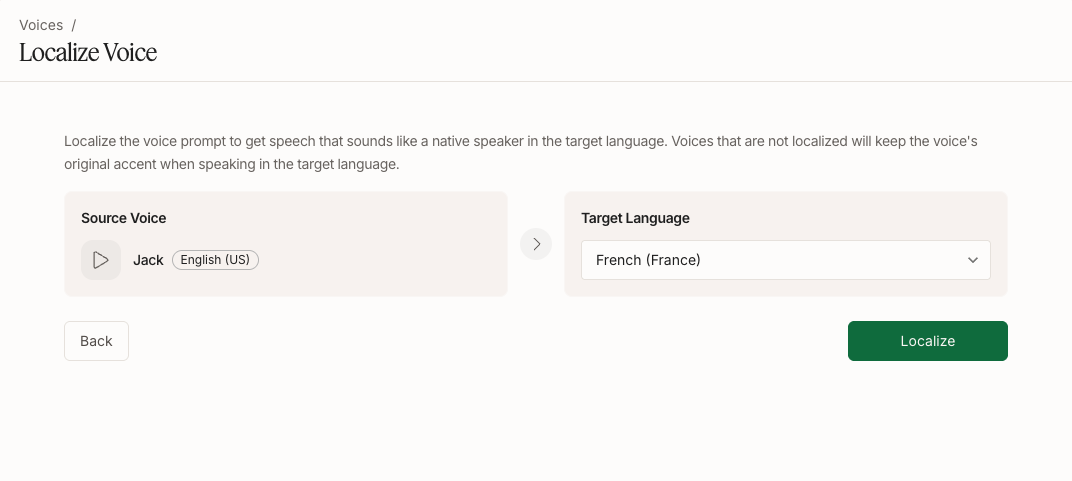
Voice localization adapts a voice to a target language so it sounds like a native speaker of that language — delivering fluent, natural speech without carrying over the accent of the voice's original language. (By contrast, specifying a language on an un-localized voice may retain the original accent.) It is supported for all Inworld TTS models.
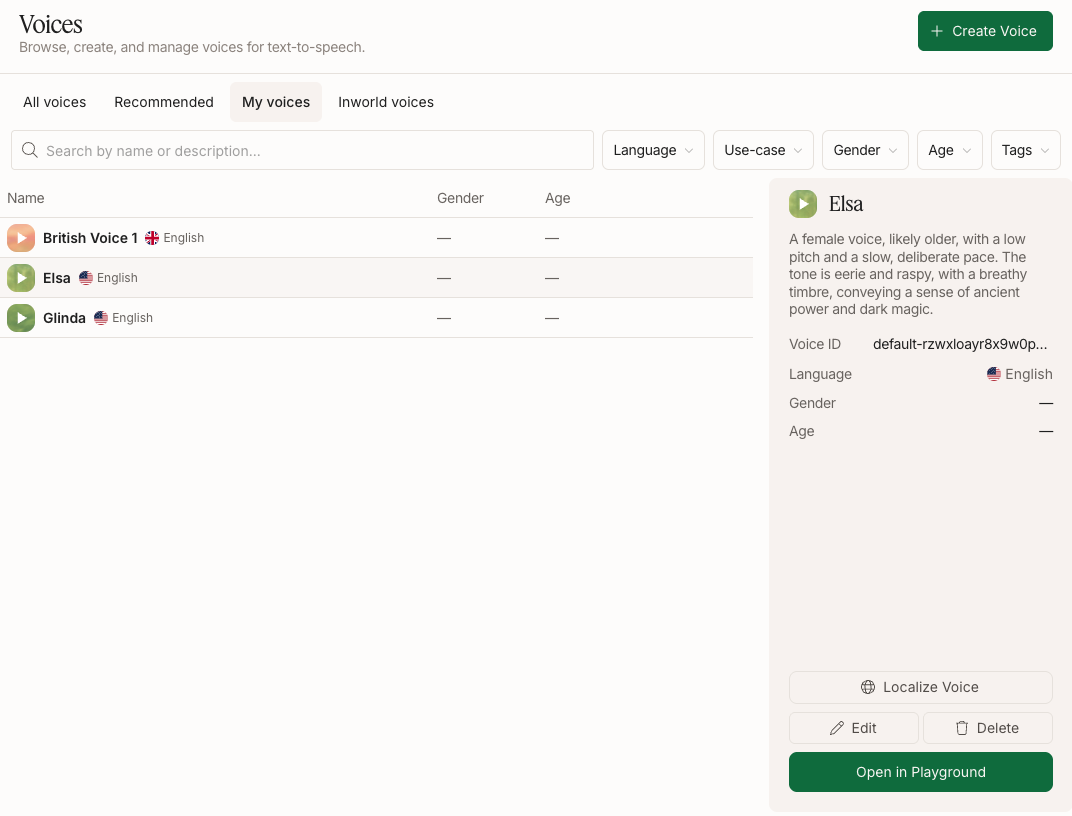
Open the Voices page in Portal
In Inworld Portal, go to Voices and select the My voices tab. Hover over an English voice to open its details panel on the right.
Review candidates
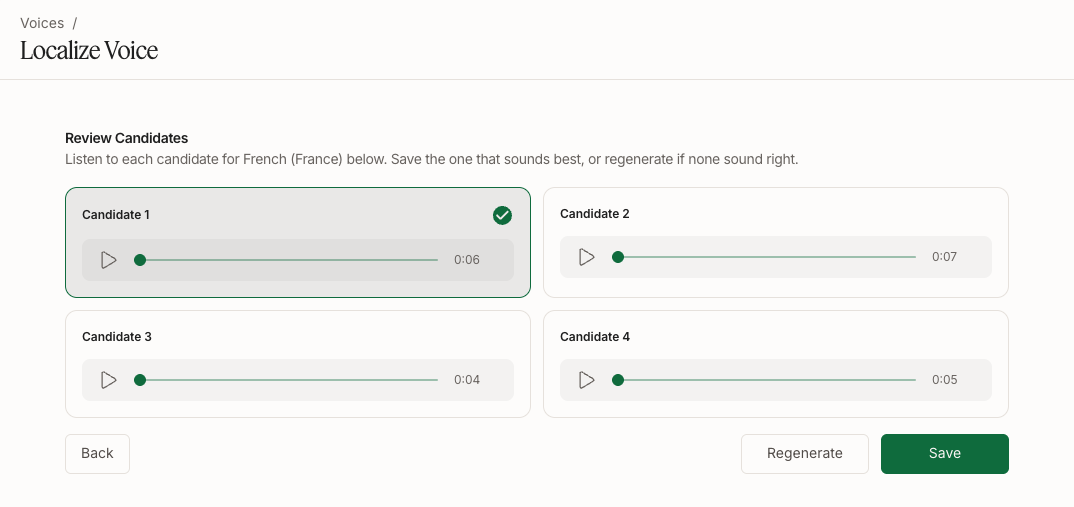
After generation, you'll see a few localized prompt candidates. Listen to each and pick the one that sounds most natural and native, then click Save.
If none sound right, you can click Regenerate. You may want to change the script before regenerating, since the script influences the generated voice.