> ## Documentation Index
> Fetch the complete documentation index at: https://docs.inworld.ai/llms.txt
> Use this file to discover all available pages before exploring further.
# Language Support
> Realtime TTS built for multilingual applications.
Bring your product to a global audience: synthesize speech with the same voice across a wide range of languages.
Realtime TTS-2 (`inworld-tts-2`) is our most capable model and the recommended choice here, with more accurate pronunciation and intonation and more natural-sounding speech.
## Supported languages
Realtime TTS-2 (`inworld-tts-2`) supports **200+ unique languages and locales** (BCP-47 codes) — from broad languages like `es` (Spanish) to regional locales like `es-MX` (Mexican Spanish). The languages we actively support and test are listed below.
### Generally available languages
These languages are **generally available (GA)**, offering the highest quality and the most natural pronunciation:
| Language | Code | [Timestamps](/tts/capabilities/timestamps) | [Normalization](/tts/best-practices/prompting-for-tts#notes-on-normalization) |
| ---------- | ---- | ------------------------------------------ | ----------------------------------------------------------------------------- |
| Arabic | `ar` | Yes | No |
| Chinese | `zh` | Yes | Yes |
| Dutch | `nl` | Yes | Yes |
| English | `en` | Yes | Yes |
| French | `fr` | Yes | Yes |
| German | `de` | Yes | Yes |
| Hebrew | `he` | Yes | No |
| Hindi | `hi` | Yes | Yes |
| Italian | `it` | Yes | Yes |
| Japanese | `ja` | Yes | Yes |
| Korean | `ko` | Yes | No |
| Polish | `pl` | Yes | Yes |
| Portuguese | `pt` | Yes | Yes |
| Russian | `ru` | Yes | No |
| Spanish | `es` | Yes | Yes |
### Experimental languages
These languages are supported by `inworld-tts-2` only. To try one, [design](/tts/voice-design) or [clone a voice](/tts/voice-cloning) in that language.
| Language | Code \* | [Timestamps](/tts/capabilities/timestamps) | [Normalization](/tts/best-practices/prompting-for-tts#notes-on-normalization) |
| ----------------- | ------------------ | ------------------------------------------ | ----------------------------------------------------------------------------- |
| Afrikaans | `af` | No | No |
| Albanian | `sq` | No | No |
| Amharic | `am` | No | No |
| Armenian | `hy` | No | No |
| Assamese | `as` | Yes | No |
| Azerbaijani | `az` | No | No |
| Basque | `eu` | No | No |
| Belarusian | `be` | No | No |
| Bengali | `bn` | Yes | No |
| Bulgarian | `bg` | No | No |
| Burmese | `my` | No | No |
| Cantonese | `yue` | No | No |
| Catalan | `ca` | No | No |
| Cebuano | `ceb` | No | No |
| Croatian | `hr` | No | No |
| Czech | `cs` | No | No |
| Danish | `da` | Yes | No |
| Eastern Yiddish | `yih` | No | No |
| Egyptian Arabic | `arz` | Yes | No |
| Estonian | `et` | No | No |
| Filipino | `fil` | No | No |
| Finnish | `fi` | No | No |
| Galician | `gl` | No | No |
| Garhwali | `gbm` | No | No |
| Georgian | `ka` | No | No |
| Greek | `el` | Yes | No |
| Gujarati | `gu` | Yes | No |
| Gulf Arabic | `afb` | Yes | No |
| Haitian Creole | `ht` | No | No |
| Hijazi Arabic | `acw` | Yes | No |
| Hungarian | `hu` | No | No |
| Icelandic | `is` | No | No |
| Indonesian | `id` | Yes | No |
| Javanese | `jv` | No | No |
| Kannada | `kn` | Yes | No |
| Kazakh | `kk` | No | No |
| Konkani | `kok` | No | No |
| Lao | `lo` | No | No |
| Latvian | `lv` | No | No |
| Libyan Arabic | `ayl` | Yes | No |
| Lithuanian | `lt` | No | No |
| Luxembourgish | `lb` | No | No |
| Macedonian | `mk` | No | No |
| Maithili | `mai` | No | No |
| Malagasy | `mg` | No | No |
| Malay | `ms` | No | No |
| Malayalam | `ml` | Yes | No |
| Marathi | `mr` | Yes | No |
| Mongolian | `mn` | No | No |
| Najdi Arabic | `ars` | Yes | No |
| Nepali | `ne` | Yes | No |
| Northern Uzbek | `uzn` | No | No |
| Norwegian Bokmål | `nb` | No | No |
| Norwegian Nynorsk | `nn` | No | No |
| Odia | `or` | Yes | No |
| Omani Arabic | `acx` | No | No |
| Pashto | `ps` | No | No |
| Persian | `fa` | Yes | No |
| Piedmontese | `pms` | No | No |
| Punjabi | `pa` | Yes | No |
| Romanian | `ro` | No | No |
| Serbian | `sr` | No | No |
| Sindhi | `sd` | No | No |
| Sinhala | `si` | No | No |
| Slovak | `sk` | No | No |
| Slovenian | `sl` | No | No |
| Swahili | `sw` | No | No |
| Swedish | `sv` | Yes | No |
| Tamil | `ta` | Yes | No |
| Telugu | `te` | Yes | No |
| Thai | `th` | Yes | No |
| Tunisian Arabic | `aeb` | Yes | No |
| Turkish | `tr` | Yes | Yes |
| Ukrainian | `uk` | Yes | No |
| Urdu | `ur` | Yes | No |
| Uzbek | `uz` | No | No |
| Vietnamese | `vi` | Yes | No |
| Võro | `vro` | No | No |
| Welsh | `cy` | No | No |
\* These are base language subtags (ISO 639-1, or ISO 639-3 for less common languages).
**Accents and regional variants:** A voice reproduces the specific accent it was [cloned](/tts/voice-cloning) in (e.g., a voice cloned in British English speaks `en-GB` natively). If your voice wasn't cloned in the accent you need, pass the matching [BCP-47](https://www.rfc-editor.org/info/bcp47) regional code in the [`language`](#specifying-a-language) field (e.g., `en-GB`, `es-MX`, `pt-BR`) to steer it. See [Specifying a language](#specifying-a-language) below.
Text normalization is language-specific, not locale-specific — English is normalized the same way whether you target `en-US` or `en-GB`, even though conventions for dates, currencies, and the like can differ. If you need locale-specific formatting, normalize that text yourself.
**TTS-1.5:** `inworld-tts-1.5-max` and `inworld-tts-1.5-mini` support 15 languages: Arabic, Chinese, Dutch, English, French, German, Hebrew, Hindi, Italian, Japanese, Korean, Polish, Portuguese, Russian, and Spanish. For new multilingual projects, we recommend Realtime TTS-2.
## Cross-lingual support
Regardless of model, a voice delivers the best speaker similarity when it speaks the language it was [cloned](/tts/voice-cloning) in — its native tongue.
When synthesizing a different language, the model families behave differently:
* **TTS 1.5** is not cross-lingual: it carries over the accent of the voice prompt (e.g., a French voice speaks English with a French accent).
* **Realtime TTS-2** supports cross-lingual synthesis and can do both, depending on how you use it: by default, it makes a best-effort attempt to speak the target language natively, without carrying over the original accent. If you want the voice to keep its original accent, prompt for it explicitly (e.g., with [steering](/tts/capabilities/steering)).
For the most natural, consistent cross-lingual results, we recommend [specifying the language](#specifying-a-language) to synthesize in and [localizing the voice](#voice-localization).
### Specifying a language
Use the `language` field to tell the model which language (as specified by a BCP-47 language tag) the voice should speak the text in. When set, the service will:
* Apply text normalization (if enabled) for the target language (e.g., speaking numbers in the target language).
* Use the voice's localized prompt for that language, if one exists. If no localized prompt is available, the model will be steered to speak in the target language.
When `language` is omitted, the original voice prompt is used and the language for normalization (if enabled) is auto-detected from the input text.
If you are sending short requests with only numbers or dates (e.g., `123-456-7890`), auto-detection may not have enough context to detect the right language. In those cases, we recommend specifying a language for most consistent results.
A voice's native (prompt) language shapes how it sounds in other languages — speaker similarity is always highest in the voice's native tongue. For accent-free, native delivery in another language, [localize the voice](#voice-localization).
### Voice localization
Voice localization adapts a voice to a target language so it sounds like a native speaker of that language — delivering fluent, natural speech without carrying over the accent of the voice's original language. (By contrast, [specifying a language](#specifying-a-language) on an un-localized voice may retain the original accent.) It is supported for all Inworld TTS models.
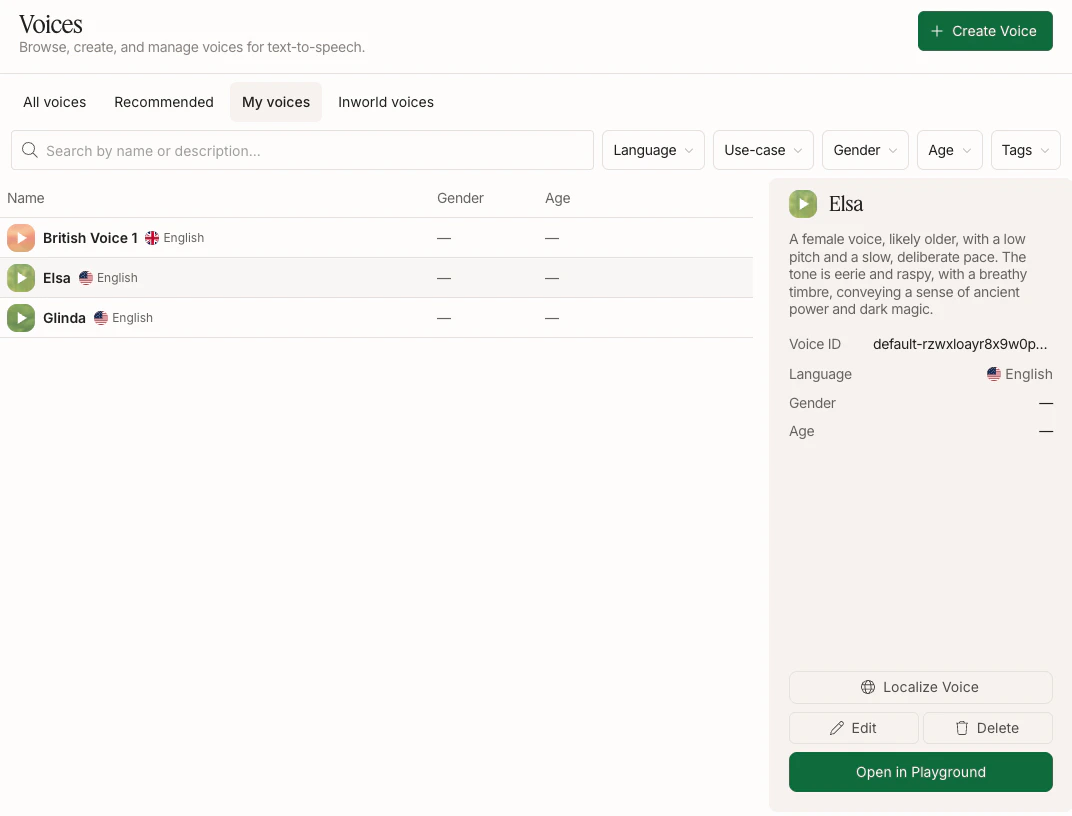
In [Inworld Portal](https://platform.inworld.ai/), go to **Voices** and select the **My voices** tab. Hover over an English voice to open its details panel on the right.
Voice localization is currently only supported for voices where the original audio was in English. Support for additional languages is coming soon.
With a voice selected, click **Localize Voice** in the right panel.
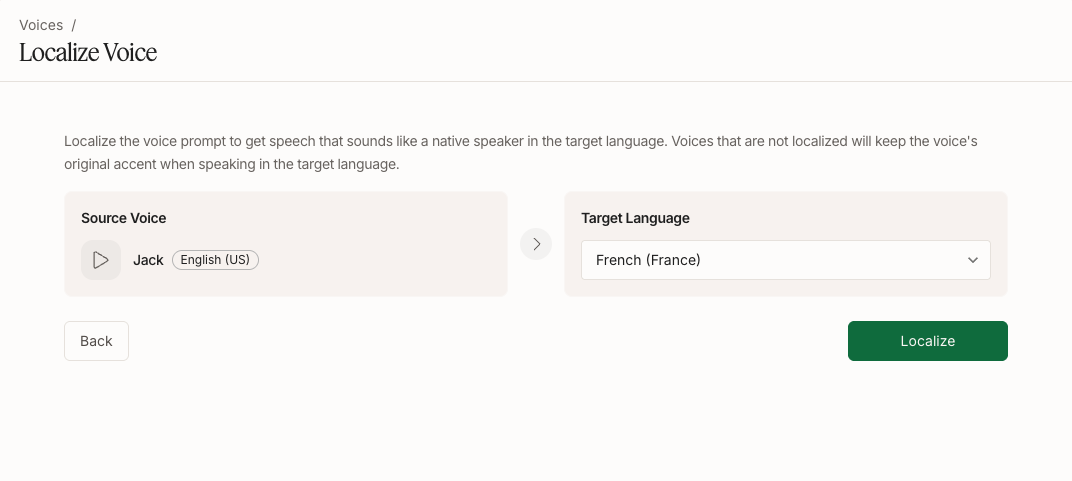
 Pick a target language from the dropdown and click **Localize**, which will start generating localized prompt candidates. This may take up to 2 minutes.
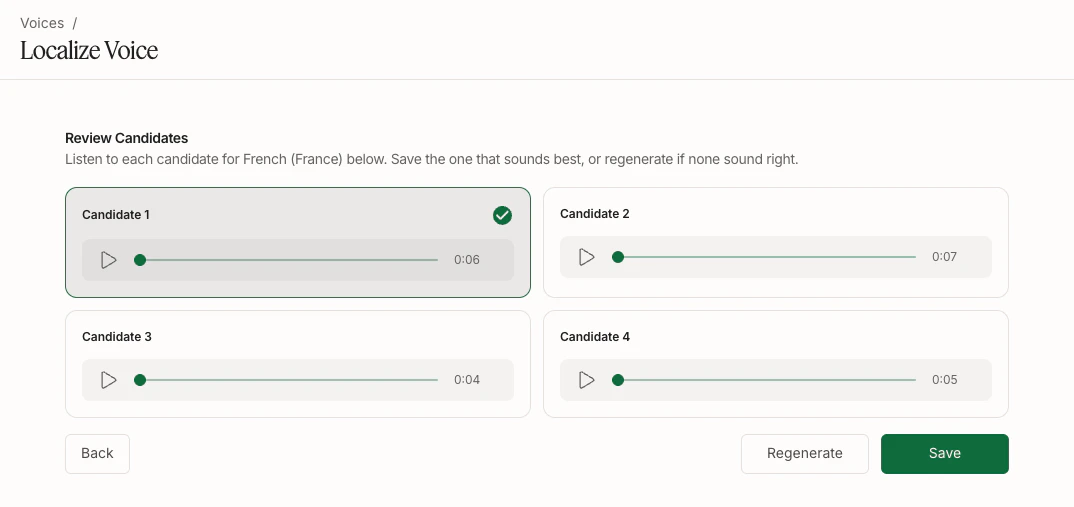
 After generation, you'll see a few localized prompt candidates. Listen to each and pick the one that sounds most natural and native, then click **Save**.
If none sound right, you can click **Regenerate**. You may want to change the script before regenerating, since the script influences the generated voice.
After generation, you'll see a few localized prompt candidates. Listen to each and pick the one that sounds most natural and native, then click **Save**.
If none sound right, you can click **Regenerate**. You may want to change the script before regenerating, since the script influences the generated voice.
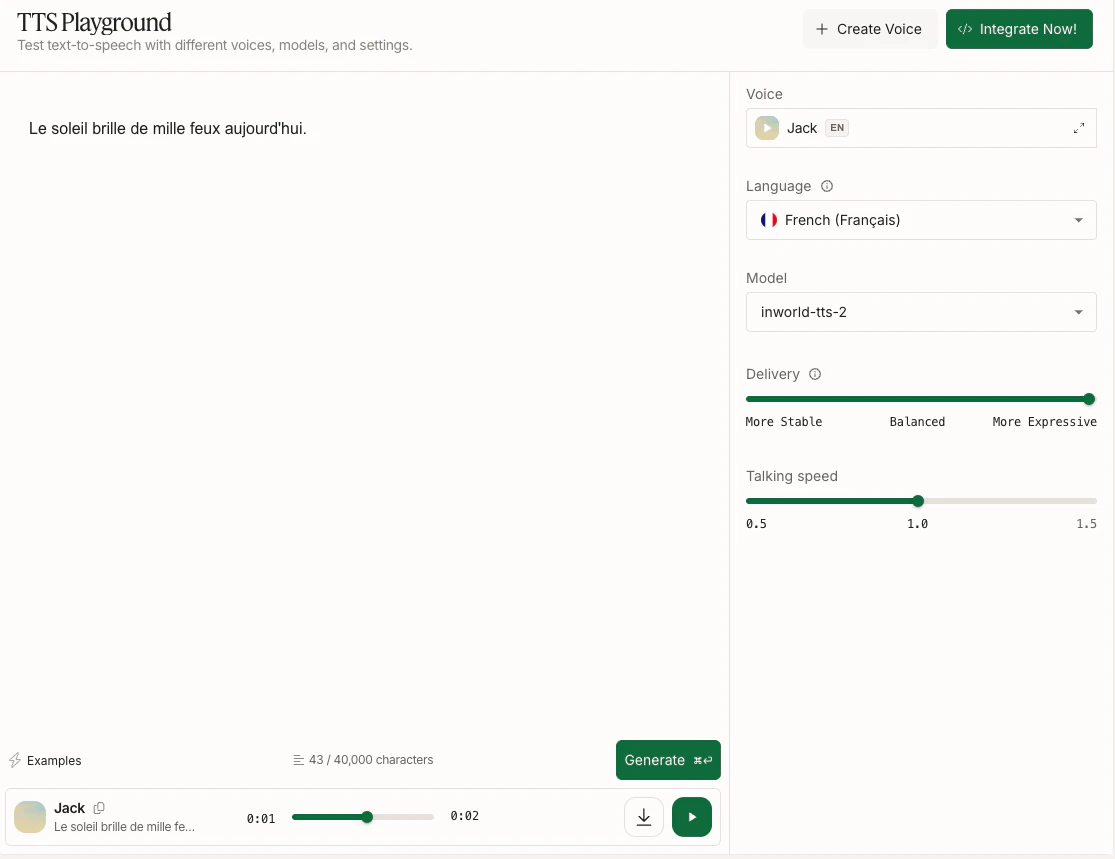
 Once saved, the voice will use your localized prompt when you specify the `language` to match the language of your localized prompt. Try it out in TTS Playground or via API (the voice ID remains the same).
 ## Next steps
Clone a voice once and reuse it across languages.
Use IPA notation to control pronunciation of proper nouns and edge cases.
## Next steps
Clone a voice once and reuse it across languages.
Use IPA notation to control pronunciation of proper nouns and edge cases.