> ## Documentation Index
> Fetch the complete documentation index at: https://docs.inworld.ai/llms.txt
> Use this file to discover all available pages before exploring further.
# Inworld Audio Buffer
[Overview](./overview) > Inworld Audio Buffer
**Class:** `UInworldAudioBuffer` | **Inherits from:** `UObject`
Audio buffer for collecting and managing voice recording data. This class provides functionality for buffering audio chunks during voice recording, allowing for efficient collection and processing of audio data before sending it for further processing. It manages sample rate consistency, data accumulation, and provides thread-safe operations for audio data handling.
Key features:
* Thread-safe audio data collection
* Sample rate validation and consistency checking
* Minimum duration enforcement before flushing
* Event-driven architecture with flush notifications
## Methods
* [Add](#add)
* [CreateAudioBuffer](#createaudiobuffer)
* [Flush](#flush)
## Reference
### Add
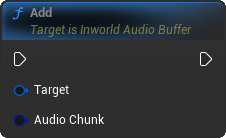
Adds an audio chunk to the audio buffer.
This function appends the provided audio data to the buffer.
Ensures that the incoming audio chunk matches the buffer's sample rate and channel configuration.
If the chunk is incompatible, the function will abort.
 ## Examples
```c++ theme={"system"}
void Add(const FInworldData_Audio& AudioChunk)
```
#### Parameters
| Parameter | Type | Description |
| ---------- | --------------------------- | -------------------------------------------------------------------------------------- |
| AudioChunk | `const FInworldData_Audio&` | The audio data to add to the buffer. Must match the buffer's sample rate and channels. |
***
### CreateAudioBuffer
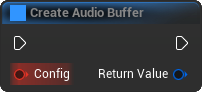
Creates a new audio buffer to record voice.
This function initializes an instance of UInworldAudioBuffer using the provided configuration.
It allows customization of the sample rate and channels.
## Examples
```c++ theme={"system"}
void Add(const FInworldData_Audio& AudioChunk)
```
#### Parameters
| Parameter | Type | Description |
| ---------- | --------------------------- | -------------------------------------------------------------------------------------- |
| AudioChunk | `const FInworldData_Audio&` | The audio data to add to the buffer. Must match the buffer's sample rate and channels. |
***
### CreateAudioBuffer
Creates a new audio buffer to record voice.
This function initializes an instance of UInworldAudioBuffer using the provided configuration.
It allows customization of the sample rate and channels.
 ## Examples
```c++ theme={"system"}
UInworldAudioBuffer* CreateAudioBuffer(const FInworldAudioBufferConfig& Config)
```
#### Parameters
| Parameter | Type | Description |
| --------- | ---------------------------------- | ------------------------------------------------------------- |
| Config | `const FInworldAudioBufferConfig&` | The configuration struct containing sample rate and channels. |
#### Returns
**Type:** `UInworldAudioBuffer*`
**Description:** A pointer to the newly created UInworldAudioBuffer instance.
***
### Flush
Flushes the collected audio data from the buffer. If the buffer contains audio data, it constructs an FInworldData\_Audio and broadcasts it via the OnAudioBufferFlush delegate. After broadcasting, the buffer is cleared. If the buffer is empty, this function does nothing. Events: OnAudioBufferFlush
## Examples
```c++ theme={"system"}
UInworldAudioBuffer* CreateAudioBuffer(const FInworldAudioBufferConfig& Config)
```
#### Parameters
| Parameter | Type | Description |
| --------- | ---------------------------------- | ------------------------------------------------------------- |
| Config | `const FInworldAudioBufferConfig&` | The configuration struct containing sample rate and channels. |
#### Returns
**Type:** `UInworldAudioBuffer*`
**Description:** A pointer to the newly created UInworldAudioBuffer instance.
***
### Flush
Flushes the collected audio data from the buffer. If the buffer contains audio data, it constructs an FInworldData\_Audio and broadcasts it via the OnAudioBufferFlush delegate. After broadcasting, the buffer is cleared. If the buffer is empty, this function does nothing. Events: OnAudioBufferFlush
 ## Examples
```c++ theme={"system"}
FInworldData_Audio Flush()
```
#### Returns
**Type:** `FInworldData_Audio`
***
## Examples
```c++ theme={"system"}
FInworldData_Audio Flush()
```
#### Returns
**Type:** `FInworldData_Audio`
***