

Getting Started
To set up a player-character interaction in your own game, you’ll need to set up both the player and the character.Player setup
Let’s start with the player.- Add the Inworld Player component to an Actor or other blueprint in your level. In this template we attached the Inworld Player component to a custom Player Controller.
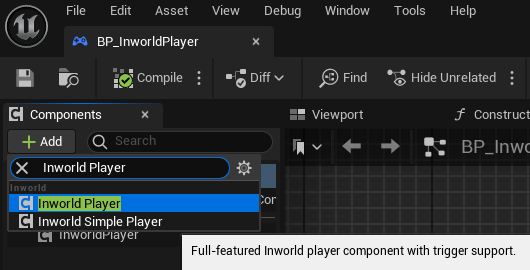
- In the Details panel, setup the Player Profile defaults:
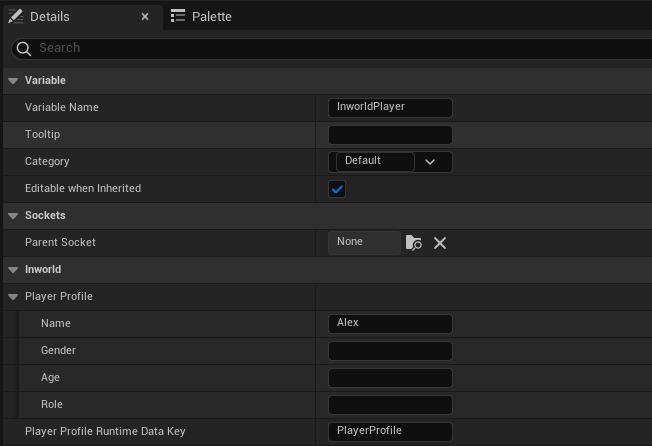
- Name: The name of the player (that the Character will know the player as). By default, we use the name “Alex”.
- Gender: The gender of the player.
- Age: The age of the player (this could be interpreted as a number or stage of life).
- Role: This is the player’s role (this can be interpreted in a number of ways, such as the player’s job or role in society. Used to give more context as to who the player is to characters).
- Setup the Audio Capture config:
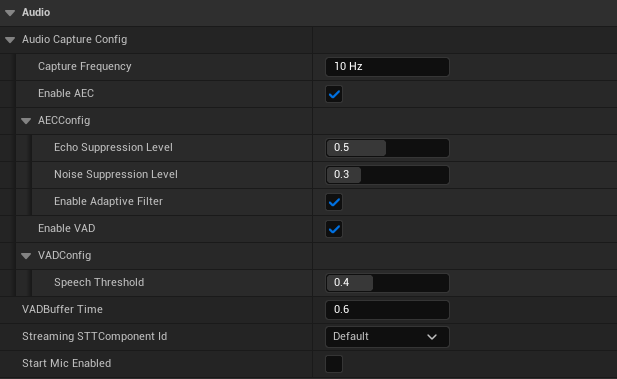
- Capture Frequency - The frequency at which audio is captured (measured in cycles per second). Controls how frequently OnAudioCapture is fired.
- Enable AEC - Enable Acoustic Echo Cancellation (AEC). This helps reduce game audio from being interpreted as player speech when captured by the microphone.
- AECId - Ids the AEC primtive creation configuration (there is currently no creation config settings, just leave as
Default) - AECConfig:
- Echo Supression Level - AEC processing intensity (0.0-1.0, higher values provide stronger echo cancellation)
- Noise Suppression Level - Noise suppression intensity (0.0-1.0, higher values provide stronger noise reduction)
- Enabled Adaptive Filter - Enable adaptive filtering for better echo cancellation
- Enable VAD - Enable Voice Audio Detection (VAD). This is useful for determining when the player is speaking for sending audio data.
- VADId - Ids the VAD primtive creation configuration (there is currently no creation config settings, just leave as
Default) - VADConfig:
- Speech Threshold - Sensitivity threshold for detecting speech. This is a
floatvalue where higher thresholds make the detection more selective (fewer false positives), and lower thresholds make it more sensitive (detecting quieter speech). Valid range: 0.0 - 1.0 (default = 0.4)
- Speech Threshold - Sensitivity threshold for detecting speech. This is a
- VADBuffer Time - The amount of silence required before it is determined that the player has stopped speaking.
- StreamingSTTComponentId - Identifier for the Streaming STT Creation Config settings for the Streaming STT component used for converting speech-to-text.
- Start Mic Enabled - Whether to start the game with the microphone enabled.
Character setup
Now, let’s set up the character.- Start by creating a blueprint Actor that represents your character.
-
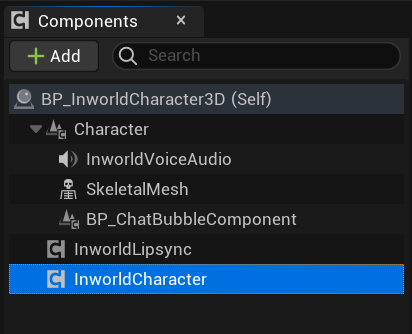
Add the necessary Inworld components to your actor:
- InworldCharacter - for interfacing with the conversational AI system
- InworldVoiceAudio - for playing character speech audio
- InworldLipsync (optional) - for lip-syncing (experimental)
- BP_ChatBubbleComponent (optional) - for displaying chat bubbles in world space
-
Setup the InworldCharacter component’s Id and Graph properties:
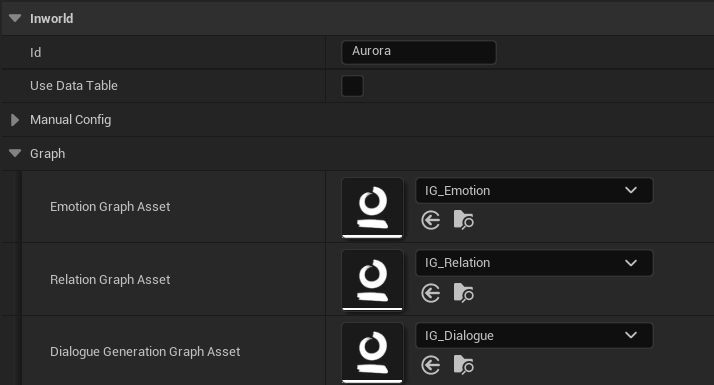
- Id: The id of the conversation target. This is used to identify the conversation target in the Inworld Character Subsystem.
- Emotion Graph Asset: The graph used to generate the character’s current emotional state.
- Relation Graph Asset: The graph used to generate the character’s relationship to the player.
- Dialogue Generation Graph Asset: The graph used to generate the character’s dialogue responses.
-
Setup the InworldCharacter component’s Inworld runtime data properties:
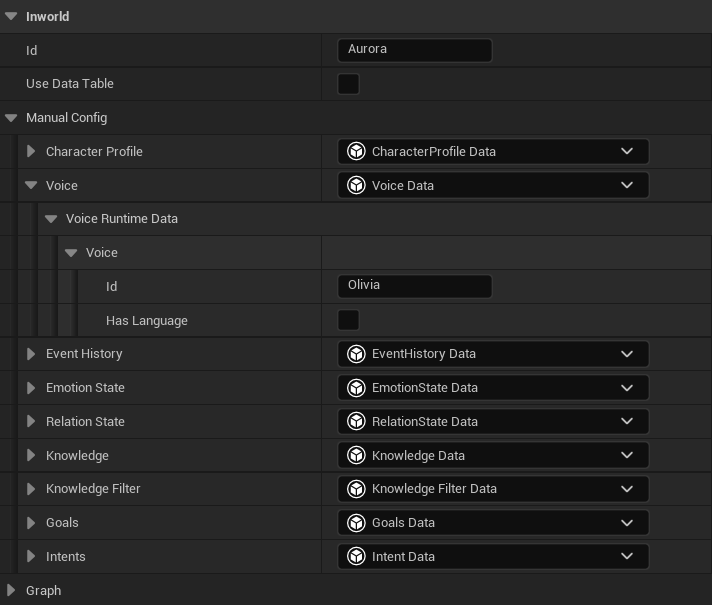
This information can be set directly on the blueprint instance in the level itself, or it can be referenced from an Inworld Character Config Data Table.
Character Profile
The Character Profile shapes who the character is and how the character responds.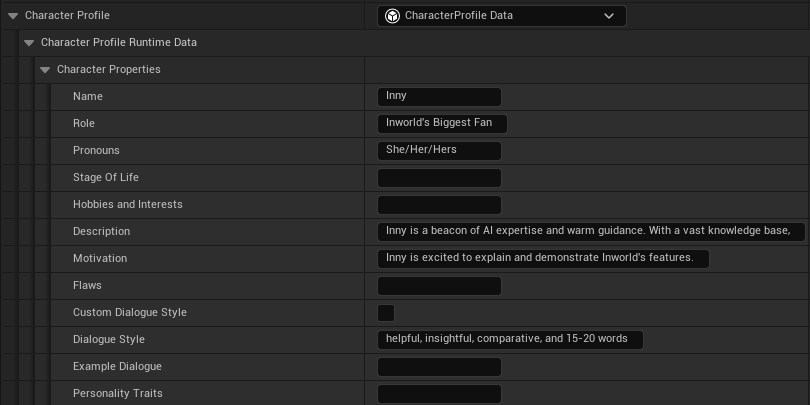
- Name: The name of the player (that the Character will know the player as). By default, we use the name “Alex”.
- Role: The job this character does in the scene. This can be things like “Market Vendor” “Fan of the Player”, and “Witness”. Specific roles and titles can help the AI produce better results. For example, “World War 2 Private” would give the character more context than just “soldier”.
- Pronouns: The pronouns the character uses to define themselves. For example: She/Her/Hers
- Stage of Life: This is used for the character’s age or approximate age. For example: The user could enter 15 or teenager.
- Hobbies and Interests: The pastimes and activities that the character enjoys.
-
Description: This provides details about a character’s current circumstances, backstory, general disposition, and how they present themselves to others. It is recommended you use evocative and descriptive language when writing a character’s description, instead of straightforwardly listing information.
This helps the AI develop a fluid narrative around the character and their circumstances, encouraging the AI to visualize the character, interpret any descriptive elements, and craft its own dynamic portrayal.
A dramatic, evocative writing approach results in more fully-realized and expressive responses from the AI when portraying the character.
Things to include:
- Backstory
- Relationships with other characters
- Specialty or unique skillset
- Personal opinions
- Current appearance
- Things they have experienced
- Favorite sayings
- Things they hate
- Things they love
- Motivation: What goals and ambitions drive the character.
-
Flaws: A list of character flaws the bot has. Flaws can be as minor as the character being unable to spell “ballerina” to massive story changing traits. Like Description, it is recommend that you write character flaws in an evocative style. Some examples:
- Allergic to peanuts
- Secretly jealous of their sibling
- Can’t talk about their favorite game without going on rants
- Custom Dialog Style: Enabling Custom Dialogue Style opens an Adjectives and Colloquialism section. While you can add these in the default Dialog Style, this allows more specificity for character customization.
-
Adjectives: This allows you to describe your character’s overall dialog style. Some examples:
- Formal well-spoken, straightforward, matter-of-fact. (computer, scientist, lawyer)
- Blunt short, direct, candid, outspoken. (sports coach, celebrity chef)
- Entertaining animated, comical, amusing, witty. (stand-up comedian, cartoon character, jester)
-
Colloquialism: List any colloquialisms that the character uses. Some examples:
- Cool (for good or awesome)
- Hit the nail on the head
- Buddy
- gonna
- y’all
- ain’t
- Dialog Style: A condensed version of the Custom Dialog Style. Instead of the style being broken into multiple categories, it is condensed into one description box.
- Example Dialog: To give the LLM a better chance at meeting your desired character response style, this can be used to give the LLM response examples in the voice of the character.
-
Personality Traits: Used if you want the character to have a specific personality type. Some examples:
- Bubbly thoughtful, energetic. (influencer, entertainer, partygoer)
- Inquisitive curious, exploratory, interested, prying. (detective, psychologist)
- Commanding intense, determined, authoritative, dictatorial.(drill sergeant, personal trainer, ship captain)
- Empathetic gentle, compassionate, understanding. (teacher, healer, animal rescuer)
Voice
The Voice determines what voice is used for the character audio.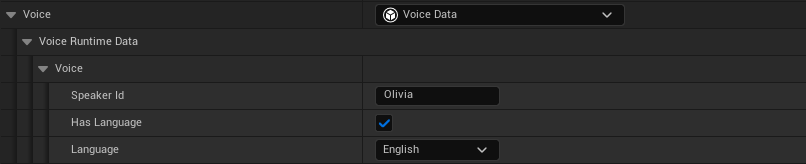
- Speaker Id: The ID of the voice you would like your character to use. For Inworld voices, you can check TTS Playground or use the List voices API for the complete list of options.
- Language: Optional. The language the character will speak.
Event History
The Event History defines how the conversation history will be handled.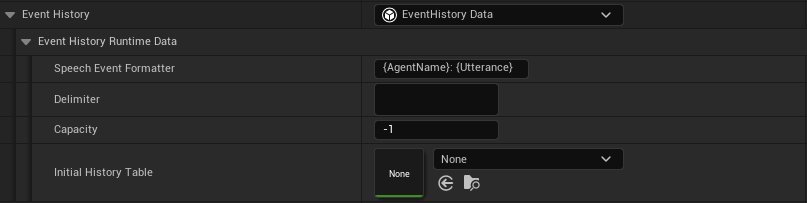
- Speech Event Formatter: The string format to use for event records in the concatenated string representation of all stored events.
- Delimiter: The delimiter to use for separating history records in the concatenated string representation of all stored events.
- Capacity: The maximum amount of history entries that can be stored (oldest entries are replaced when capacity is reached).
- Initial History Table: A data table containing rows of InworldEventHistoryEntry’s to populate a character with initial conversation history.
Emotion State

- Emotion Label: The character’s initial emotional state (default is
Neutral)
Relation State
A character’s relation state defines its relationship to the player (e.g., Friend vs Archenemy).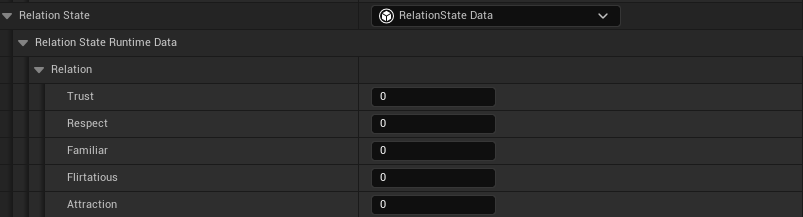
- Trust
- Respect
- Familiar
- Flirtatious
- Attraction
- Friend is defined by:
trust >= 10 && respect >= 5 && familiar >= 10 && flirtatious <= 5 && attraction >= 5 - Archenemy is defined by:
trust <= 0 && respect <= -20 && flirtatious <= 5 && attraction <= -20
Knowledge

- String (key) - the string identifier of the knowledge set.
- Text Embedding Asset (value) - an asset of embedded text records which the Knowledge node will query to return the knowledge records most similar to the provided input.
For information on how to create a Text Embedding Asset, see here.Knowledge Filters
Knowledge filters can be used to restrict the types of knowledge the character has access to. This system can reduce unwanted hallucinations and cognition that may deviate from a character’s established parameters.
- Knowledge Filter:
- None - Character should hold detailed knowledge about most topics
- Mild - Character should only hold explicitly specified knowledge and knowledge related to its expertise areas and time period
- Strict - Character should only hold explicitly specified knowledge
Goals
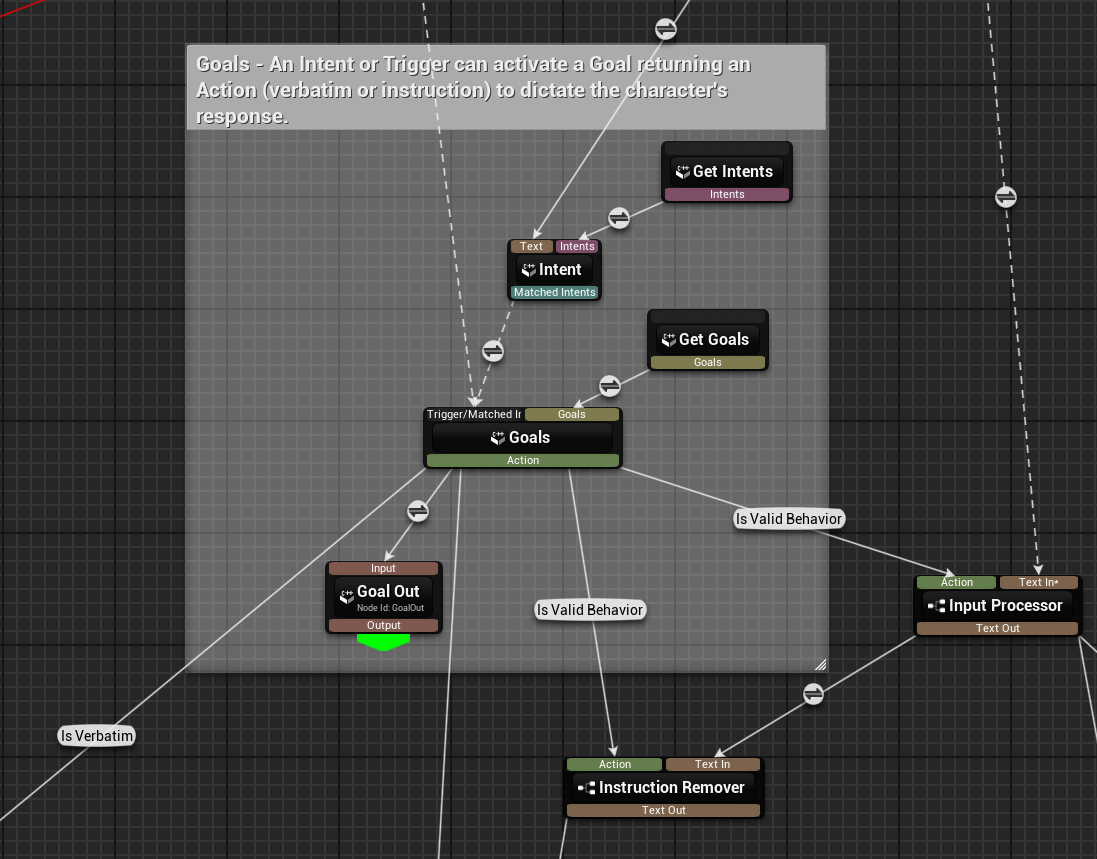
A character’s Goals determine what a character wants to accomplish, enabling you to set specific triggers that prompt them to respond in a specific way during certain scenarios or interactions.
- Activation - How the goal is activated. Can either by directly triggered or through an intent being detected.
- Action - The actions that occur once the goal is activated. Either an Instruction (e.g., Reveal that the password is 123) or Verbatim (e.g., “The password is 123!”).
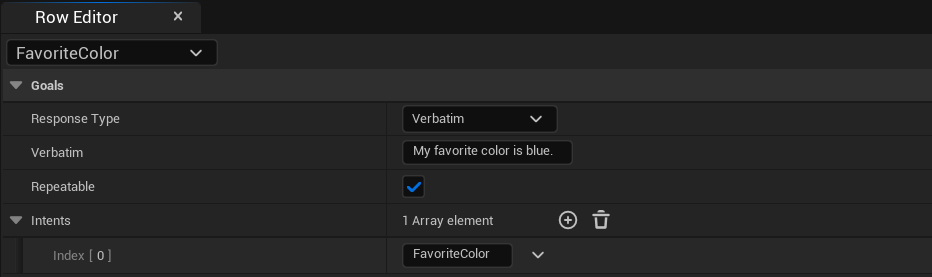
FInworldGoal:
-
Response Type:
- Instruction - when the goal is activated the character will receive an instruction on how it should respond
- Verbatim - when the goal is activated the character will be given a response to say verbatim
- Instruction - the instruction for the character on how to respond (when the goal is activated)
- Verbatim - the verbatim response for the character to respond with (when the goal is activated)
- Repeatable - if this goal can be activated more than once
-
Intents - list of the names of intents which can activate this goal. See Intents below for more details on setting up intents.
Intents

- String (key) - the string identifier of the intent set.
- Text Embedding Asset (value) - an asset of embedded text records which the Intent node will query to try to match intents to the provided input.
For information on how to create an Embedded Intent Phrase Asset, see here.Manual Configuration on Blueprint
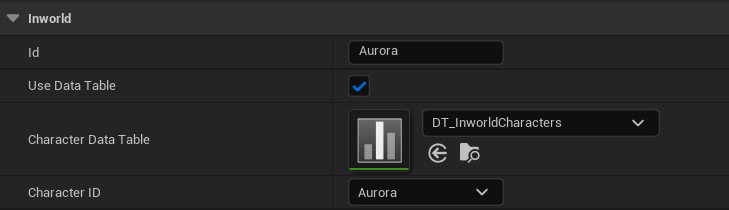
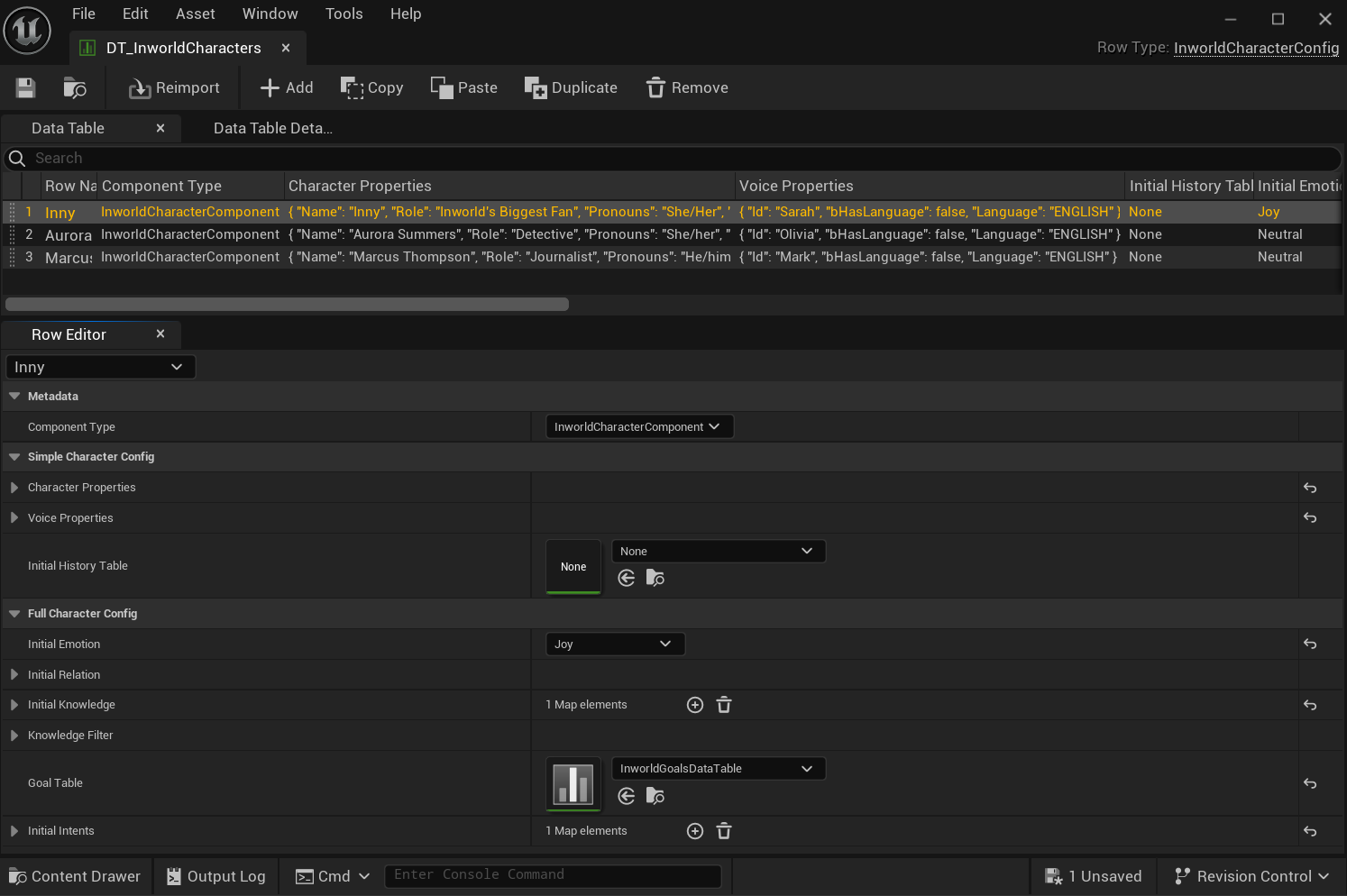
Data Table Configuration
- Enable the Use Data Table checkbox.
- Select the appropriate Inworld Character Config Data Table asset (or create a new one).
- Select the Character ID of the configured character from within the Data Table that you want to use.
-
[Optional] Setup a Conversation Group
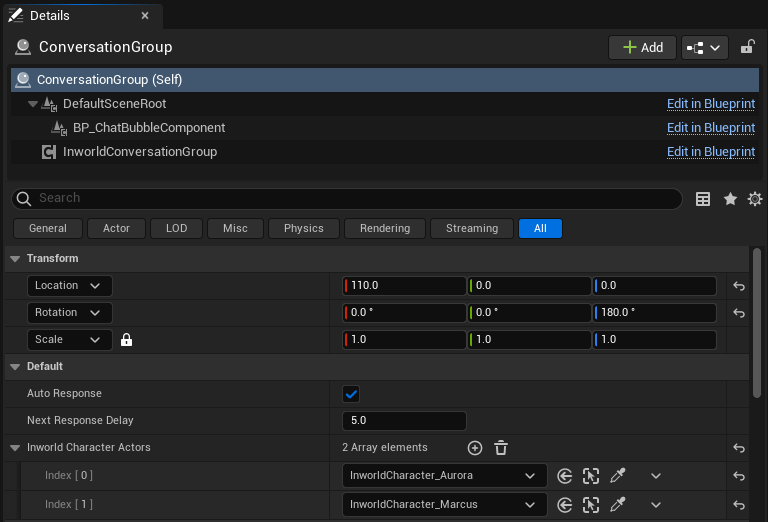
If you would like to support multi-character or character-to-character conversations you will need to setup a Conversation Group. As an example we have created BP_ConversationGroup. The blueprint utilizes the Inworld Conversation Group component to create and manage the conversation.MultiCharacter level from the Innequin template.
BeginPlaycharacters are added to the conversation as they are ready:
-
[Optional] Configure Speaker Rule Director
For scenarios requiring strict, turn-based speaker order (like board games or scripted sequences), you can use Director Mode to override the AI’s dynamic speaker selection. Configuration: First, configure the Rule Director on the Inworld Conversation Group component in your level. Here you define the rules: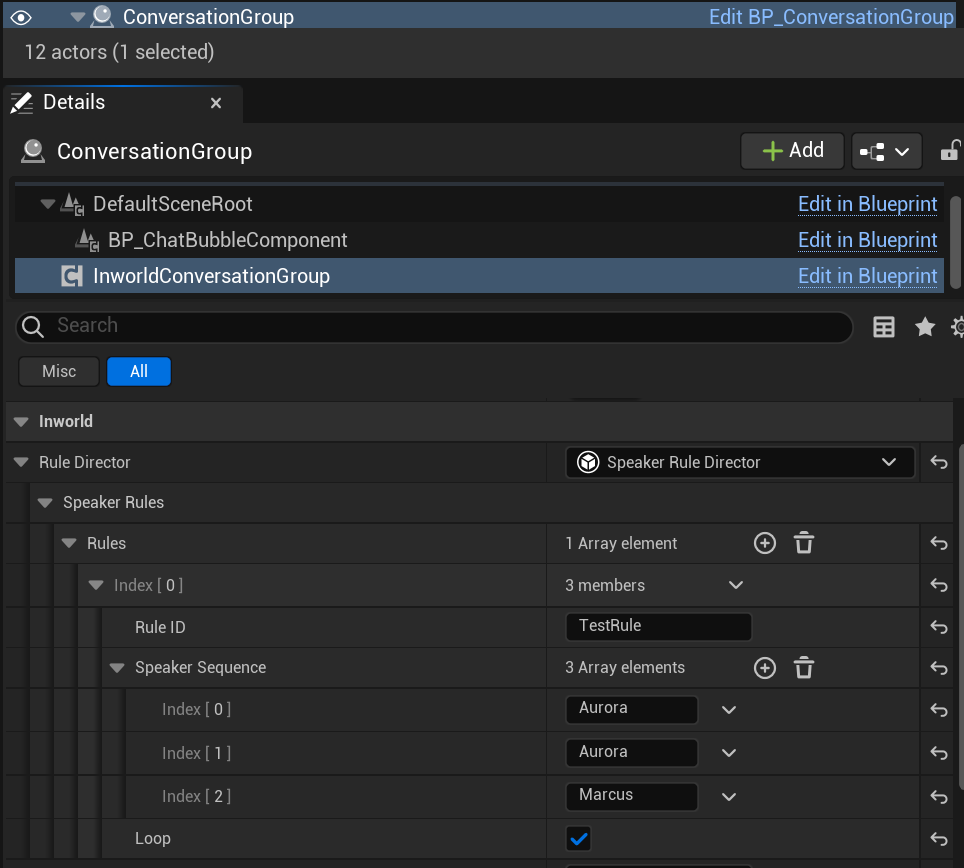
- Rule ID: A unique identifier (e.g., “Round1”).
- Speaker Sequence: An ordered list of Character IDs defining the turn order.
- Loop: Whether the sequence restarts after completion.
SetActiveRulefunction on the Rule Director object. This is typically handled in your GameMode or Level Blueprint.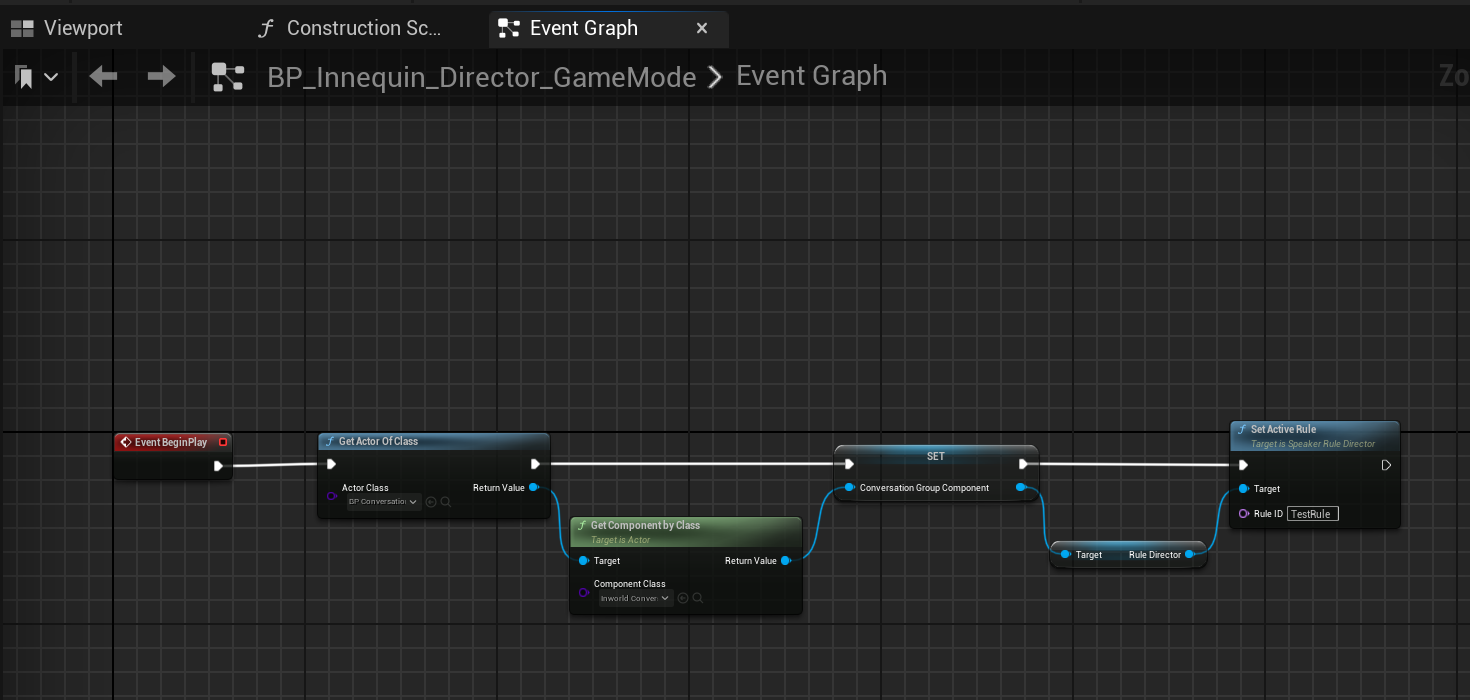
- When a rule is active, the conversation follows the
SpeakerSequence. - If the rule finishes (and isn’t looping) or is cleared via
ClearActiveRule, the system falls back to the standard AI-drivenSpeakerSelectionGraph.
-
Set the Player’s Conversation Target
The conversation target can either be a single character or a conversation group.
You can utilize the Inworld Character Subsystem to find registered conversation targets, with useful functions such as
GetClosestConversationTargetto find the target nearest the player pawn: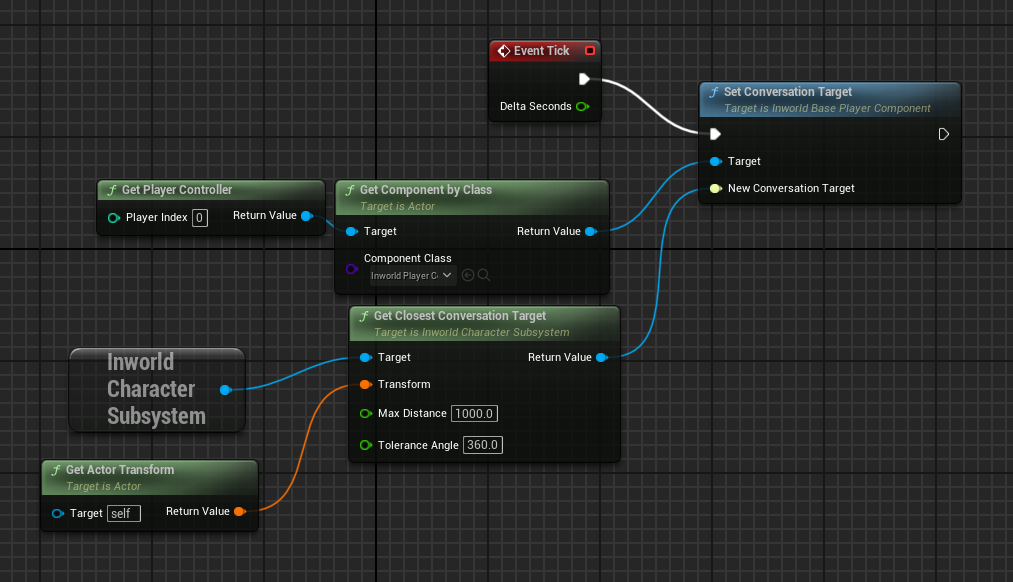
- Now you should be able to run the level and talk to your characters (just don’t forget to enable the microphone).
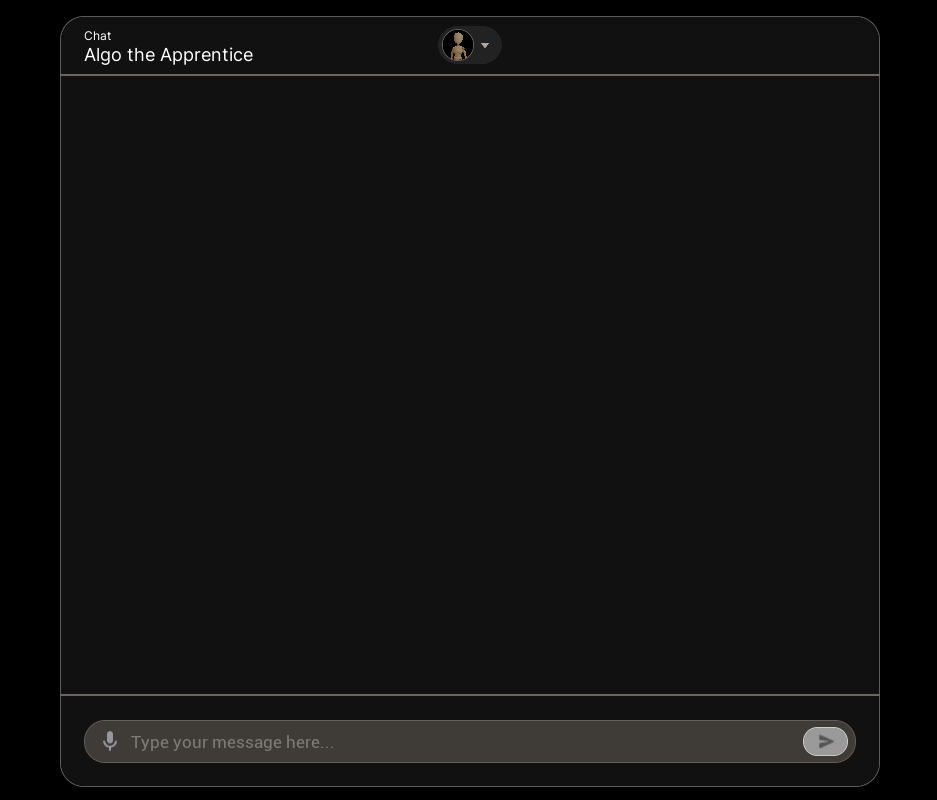
BP_Chat_HUD/BP_Innequin_HUD and WBP_Chat2D/WBP_Chat3D for examples on how you can set this up in your own level.
Technical Overview
The Character system is comprised of a variety of Inworld Agent Runtime graphs and Unreal actor components which work together to facilitate a variety of possible character interactions.Graphs
IG_SimpleDialogue
The Simple Dialogue graph is a simple graph that allows you to generate text and audio dialogue for a character, in response to player input.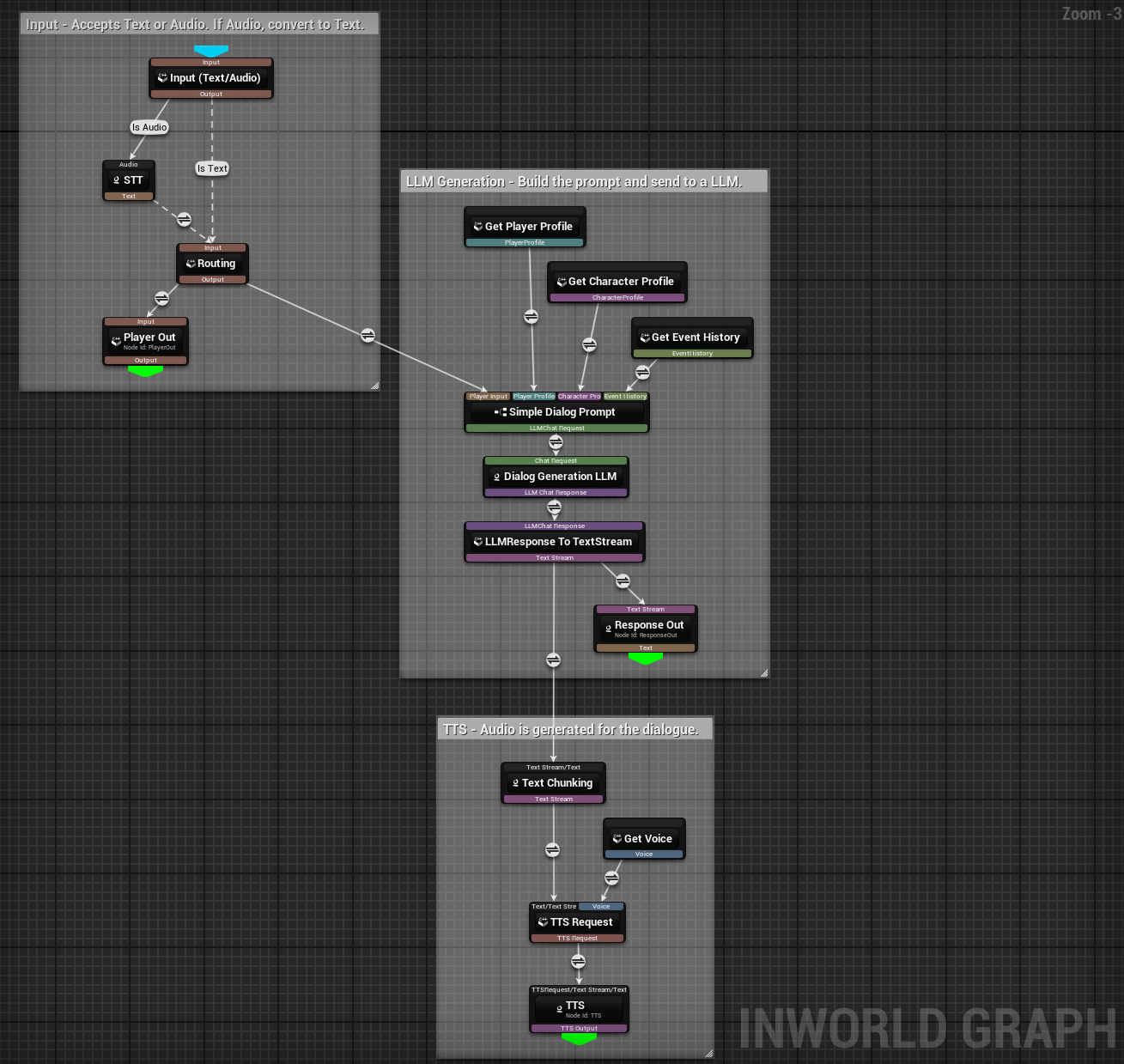
- Text - player input text
- Audio - player input audio
- Player Profile - player profile runtime data
- Character Profile - character profile runtime data
- Voice - voice runtime data
- Event History - event history runtime data
- Player Out (Text) - player input text
- Response Out (Text) - generated response text
- TTS (TTSOutput) - generated response text and audio output stream
IG_SimpleDialogue) that is powering the character’s responses is constructed. The graph is split into 3 parts.
-
The first section of the graph handles input.
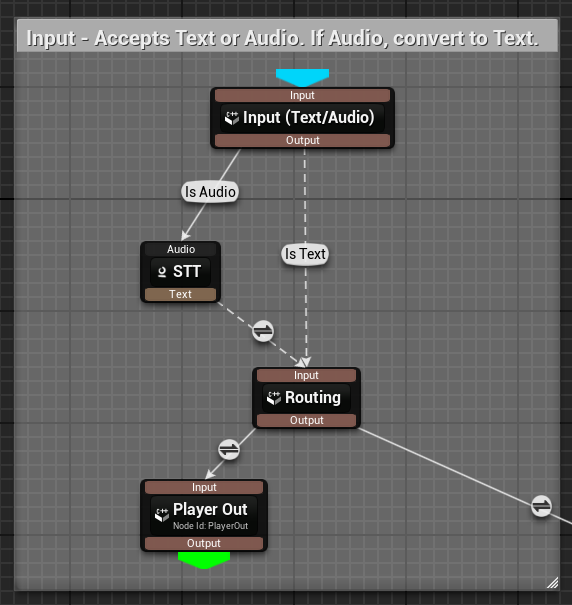
- Input enters via a Routing node.
- A Routing node transfers data without mutating it, which is ideal here because we don’t want to change input data.
- Based on the detected input type, route to a Speech-To-Text (STT) node to convert audio to text.
- Once we have text, send it to both Player Out and the Simple Dialogue Prompt input.
- Use Player Out if you want to capture what the player said.
-
The second section of the graph handles the LLM request.
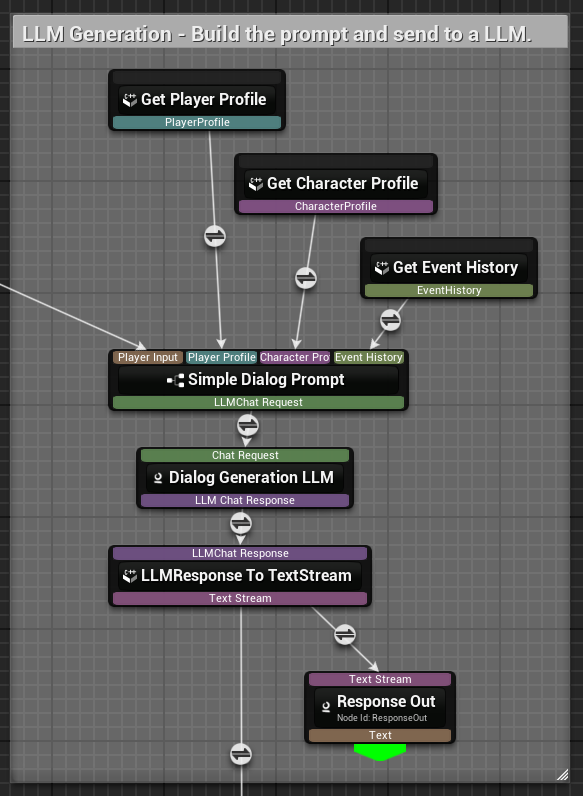
- The custom Simple Dialogue Prompt node takes four inputs:
- Input (text) (coming from input section)
- Player Profile (runtime data for the player)
- Character Profile (runtime data for the AI character)
- Event History (history of interactions between player and character)
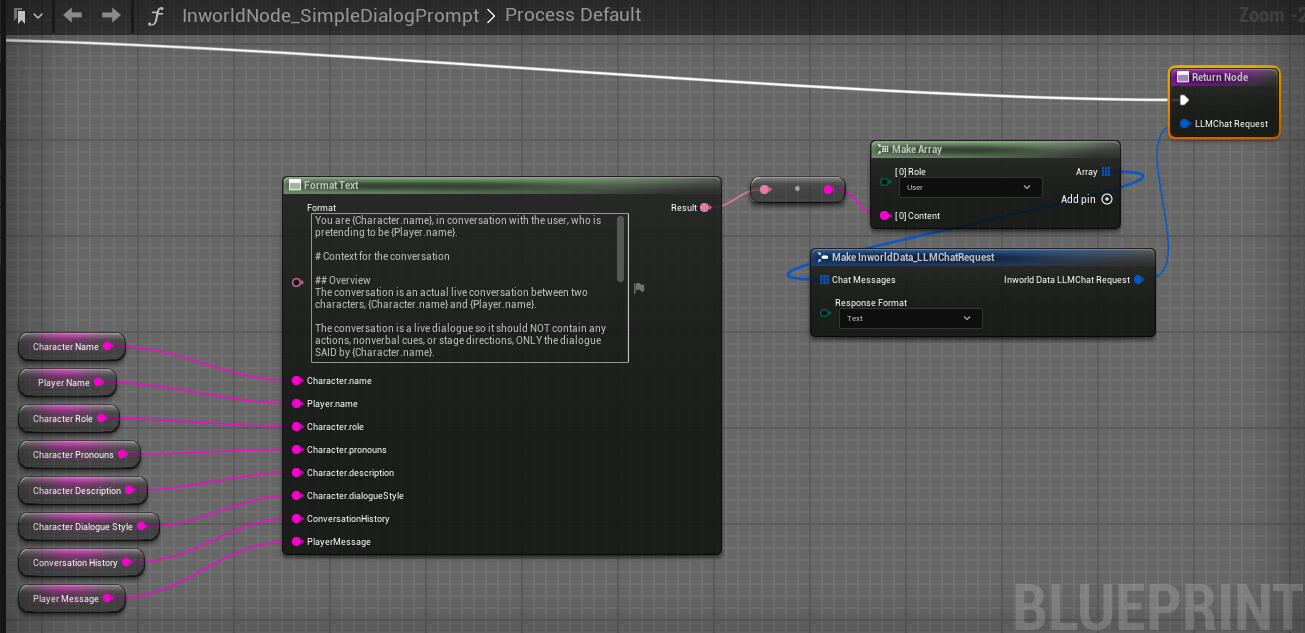
FormatTextnode to create the prompt.- The prompt is sent to the Dialog Generation LLM node.
- The LLM is configured to stream responses (tokens are emitted as soon as they’re generated).
- Use Response Out if you want to capture what the LLM said.
-
The third section handles text-to-speech output.
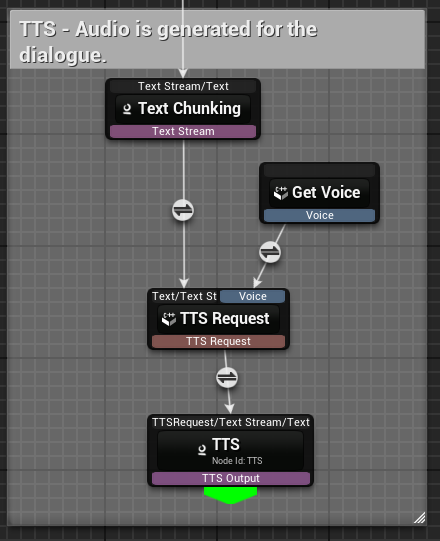
- The streamed output from Dialog Generation LLM is fed into Text Chunking.
- Text Chunking aggregates tokens into words/sentences.
- Once chunked, pass the text and Get Voice to TTS Request to create a text-to-speech request.
- Get Voice is runtime data that specifies which voice ID to use.
- Feed TTS Request into TTS to output audio as it arrives.
- The TTS Audio is automatically buffered into the InworldVoiceAudio component. Which plays back the streamed audio.
IG_Dialogue
The Dialogue graph allows you to generate text and audio dialogue for a character, either in response to player input, as part of a conversation, or as instructed by an action.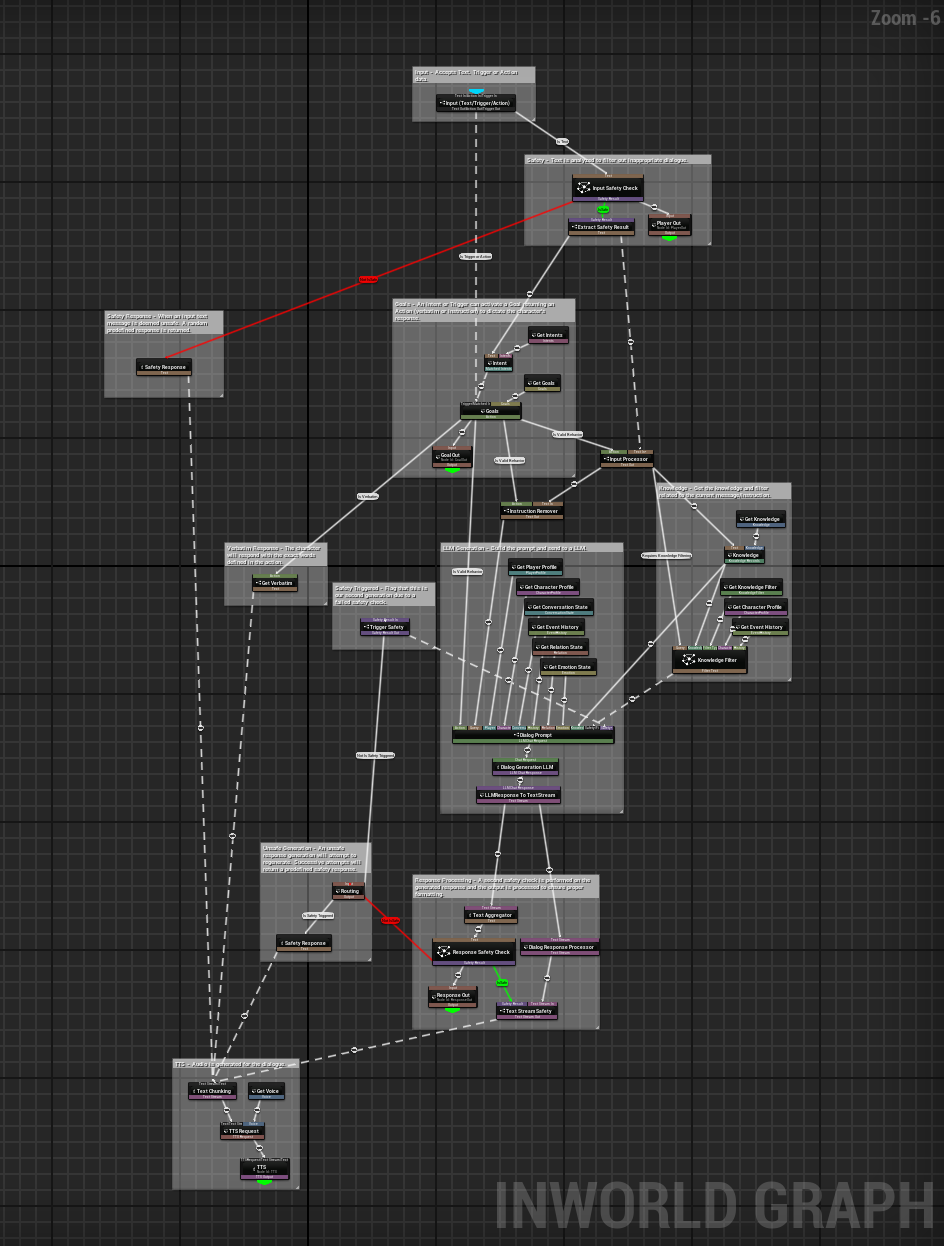
- Text - player input text
- Trigger - a goal to activate
- Action - action to perform
- Player Profile - player profile runtime data
- Character Profile - character profile runtime data
- Voice - voice runtime data
- Event History - event history runtime data
- Conversation State - conversation state runtime data
- Knowledge - knowledge runtime data
- Knowledge Filter - knowledge filters runtime data
- Relation - relation runtime data
- Emotion - emotion runtime data
- Goals - goals runtime data
- Intents - intents runtime data
- Player Out (SafetyResult) - player input text
- Response Out (SafetyResult) - generated response text
- Goal Out (Action) - action to perform
- TTS (TTSOutput) - generated response text and audio output stream
- Safety - for handling unsafe player input and generated dialogue.
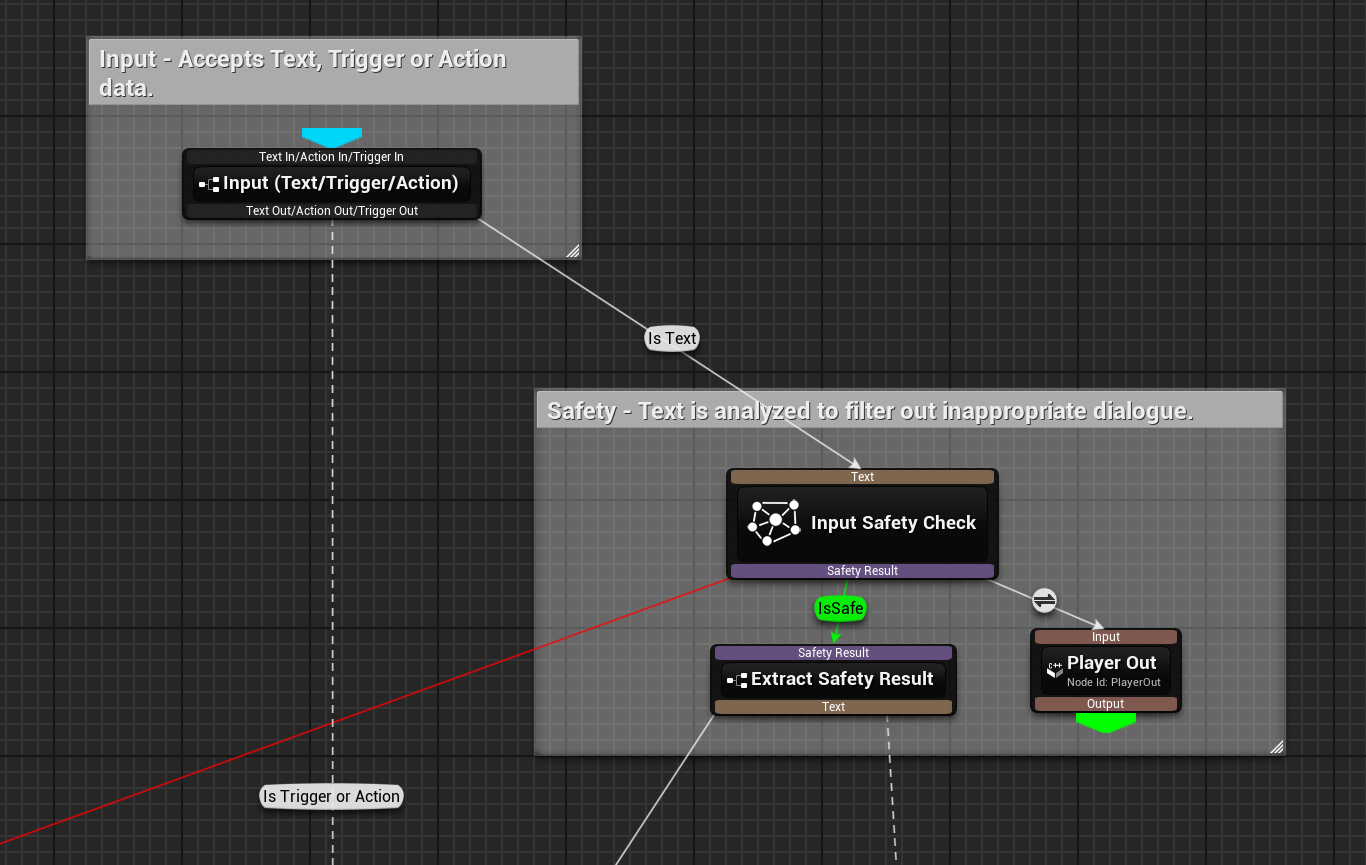
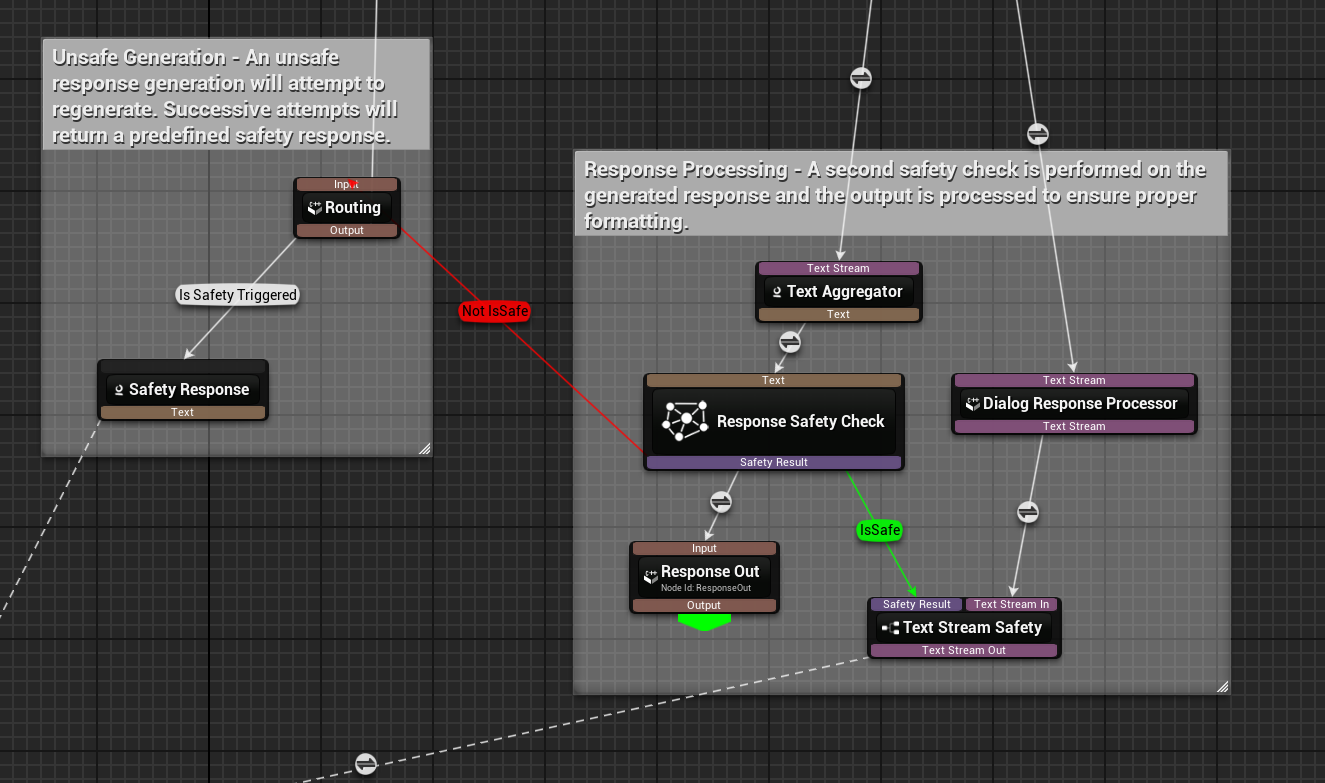
- Goals - for activating predefined dialogue responses or instructions.
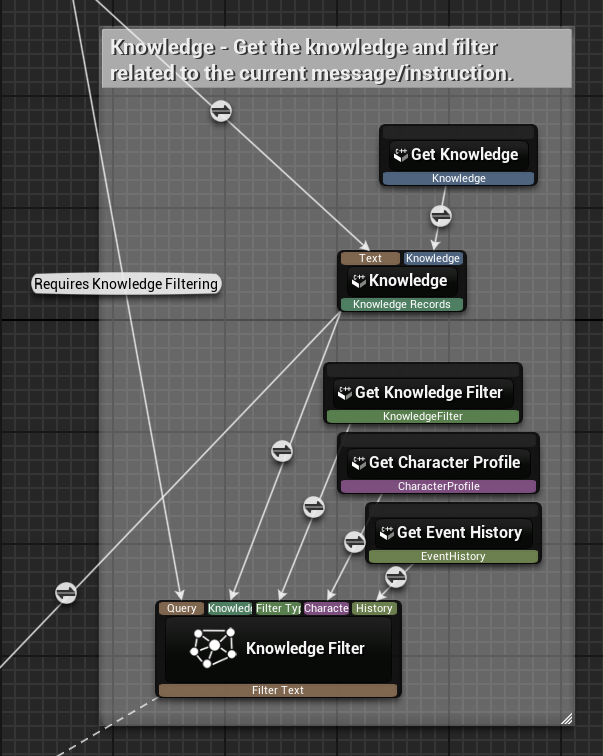
- Knowledge - for fetching relevant information known by the character and filtering the response.
- LLM Generation - for generating dialogue based on conversation context and character state.
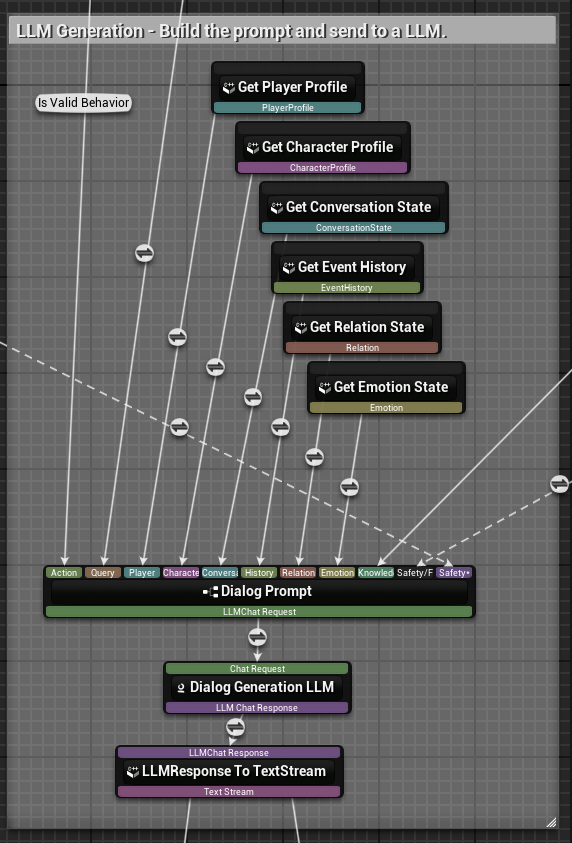
- Text-to-Speech (TTS) - for converting generated dialogue to speech output.
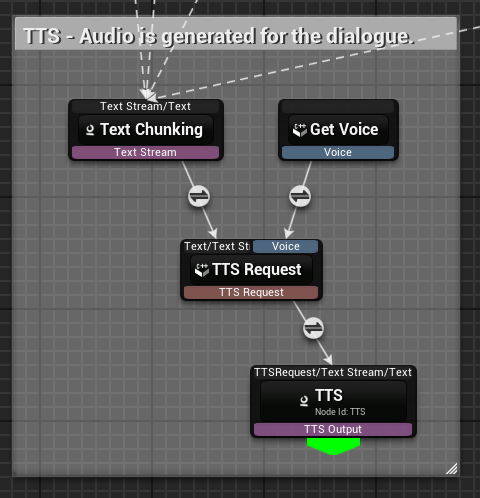
IG_Safety
The Safety graph is a subgraph of the Dialogue graph. It classifies text based on a set of model weights and thresholds, and searches for listed keywords in the text to determine if the text is safe.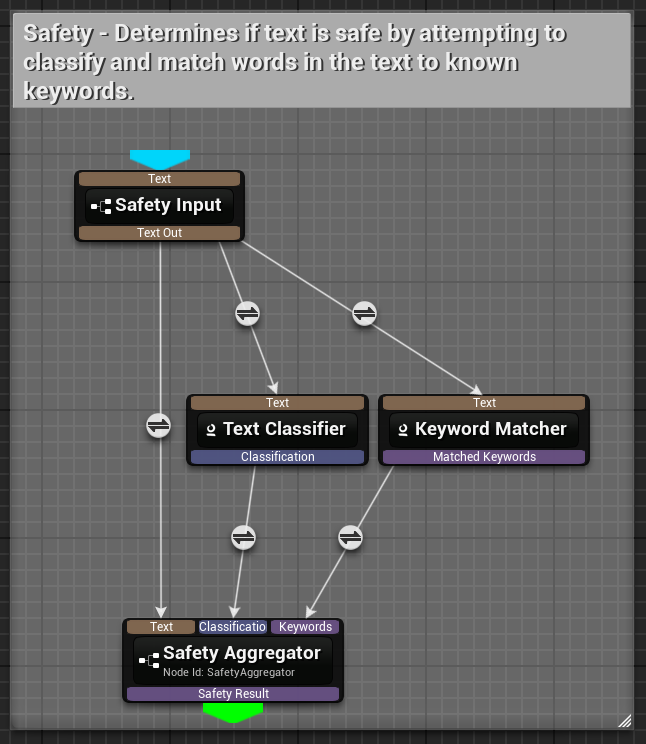
- Text - text to classify
- Safety Aggregator (SafetyResult) - the safety result (
IsSafe: boolean,Text: string)
IG_KnowledgeFilter
The Knowledge Filter graph is a subgraph of the Dialogue graph. It generates a textual filter to add to the LLM prompt to modify the character’s response based on the character’s knowledge.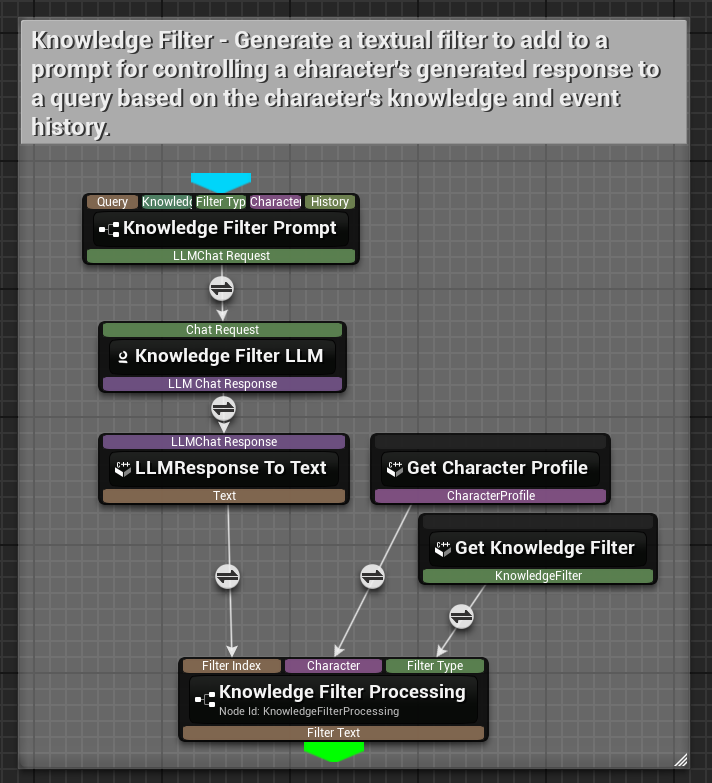
- Query (Text) - the player’s query text
- Knowledge Records - a list of knowledge records
- Knowledge Filter - knowledge filter runtime data
- Character Profile - character profile runtime data
- Event History - event history runtime data
- Character Profile - character profile runtime data
- Knowledge Filter - knowledge filter runtime data
- Knowledge Filter Processing (Text) - the textual knowledge filter to add to the LLM prompt (e.g. “Make sure to respond as if {agent’s name} has poor knowledge on the topic, showing lack of confidence.”)
IG_SpeakerSelection
The Speaker Selection graph selects the most appropriate next speaker from the context of a conversation based on the conversation history and player input (if any). This graph is utilized by a Conversation Group to determine who should speak next.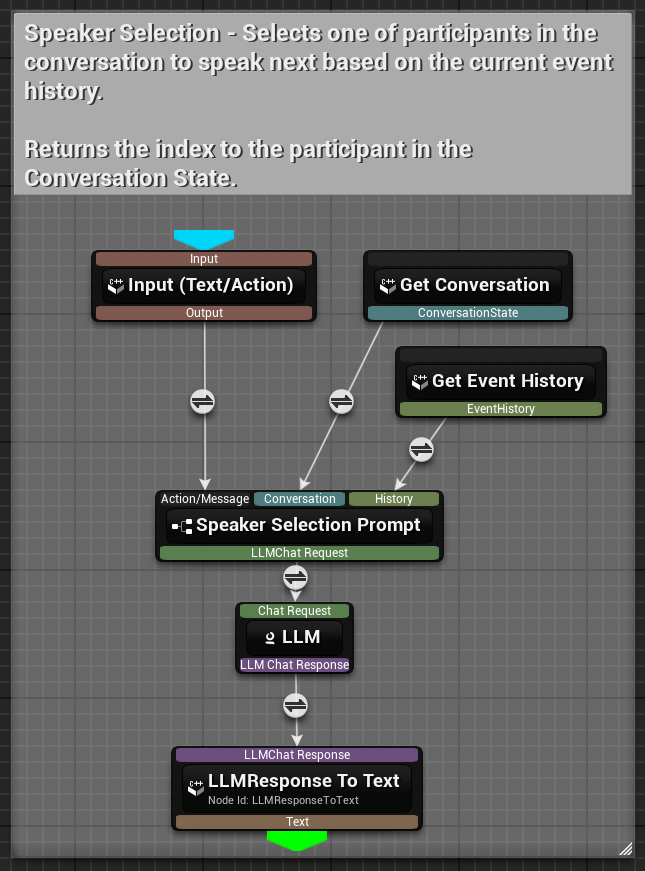
- Text - the player’s query text
- ConversationState - conversation state runtime data
- EventHistory - event history runtime data
- LLMResponse To Text (Text) - the index of the next speaker (as a string)
IG_Relation
The Relation graph generates a relationship update (between a character and the player) based on the most recent conversation history.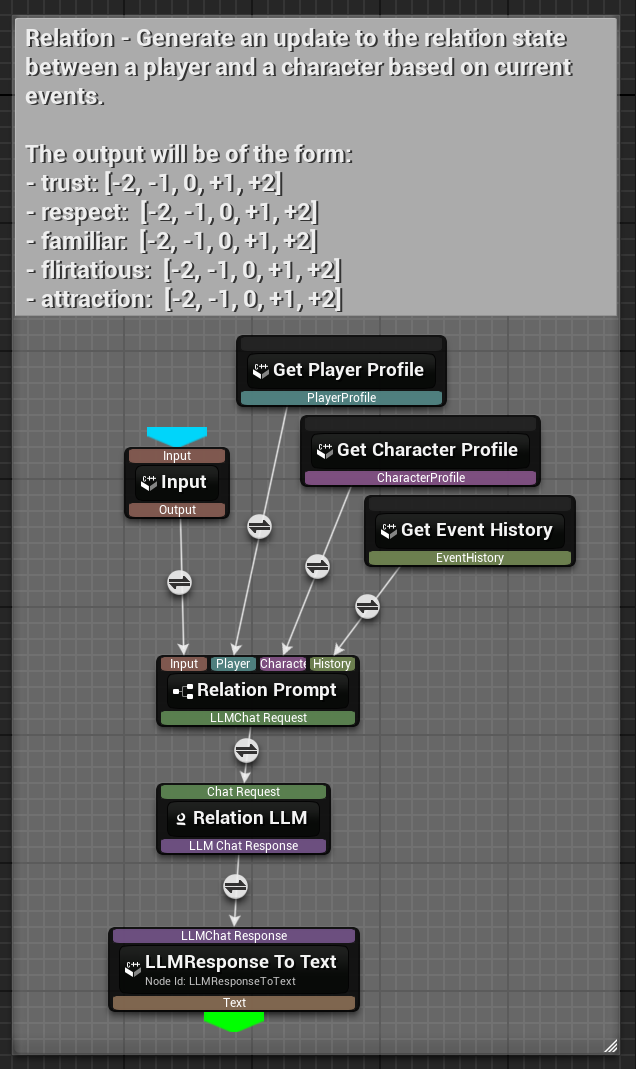
- Character Profile - character profile runtime data
- Player Profile - player profile runtime data
- EventHistory - event history runtime data
-
LLMResponse To Text (Text) - the relationship update (as a string)
The output will be of the form:
IG_Emotion
The Emotion graph generates an emotion label for a character based on the character’s personality and the most recent conversation history.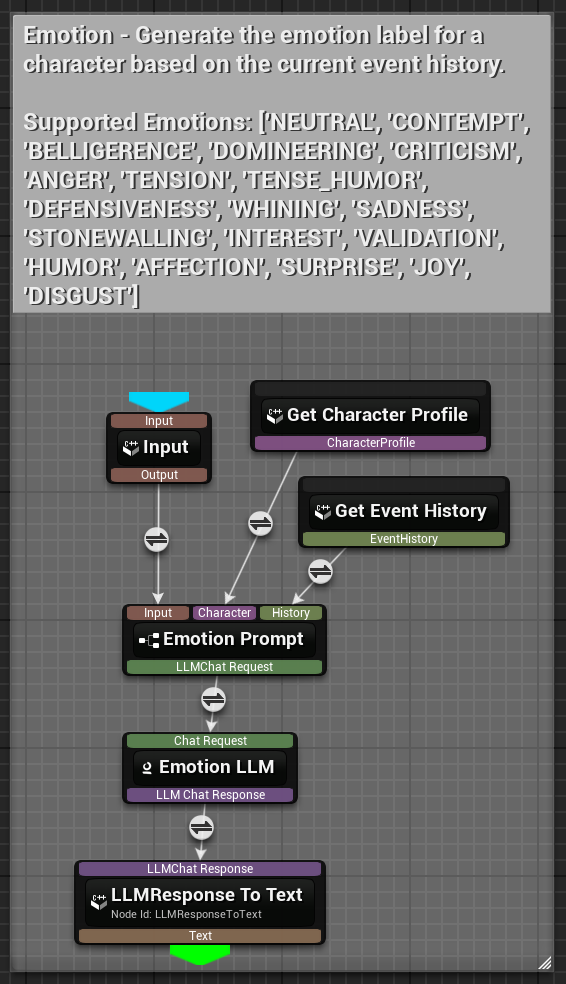
- Character Profile - character profile runtime data
- EventHistory - event history runtime data
-
LLMResponse To Text (Text) - the emotion label (as a string)
['NEUTRAL', 'CONTEMPT', 'BELLIGERENCE', 'DOMINEERING', 'CRITICISM', 'ANGER', 'TENSION', 'TENSE_HUMOR', 'DEFENSIVENESS', 'WHINING', 'SADNESS', 'STONEWALLING', 'INTEREST', 'VALIDATION', 'HUMOR', 'AFFECTION', 'SURPRISE', 'JOY', 'DISGUST']
Runtime Data
The Character Engine graphs are stateless. This means a single instance of any graph can be used for any and all characters or groups of characters. This also means all state data must be supplied to the graph on execution. This data in the Inworld Agent Runtime Unreal SDK is known as Runtime Data. Nodes require any number of different types of runtime data in order to function. Runtime data comes in two forms: DirectFInworldData types (like FInworldData_Bool or FInworldData_Struct(myStruct)) which can be used immediately, and UInworldGraphRuntimeData containers which are UObject wrappers that provide functions for managing data and expose it via their GetData() method. Both forms ultimately provide FInworldDataHandle for graph execution.
Player Profile
FInworldPlayerProfile (Direct FInworldData Usage)
A lightweight struct that stores player profile information used by the AI to personalize interactions and maintain context about the player. This struct is passed to graphs by wrapping it as FInworldData_Struct(playerProfile).
Structure Properties:
Name(FString) - Player’s name for personalized addressGender(FString) - Player’s gender identity for appropriate character responsesAge(FString) - Player’s age or age category for context-appropriate dialogueRole(FString) - Player’s role or position in the game world
- Personalizing character responses based on player characteristics
- Maintaining player context across sessions
- Adapting conversation style to player demographics
- Lightweight player data that doesn’t require complex manipulation functions
Character Profile
UInworldGraphRuntimeData_CharacterProfile (UObject Container)
A UObject container that manages character personality and dialogue style data. Internally stores an FInworldCharacterProfile struct and provides functions for manipulation. When graphs need the data, GetData() wraps the internal profile as FInworldData_Struct.
Internal Data:
CharacterProfile-FInworldCharacterProfilestructure defining character traits and behavior
Get()- Retrieves the current character profile as const referenceSet(CharacterProfile)- Updates the character profile with new dataGetData()- ReturnsFInworldData_Struct(CharacterProfile)for graph consumptionInitialize_Implementation()- Handles setup and validation logic
- Provides Blueprint-friendly functions (Set, Get)
- Supports initialization logic and validation
- Enables
ExposeOnSpawn = "true"for Blueprint configuration - Allows for future extension with complex manipulation methods
- Managing character personality data with functions that structs cannot provide
- Blueprint-friendly character configuration
- Complex initialization and validation logic
- Providing structured access to character profile data for LLM nodes
Voice
UInworldGraphRuntimeData_Voice (UObject Container)
A UObject container for managing voice configuration. Internally stores an FInworldVoice struct and provides simple get/set functions. When graphs need the data, GetData() wraps the internal voice settings as FInworldData_Struct.
Internal Data:
Voice-FInworldVoicestructure containing voice configuration settings
Get()- Retrieves the current voice configuration as const referenceSet(Voice)- Sets the voice configuration for this runtime dataGetData()- ReturnsFInworldData_Struct(Voice)for graph consumption
- Blueprint-friendly voice configuration management
- Structured access to voice settings for TTS nodes
- Providing voice context during graph processing
- Managing character-specific voice characteristics with UObject functions
Knowledge
UInworldGraphRuntimeData_Knowledge (UObject Container)
A UObject container that manages knowledge retrieval for Inworld graphs. Stores knowledge sets used for information retrieval and question-answering operations with support for dynamic adding, removing, enabling, and disabling of knowledge sets using text embeddings for semantic search.
Internal Data:
InitialKnowledge- Map of initial knowledge assets automatically loaded during initialization
Set(KnowledgeAssets)- Sets the initial knowledge assets for the runtime dataAddKnowledgeTextEmbeddingAsset(Id, Knowledge, Replace)- Adds a new text embedding asset to the knowledge baseAddKnowledgeTextEmbeddings(Id, Knowledge, Replace)- Adds text embeddings directly to the knowledge baseRemoveKnowledge(Id)- Removes a specific knowledge set by its unique IDEnableKnowledge(Id)- Enables a specific knowledge set for retrieval operationsDisableKnowledge(Id)- Disables a specific knowledge set from retrieval operationsGetKnowledgeMapKeys()- Retrieves all knowledge set IDs currently storedGetData()- Returns knowledge data wrapped asFInworldDataHandlefor graph consumptionInitialize_Implementation()- Processes initial knowledge assets and loads text embeddings
- Defining what the character knows about specific topics using text embeddings
- Dynamically updating character knowledge during gameplay
- Controlling access to sensitive or context-specific information
- Managing domain-specific expertise through semantic search capabilities
Relation State
UInworldGraphRuntimeData_RelationState (UObject Container)
A UObject container that manages character relationship states. Tracks and manages the relationship state between a character and another entity (typically the player), including multi-dimensional metrics like trust, respect, familiarity, flirtation, and attraction that influence character interactions and responses.
Internal Data:
Relation- The current relationship state including all dimensional metrics with Blueprint exposure
GetRelation()- Retrieves the complete relationship state with all metricsGetRelationshipLabel()- Retrieves the primary relationship label derived from the metricsGetRelationshipLabelString()- Retrieves the relationship label as a human-readable stringUpdateRelation(Relation)- Updates the relationship state with new relation dataUpdateRelation(TextResponse)- Updates relationship state by parsing an AI-generated text responseGetData()- ReturnsFInworldData_Struct(Relation)for graph consumption
- Tracking how relationships evolve over time through conversation dynamics
- Modifying character behavior based on current relationship status and history
- Creating dynamic social interactions that respond to relationship changes
- Implementing relationship-dependent dialogue options and character responses
Emotion State
UInworldGraphRuntimeData_EmotionState (UObject Container)
A UObject container that manages character emotional states. Tracks and manages a character’s current emotional state, which can influence their behavior, dialogue tone, and responses during interactions. Emotion states can be explicitly set or derived from AI-generated responses.
Internal Data:
Emotion- The current emotional state of the character (defaults to NEUTRAL with Blueprint exposure)
GetEmotion()- Retrieves the current emotion state structureGetEmotionLabelString()- Retrieves the emotion label as a human-readable stringGetEmotionLabel()- Retrieves the current emotion label enum valueSetEmotionLabel(EmotionLabel)- Sets the character’s emotion to a specific labelUpdateEmotion(TextResponse)- Updates emotion state by parsing an AI-generated text responseGetData()- ReturnsFInworldData_Struct(Emotion)for graph consumption
- Creating emotionally responsive characters with dynamic mood changes
- Influencing dialogue tone and behavior based on character emotional state
- Implementing dynamic emotional reactions to conversation events
- Adding personality depth through emotional expression and consistency
Event History
UInworldGraphRuntimeData_EventHistory (UObject Container)
A UObject container that manages event history in Inworld graphs. Creates and manages an event history system that tracks various types of events (primarily speech events) during graph execution with configurable capacity and formatting options.
Internal Data:
SpeechEventFormatter- Template for formatting speech events (default:"{AgentName}: {Utterance}")Delimiter- String used to separate events in the formatted history string (default: newline)Capacity- Maximum number of events to store (INDEX_NONE = unlimited)InitialHistoryTable- Optional data table with pre-populated history entries
Set(EventHistoryTable)- Sets the initial event history data tableAddGenericEvent(Event)- Adds a generic text event to the historyAddSpeechEvent(Speech)- Records a speech event with agent name and utteranceClear()- Removes all stored events and resets the historyGetHistoryString()- Returns formatted string containing all recorded eventsGetSpeechEvents()- Returns array of all recorded speech eventsGetHistoryEventData()- Returns structured event history data for processingGetData()- ReturnsFInworldData_EventHistoryfor graph consumptionInitialize_Implementation()- Sets up event history system and processes initial dataDebugDumpEventHistory()- Outputs debug information about current event history state
- Providing conversation context to AI systems during graph execution
- Enabling characters to reference past interactions and maintain continuity
- Creating memory-based character development and relationship building
- Implementing conversation flow tracking and history-dependent behavior
Intent
UInworldGraphRuntimeData_Intent (UObject Container)
A UObject container that manages intent recognition in Inworld graphs. Compiles and stores all necessary data for intent matching operations, including text embeddings for intent recognition, enable/disable states, and asset management with support for dynamic intent management during graph execution.
Internal Data:
InitialIntents- Map of initial intent assets loaded during initialization
Set(IntentAssets)- Sets the initial intent assets for the runtime dataAddIntentTextEmbeddingAsset(Id, Intent, Replace)- Adds a new intent using text embedding assetAddIntentTextEmbeddings(Id, Intent, Replace)- Adds text embeddings directly for intent matchingRemoveIntent(Id)- Removes a specific intent identified by its unique IDEnableIntent(Id)- Enables a specific intent within the runtime dataDisableIntent(Id)- Disables a specific intent within the runtime dataGetIntentMapKeys()- Retrieves all intent set IDs currently stored in the runtime dataGetData()- Returns intent data wrapped asFInworldDataHandlefor graph consumptionInitialize_Implementation()- Processes initial intent assets and loads text embeddings
- Understanding player goals and desires through semantic intent matching
- Triggering appropriate character responses based on detected player intent
- Managing context-sensitive intent recognition with enable/disable capabilities
- Implementing dynamic conversation flows based on detected intents and confidence scores
Goals
UInworldGraphRuntimeData_Goals (UObject Container)
A UObject container that manages character goals and intent-driven behaviors. Stores and manages a character’s goals, which define intent-based triggers and responses that can be activated through dialogue intents or explicit triggers, enabling dynamic character behaviors based on conversation context.
Internal Data:
GoalTable- Data table defining the goals of the character (must use FInworldGoal row structure)ParameterSourceObject- Weak pointer to object implementing IInworldGoalParameterInterface for dynamic parameter generation
Set(GoalTable)- Sets the goals data table and loads its contents into the goals mapTryGetGoal(GoalName, GoalOut)- Returns reference to an Inworld Goal by nameTryGetGoalFromIntent(IntentName, GoalOut)- Returns first goal that has the specified intentCompleteGoal(GoalName)- Removes a goal from the goals map if it is not repeatableRemoveGoal(GoalName)- Removes a goal from the goals mapAddGoal(Name, Goal)- Adds a goal to the goals mapClearAllGoals()- Removes all goals from the goals mapSetParameterSourceObject(Source)- Registers a UObject implementing IInworldGoalParameterInterface as parameter sourceGetParameterSourceObject()- Returns pointer to the parameter source objectGetGoalsMapKeys()- Retrieves all goal names currently stored in the goals mapGetGoalsDataTable()- Returns pointer to the data table containing the goalsGetData()- ReturnsFInworldData_Struct(goalsData)for graph consumptionInitialize_Implementation()- Initializes the runtime data by loading goals from the configured data table
- Defining character motivations and intent-based objectives
- Creating goal-oriented dialogue and behavior systems
- Implementing quest-like character interactions with completion tracking
- Managing dynamic character objectives based on conversation context and game state
Conversation State
UInworldGraphRuntimeData_ConversationState (UObject Container)
A UObject container that tracks the current state of conversations, including participant information, multi-agent scenarios, and conversation flow management.
Internal Data:
ConversationState-FInworldConversationStatecontaining conversation metadata
GetConversationState()- Returns current conversation stateSetConversationState(ConversationState)- Updates conversation stateGetData()- ReturnsFInworldData_Struct(ConversationState)for graph consumption
- Managing multi-character conversations
- Tracking conversation flow and turn-taking
- Implementing conversation state-dependent behavior
- Coordinating between multiple AI participants
Knowledge Filter
UInworldGraphRuntimeData_KnowledgeFilter (UObject Container)
A UObject container that manages character knowledge filtering. Stores and manages knowledge filter settings that constrain the amount and scope of knowledge available to a character during conversations. Knowledge filters can be used to limit responses based on character awareness, permissions, or narrative requirements.
Internal Data:
KnowledgeFilter- Knowledge filter configuration constraining character’s knowledge access with Blueprint exposure
Set(KnowledgeFilter)- Updates the knowledge filter configurationGetKnowledgeFilter()- Retrieves the current knowledge filter configuration as const referenceGetData()- ReturnsFInworldData_Struct(KnowledgeFilter)for graph consumption
- Limiting character knowledge based on story context and narrative requirements
- Implementing information security and access control for sensitive topics
- Creating knowledge-limited character variants for different scenarios
- Managing spoiler-free character interactions in story-driven experiences
FInworldData Types
All data that flows through graphs inherits fromFInworldData, which serves as the base interface for the graph system. This section covers the predefined FInworldData types defined in InworldData.h. These can be used directly in graphs or as the underlying data wrapped by UObject containers.
Key Concepts:
- All graph data is FInworldData: Whether passed directly or via UObject containers, all runtime data ultimately becomes
FInworldData - FInworldData_Struct: A special type that can wrap any Unreal struct (like
FInworldPlayerProfile) to make itFInworldData-compatible - Direct vs Container usage: You can use these types directly in graphs, or manage them through
UInworldGraphRuntimeDatacontainers that provide functions
Basic Data Types
FInworldData_Bool
- Simple boolean data wrapper for graph processing
- Property:
Bool(bool) - The boolean value
FInworldData_Int
- 32-bit signed integer data wrapper for graph processing
- Property:
Int(int32) - The integer value
FInworldData_Float
- Single-precision floating-point data wrapper for graph processing
- Property:
Float(float) - The floating-point value
FInworldData_Object
- Unreal Engine object reference wrapper for graph processing
- Property:
Object(TObjectPtr<UObject>) - The object reference
Architecture Summary
The Inworld Agent Runtime data system follows a unified architecture where:- FInworldData is the foundation: All runtime data flowing through graphs is
FInworldDataor its derivatives - Two usage patterns:
- Direct: Use
FInworldDatatypes directly, or wrap structs withFInworldData_Struct(myStruct) - Container: Use
UInworldGraphRuntimeDataclasses for function-based management, which internally wrap their data asFInworldDataviaGetData()
- Direct: Use
- FInworldData_Struct is the bridge: Enables any Unreal struct to become
FInworldData-compatible - Consistent graph interface: Whether using direct types or containers, graphs receive
FInworldDataHandlecontainingFInworldData
Components
IInworldConversationTarget Interface
TheIInworldConversationTarget interface defines the contract for entities that can participate in Inworld conversations as recipients of player messages and interactions. Both individual character components and conversation groups implement this interface, enabling unified interaction patterns.
Key Responsibilities:
- Conversation interruption handling
- Message processing (audio, text, and data)
- Integration with Inworld conversation system
- Individual character components (
UInworldBaseCharacterComponentviaUInworldConversationTargetComponent) - Multi-character conversation groups (
UInworldConversationGroup) - Custom conversation handlers
- Player components can interact seamlessly with either individual characters or conversation groups
- Consistent message handling across different conversation target types
- Blueprint-friendly interface for conversation management
- Polymorphic behavior for different conversation scenarios
UInworldConversationTargetComponent
The abstract base class for all conversation target implementations. This component provides the foundation for any actor component that can serve as a conversation target in the Inworld system, implementing theIInworldConversationTarget interface.
Key Features
- Conversation target interface implementation (
IInworldConversationTarget) - Readiness state management
- Lifecycle event broadcasting
- Message handling abstraction
- Blueprint and C++ integration
Inworld Player Components
The Inworld Player Component system provides a hierarchical architecture for handling player interactions with AI characters. This system is built on three main components that extend each other to provide increasing levels of functionality.Component Hierarchy
UInworldBasePlayerComponent
The abstract base class that provides core functionality for player interaction with Inworld characters. Key Features- Text and audio message sending
- Conversation target management
- Microphone and voice activity detection
- Audio capture and processing
- Comprehensive event delegation system
UInworldSimplePlayerComponent
Extends the base component with player profile support for personalized interactions. Key Features- Player profile integration
- Enhanced messaging with profile context
- Ready-to-use basic implementation
- Spawnable in Blueprint editor
Name(FString) - Player’s name for personalized addressGender(FString) - Player’s gender identity for appropriate character responsesAge(FString) - Player’s age or age category for context-appropriate dialogueRole(FString) - Player’s role or position in the game world
UInworldPlayerComponent
The full-featured implementation that adds trigger support for goal-driven interactions. Key Features- Complete player interaction suite
- Trigger system for goal-based interactions
- Custom parameter support
- Advanced conversation control
- Activate specific character behaviors, goals, or conversation paths
- Include custom parameters to provide context and customize the interaction
- Control advanced AI interactions through goal-driven conversations
Inworld Character Components
The Inworld Character Component system provides a hierarchical architecture for AI-driven characters. Built on the conversation target foundation (explained above), this system creates increasingly sophisticated character implementations.Component Hierarchy
UInworldBaseCharacterComponent
The abstract base class that extendsUInworldConversationTargetComponent and provides core functionality for AI-driven character behavior and conversation management.
Key Features
- Conversation target implementation (extends UInworldConversationTargetComponent)
- Audio and text message handling via data handles
- Speech synthesis and viseme blending
- Character graph integration for dialogue generation
- Runtime data management system
- Comprehensive event system for speech and conversation events
- Character data table support
UInworldSimpleCharacterComponent
Simple implementation extending the base character functionality with essential runtime data management for basic AI features. Key Features- Character profile and personality configuration
- Voice and speech settings
- Event history tracking for context
- Conversation state management
- Spawnable in Blueprint editor
- Complete basic character functionality
UInworldCharacterComponent
Full-featured implementation that adds advanced AI capabilities including emotion tracking, relationship states, and sophisticated behavioral systems. Key Features- Emotion state tracking and emotional responses
- Relationship state management with dynamic character relationships
- Knowledge base and knowledge filtering
- Goal system with completion tracking
- Intent recognition and processing
- Advanced TTS output processing and buffering
UInworldConversationGroupComponent
Component wrapper for managing multi-character conversation groups. This component extendsUInworldConversationTargetComponent and provides an actor component interface to UInworldConversationGroup, allowing easy integration of multi-character conversations into actors.
Key Features
- Multi-character conversation management
- Speaker selection graph integration
- Participant management (add/remove characters)
- Event history tracking
- Blueprint accessible conversation control
Inworld Conversation Group (UObject)
TheUInworldConversationGroup is a UObject (not a component) that manages multi-character conversations, orchestrating interactions between multiple AI characters and a player through intelligent message routing and speaker selection. It implements the IInworldConversationTarget interface and can be used directly in C++ or wrapped by UInworldConversationGroupComponent for Blueprint/component-based usage.
Key Features
- Multi-character conversation management - Coordinates multiple AI participants
- Intelligent speaker selection system - AI-driven selection of appropriate responders
- Message broadcasting - Distributes messages to all participants
- Conversation state and history tracking - Maintains context across interactions
- Player target integration - Connects with player components
- Event system - Comprehensive monitoring of conversation activities
- Dynamic participant management - Add/remove characters during conversations
Core Functions
Creation and SetupEvents
Player Message Events - Fired when a player sends a message in the conversationProperties
AI GuidanceUsage Pattern
Usage Guidelines
Choosing the Right Components
Use UInworldSimplePlayerComponent when:- Basic player interactions are sufficient
- Player profile personalization is needed
- Simple text/audio messaging is the primary requirement
- No advanced trigger system is needed
- Full-featured player interactions are required
- Goal-driven conversations are needed
- Trigger system with custom parameters is necessary
- Maximum flexibility and control is desired
- Basic AI character functionality is sufficient
- Character profile and voice settings are needed
- Event history tracking is desired
- Advanced AI features are not necessary
- Advanced AI capabilities are required
- Emotion and relationship tracking are needed
- Conversation state management is important
- Goal-driven behavior and intent recognition are necessary
- Complex multi-graph AI processing is required
- Multiple AI characters need to participate in conversations
- Intelligent speaker selection is required
- Complex multi-participant dialogue management is needed
- Group conversation state tracking is important
Best Practices
Component Setup- Choose the appropriate component level based on feature requirements
- Configure all necessary runtime data before beginning play
- Set up event bindings early in component initialization
- Assign player profiles and character profiles for personalized interactions
- Use direct
FInworldDatatypes (likeFInworldData_Bool) for simple data - Use
UInworldGraphRuntimeDatacontainers for complex data that needs manipulation functions - Ensure all runtime data is properly initialized before graph execution
- Use
FInworldData_Structto make any Unreal struct graph-compatible
- Always set a conversation target before sending messages
- Handle conversation target changes in your UI system
- Use conversation groups for multi-character scenarios
- Clean up targets when switching contexts
- Monitor speech events for responsive UI feedback
- Configure voice settings appropriately for each character
- Handle microphone permissions on different platforms
- Provide visual feedback for audio capture and playback status
- Configure appropriate runtime data for character behavior
- Set up goals and intents for character behavior patterns
- Use emotion and relationship states to create dynamic interactions
- Use player triggers strategically for scripted story moments
- Leverage conversation groups for multi-character scenarios