Team & access
Domain verification
Verify your email domains to auto-join colleagues and unlock SAML SSO and SCIM provisioning.
Verifying an email domain proves to Inworld that your organization controls it. A verified domain lets colleagues join your team automatically and is required for SAML SSO and SCIM provisioning. Both apply only to verified domains.
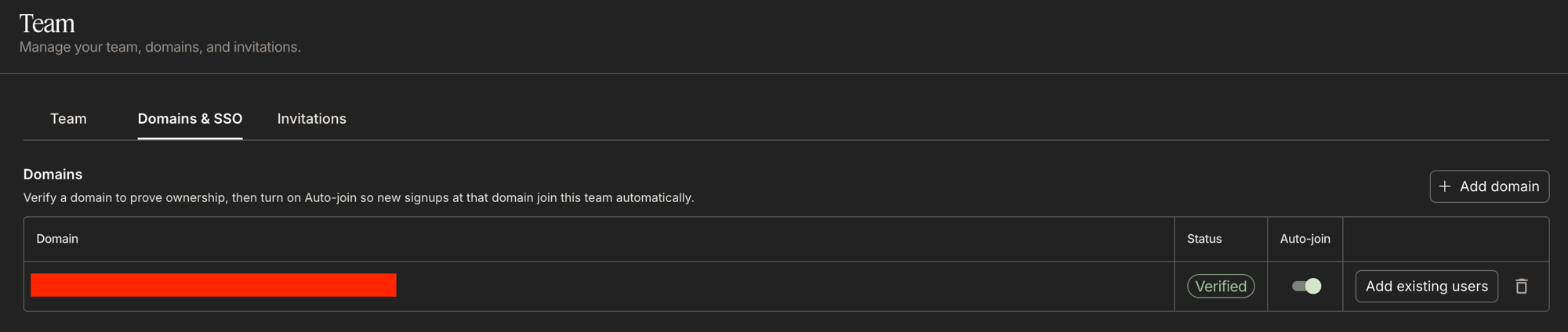
Domains are managed by Owners on the Domains & SSO tab of the Team page. Admins can view them.
gmail.com cannot be registered.Verify a domain
Verify
Click Verify. Inworld looks for the TXT record among the domain's DNS records and, when it finds it, moves the domain to Verified.
DNS changes can take up to a few hours to propagate. If verification fails, wait and try again. The check is safe to repeat, and verifying an already-verified domain does nothing.
A domain can be verified by one organization at a time. Registration fails if another organization has already verified it. Contact support if that is unexpected.
Auto-join for new signups
Verifying a domain proves ownership. It does not add anyone to your team by itself. Auto-join is a separate, opt-in switch for each domain.
Once you enable Auto-join on a verified domain, anyone who signs up with an email address at that domain joins your organization as a Member instead of getting their own personal account.
- Auto-join is off by default and can only be enabled on a verified domain.
- Turning it off stops future auto-joins. People who already joined stay members.
- You must have at least one workspace shared with the team before you can enable it.
Add existing users at a domain
Auto-join applies only to new signups. To add colleagues who already have Inworld accounts at a verified domain, use Add existing users on that domain.
This adds every registered user at the domain to your organization as a Member, skipping anyone who is already a member, and reports how many were added. As with auto-join, it requires a workspace shared with the team.
Remove a domain
Removing a domain stops auto-join for new signups at that domain. Members who already joined are unaffected.
Removing a verified domain also withdraws it from your access configuration:
- SAML SSO sign-ins from that domain stop being accepted, and SSO cannot be enabled without at least one verified domain remaining.
- SCIM provisioning can no longer create or reactivate users at that domain.
Troubleshooting
Verification keeps failing
Check that the record is a TXT record at the apex (host @, not www or a subdomain). The value must be the full inworld-domain-verification=<token> string. Also check that your DNS provider has not appended your domain to the host. Query it yourself with dig +short TXT example.com before retrying. DNS changes can take a few hours.
The domain is already verified by another organization
A domain can only be verified by one organization at a time — typically another team inside your company got there first. Have that team remove the domain, or contact support.
Auto-join and Add existing users are disabled
Both require at least one workspace shared with the whole team, and a Verified domain. Share a workspace with the team, then retry.
A colleague signed up but did not join the team
Auto-join is opt-in for each domain. Confirm it is on for their domain and that they signed up with an address at exactly that domain. Auto-join applies only at signup. For existing accounts, use Add existing users.