

How it works
When the TTS node produces aFInworldData_TTSOutput, it includes a Timestamps array. Each entry is an FInworldAudioChunkTimestamp — a word with its start/end times and a Phones array of FInworldPhoneSpan entries. Each span carries the phoneme symbol, its viseme category, and its timestamp.
At playback time, UInworldVoiceAudioComponent fires OnVoiceAudioPlayback every tick with the current FInworldVoiceAudioPlaybackInfo (elapsed duration) and the cached phone spans. You pass these into a BFL function to get per-viseme or per-phoneme blend weights, then feed those weights into the Inworld Viseme AnimGraph node.
Data types
FInworldData_TTSOutput
The output of a TTS node. Contains everything needed for playback and lip-sync.FInworldAudioChunkTimestamp
One word in the utterance, with its time range and phone-level detail.FInworldPhoneSpan
One phoneme within a word. The source of all lip-sync timing.FInworldVisemeBlends
Blend weights for the 12 Inworld viseme categories, each in[0, 1]. STOP represents silence/rest.
FInworldVoiceAudioPlaybackInfo
Playback timing provided each tick byOnVoiceAudioPlayback. Pass this to BFL functions to get the correct viseme weights for the current frame.
UInworldVoiceAudioComponent
TheUInworldVoiceAudioComponent handles TTS audio playback and is the main source of per-frame lip-sync data.
Methods
Events
OnVoiceAudioPlayback is the recommended binding point for lip-sync — it provides PlaybackInfo and pre-built PhoneSpans in one call.
Blueprint Function Library — Viseme & Phoneme functions
All functions are onUInworldBlueprintFunctionLibrary.
Recommended pattern: bind to
OnVoiceAudioPlayback, cache PhoneSpans on OnVoiceAudioStart, then call GetVisemeBlends(PlaybackInfo, CachedPhoneSpans) each tick. This avoids re-flattening the timestamp array every frame.
Inworld Viseme AnimGraph node
UAnimGraphNode_InworldViseme is an Animation Blueprint node that applies morph target curves from viseme blend weights. Bone transforms pass through unchanged — only the curve track (morph targets) is modified.
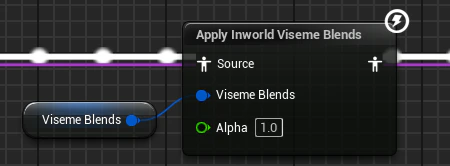
Properties
UInworldVisemeDataAsset
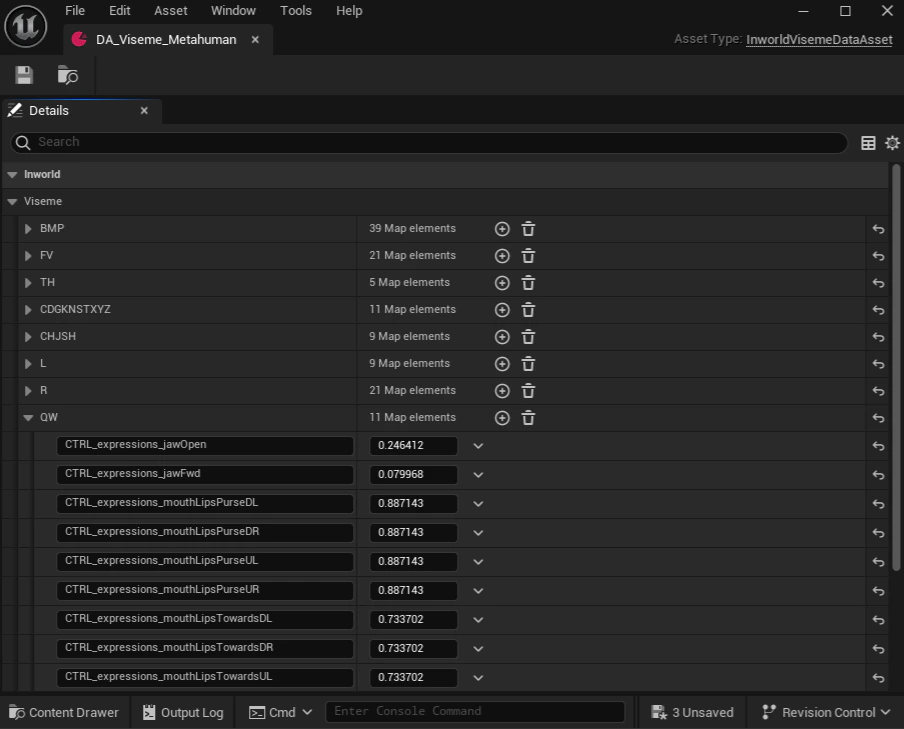
AUDataAsset that maps each viseme category to one or more morph target curve name/weight pairs. You create one asset per character rig, then assign it to the VisemeData property on the AnimGraph node.
Each viseme entry is a TMap<FName, float> where the key is the morph target curve name on your Skeletal Mesh and the value is the contribution weight for that viseme.
Supported viseme entries: BMP, FV, TH, CDGKNSTXYZ, CHJSH, L, R, QW, AEI, EE, O, U
(STOP is handled automatically — it does not need an entry in the data asset.)
Setting up a VisemeDataAsset
- In the Content Browser, right-click and choose Miscellaneous > Data Asset
- Select
InworldVisemeDataAssetas the class - Open the asset and for each viseme entry, add the morph target curve names from your Skeletal Mesh and their blend weights
- Assign the asset to the
VisemeDataproperty on yourInworld VisemeAnimGraph node
CTRL_expressions_* curves. Weights are additive — multiple curves per viseme are all applied simultaneously.
Setting up lip-sync in an Animation Blueprint
1
Add the Inworld Viseme node to your AnimGraph
Open your character’s Animation Blueprint and navigate to the AnimGraph. Search for Inworld Viseme and place the node in your graph, wiring its Source input from your existing pose and its output toward Output Pose.Assign your
UInworldVisemeDataAsset to the Viseme Data property on the node.2
Create a VisemeBlends variable
Add an
FInworldVisemeBlends variable to the Animation Blueprint. Wire it into the Viseme Blends pin on the Inworld Viseme node. This variable will be updated each tick from the character component.3
Bind to OnVoiceAudioPlayback
In the character actor’s Blueprint (or on
BeginPlay in the Anim BP), get the UInworldVoiceAudioComponent and bind to OnVoiceAudioPlayback. In the callback, call GetVisemeBlends(PlaybackInfo, PhoneSpans) and store the result into your FInworldVisemeBlends variable using Set Anim Instance Variable or a direct property write.For best performance, also bind to OnVoiceAudioStart and call BuildPhoneSpansFromTTSOutput there to cache the spans array. Then use GetVisemeBlends(PlaybackInfo, CachedPhoneSpans) in OnVoiceAudioPlayback instead of GetVisemeBlendsTTS.4
Tune smoothing and alpha
Adjust Smoothing Speed on the AnimGraph node to control how snappily the mouth follows phoneme changes. The default of
12 is a good starting point. Use Alpha to globally scale the strength of lip-sync, which is useful for blending with other facial animation systems.