Extractions
Pull typed fields (text, numbers, dates, lists, estimates) out of text or images, such as an invoice number, total and due date from a scanned receipt, with a confidence for each value
Preview. The /alpha path and the request and response shape may change before this API is marked stable. See release stages.
The Extractions API runs an extraction model that reads text or images and returns the values you ask for as typed fields. You send a state (the content to read), optional images in assets, and a map of named fields, each with a type such as text, number or date. You get back one answer per field: the value, how confident the model is, and how likely the value is to be missing from the input.
Use it to turn documents into data: invoice and receipt fields, form entries, dates and amounts in emails, line items, or a number the content implies but doesn't state. Requests use your Inworld API key and are billed to your Inworld account.
| Endpoint | POST https://api.inworld.ai/alpha/extractions |
| Models | Call the List models API with output_modalities=extractions |
| Input | Text, and PNG, JPEG or WebP images. PDFs are not accepted; see PDFs |
| Streaming | Not supported: every answer comes back in one response |
| Pricing | Input tokens only; see Billing |
| Rate limit | Per account, the same requests per second as chat completions on your plan; see Rate limits |
Choose an API
Extractions, Decisions and structured outputs on chat completions all return machine-readable results. Choose by what your code needs back:
| Use | When you need | You get |
|---|---|---|
Extractions (/alpha/extractions) | Values read from text or images: names, IDs, amounts, dates, lists, or an estimate of a number | One typed value per field, with confidence and the probability that the value is absent (p_null). Billed on input tokens only |
Decisions (/alpha/decisions) | A judgment about the content: yes or no, one of your options, or a score | A probability, one of your options, or a level on your scale |
Structured outputs (/v1/chat/completions) | JSON in your own schema, with nested objects or generated text, or a PDF as input | JSON generated by a chat model, which you validate yourself. Billed on input and output tokens |
To read a document and then decide what to do with it, you can call Extractions for the values and Decisions for the judgment.
Choose a model
Call the List models API with ?output_modalities=extractions to list extraction models. Extraction models are not in the default listing. Each model's endpoints is ["/alpha/extractions"], spec.inputModalities shows whether it reads images (image), and spec.contextLength is how many tokens of input it reads. A chat model or a decision model can't be used on this endpoint.
The examples on this page use inworld/models/clairic, which reads text and images. Send a model's id from List models unchanged. The response's model names the model that answered and can be a shorter form of that id, such as inworld/clairic.
Extract fields from text
Run these examples on your server. Set INWORLD_API_KEY to the Base64 credentials copied from Portal or the CLI; see authentication.
curl -X POST https://api.inworld.ai/alpha/extractions \
  -H "Authorization: Basic $INWORLD_API_KEY" \
  -H "Content-Type: application/json" \
  -d '{
    "model": "inworld/models/clairic",
    "state": "Invoice INV-20417 from Example Supply Co. Issued October 28, 2026. Payment terms: net 30. Total due: $712.26.",
    "fields": {
      "invoice_number": {"type": "text", "instructions": "The invoice number"},
      "total": {"type": "number", "instructions": "The total amount due", "unit": "USD", "decimals": 2},
      "due_date": {"type": "date", "instructions": "When payment is due"}
    }
  }'
Response:
{
  "model": "inworld/clairic",
  "answers": {
    "invoice_number": {
      "type": "text",
      "value": "INV-20417",
      "guess": "INV-20417",
      "confidence": 1,
      "p_null": 0.00005,
      "span": [8, 17]
    },
    "total": {
      "type": "number",
      "value": 712.26,
      "guess": 712.26,
      "confidence": 0.99999,
      "p_null": 0.00000002
    },
    "due_date": {
      "type": "date",
      "value": "2026-11-27",
      "guess": "2026-11-27",
      "confidence": 0.99994,
      "p_null": 0.0000026
    }
  },
  "truncated": false,
  "usage": {
    "state_tokens": 45,
    "image_tokens": 0,
    "schema_tokens": 272,
    "input_tokens": 362,
    "output_tokens": 0,
    "passes": 2
  },
  "metadata": {
    "attempts": [
      { "model": "inworld/clairic", "status_code": 200, "duration_ms": 209.9, "success": true }
    ],
    "generation_id": "41149c81-1125-4eb4-89a7-eb76c429af4a",
    "total_duration_ms": 210
  }
}
The text doesn't state a due date, so the model computed it from the issue date and the payment terms. To resolve relative dates such as "yesterday" or "next Friday", set reference_date (YYYY-MM-DD) to the date the content was written.
Extract fields from an image
Send each image in assets under a key you choose, and write that key in state (or in a field's instructions) where the image belongs. An asset whose key appears nowhere returns 400.
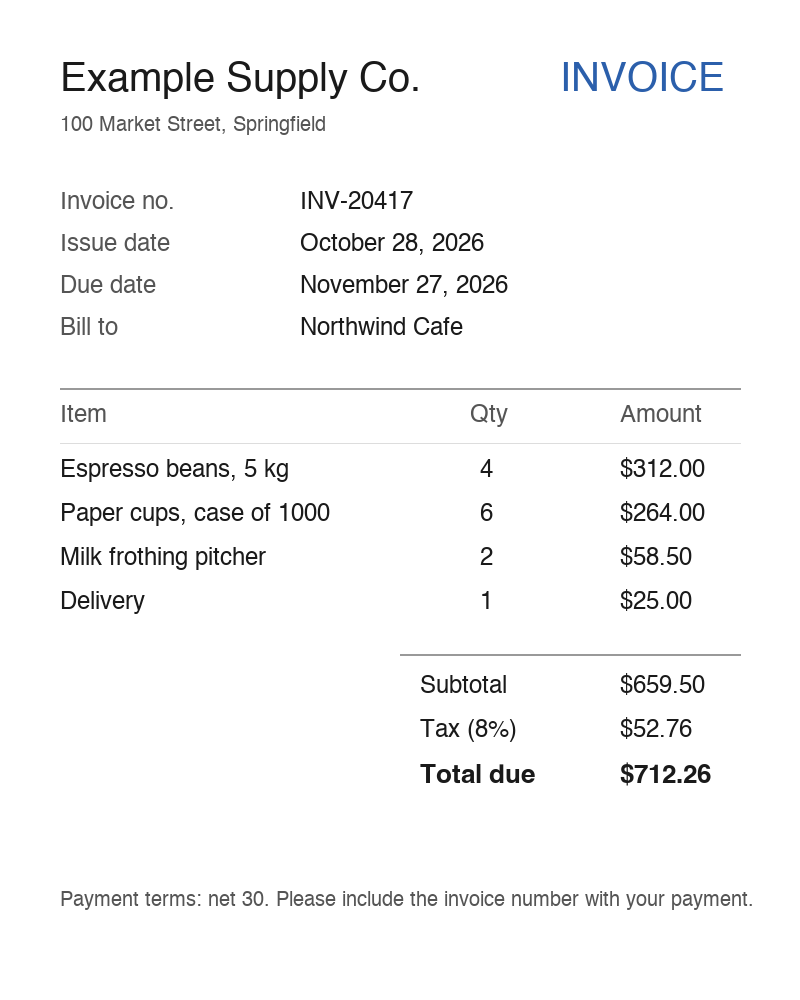
Save the invoice above as invoice.png. In the same directory, install the Python dependency and set your API key:
python -m pip install requests
export INWORLD_API_KEY="<your Base64 API key>"
Save the following as extract_invoice.py:
import base64
import os
from pathlib import Path

import requests

image = base64.b64encode(Path("invoice.png").read_bytes()).decode("ascii")
response = requests.post(
    "https://api.inworld.ai/alpha/extractions",
    headers={"Authorization": f"Basic {os.environ['INWORLD_API_KEY']}"},
    json={
        "model": "inworld/models/clairic",
        "state": "The supplier's invoice: invoice_scan",
        "assets": {"invoice_scan": {"format": "png", "data_base64": image}},
        "fields": {
            "invoice_number": {"type": "text", "instructions": "The invoice number"},
            "total": {
                "type": "number",
                "instructions": "The total amount due",
                "unit": "USD",
                "decimals": 2,
            },
            "due_date": {"type": "date", "instructions": "When payment is due"},
        },
    },
    timeout=60,
)
response.raise_for_status()
result = response.json()
if result["truncated"]:
    print("The input was cut to fit the model's context; check the answers.")
for name, answer in result["answers"].items():
    print(name, answer["value"], f"confidence={answer['confidence']:.2f}")
Run it from the directory containing both files:
python extract_invoice.pyIt prints each field with its value and confidence:
due_date 2026-11-27 confidence=1.00
invoice_number INV-20417 confidence=1.00
total 712.26 confidence=1.00
An asset is {"format": "png", "data_base64": "..."}. format is png, jpg, jpeg or webp, and data_base64 is standard base64 with no data: prefix. The key must stand alone in the text: invoice_scan matches in "invoice: invoice_scan" but not in "invoice_scan_2". When state would only name the image, it can be an empty string and the key can go in a field's instructions instead. An answer the model read from an image carries "source": "image", and a text answer read from an image has no character position (span is null).
PDFs and multi-page documents
The Extractions API reads images, not PDFs: an asset with format: pdf returns 400. For a PDF, either:
- Render each page to PNG or JPEG and send the pages as assets. The example model reads up to four images per request, and a request carrying images must fit in 4 MiB. For longer documents, send a few pages per request.
- Send the PDF to a chat model that accepts files and ask for structured outputs. See PDF input.
Field types
Each entry in fields is keyed by a name you choose, and its answer comes back under the same name. Every field has a type; instructions tells the model what to look for. Write instructions as you would label the field on a form.
type | Extracts | value |
|---|---|---|
text | A string from the content, such as a name or an ID | A string |
number | A number. Optional unit, decimals (0 to 6) and integer | A number |
date, time, datetime | A calendar date, a time of day, or both | ISO 8601: 2026-11-27, 09:30:00, 2026-11-03T09:30:00 |
duration | A length of time, in your unit | A number |
list | Every matching item. Requires items: text, number or date | An array |
estimate | A number or date the content implies but may not state, within min and max (both required, both numbers or both YYYY-MM-DD dates) | The expected value, plus median, p10 and p90 |
forecast | The next values of a series. Requires min, max, horizon (1 to 64 steps) and interval (such as month) | An array with one expected value per step, plus median, p10 and p90 arrays |
See Create extraction for every field option and answer member.
Use the answers in your application
For text, number, date, time, datetime and duration fields, each answer has:
value: the extracted value, ornullwhen the model judges it absent from the input.guess: the model's best candidate, even whenvalueisnull.confidence: from 0 to 1, how sure the model is ofguess.p_null: from 0 to 1, the probability that the input doesn't contain the field. Set a field'snull_threshold(0 to 1) to control whenvaluebecomesnull.span: fortext, the start and end character positions of the value instate, end exclusive.
A list answer has value (an array), confidence and, for text read from state, spans. An estimate answer's value is the expected value; set options.include_quantiles to true to also get the full quantiles array.
Before you store a value, check it in your code: send low-confidence answers and null values for review instead of trusting them. Choose the threshold from examples of your own documents. Also check truncated: when it is true, the input was longer than the model's context and was cut, so a field near the end may be missing or guessed. Split long documents into several requests.
The response's model is the model you requested. metadata reports attempts, generation_id and total_duration_ms.
Limits
| Limit | Value |
|---|---|
| Request body | 16 MiB. A request that carries images must fit in 4 MiB, including the base64 encoding |
| Images per request | Up to 4 for inworld/models/clairic; other models can differ. More images than the model reads returns 400 |
| Input length | The model's spec.contextLength in tokens. Longer input is cut and the response has truncated: true |
| Timeout | 60 seconds |
| Zero data retention | Not available for workspaces with zero data retention when the model can't serve them: the request returns 400 |
Resize or compress images before you send them: base64 encoding makes each image about a third larger in the request.
Errors
Check the HTTP status and the response content type before parsing the body. Extractions errors use {"error": {"message": "...", "type": "..."}}. Request validation returns 400 before the request reaches a model, with error.param naming the field to fix, such as fields.total.type or assets.invoice_scan.format. Branch on the status, error.type and error.param, not on error.message: messages are for people and can change while the API is in Preview. Errors for authentication, credits and your account's rate limit use a different body: 401 and 429 are plain text, and 402 has a numeric error.code.
| Status | error.type | Meaning | What to do |
|---|---|---|---|
400 | invalid_request_error | Invalid request: a missing state or fields, an unknown field type, a missing required field option, an invalid reference_date, an asset that is a PDF, has an unsupported format, has a data: prefix or isn't referenced, more images than the model reads, an unknown model, or a decision model. Also returned for workspaces with zero data retention when the model can't serve them | Fix the request as the error describes. For zero data retention, use a workspace without it |
401 | Missing or invalid Inworld API key | Check the Authorization header | |
402 | Your account has no credits remaining | Add credits, then retry | |
404 | not_found_error | The model was retired | Choose another extraction model |
413 | invalid_request_error, or a body with a numeric code over 16 MiB | The body is over 4 MiB with images, or over 16 MiB | Send smaller or fewer images, or less state |
422 | invalid_request_error | The model rejected input that passed request validation | Fix the request as the error describes |
429 | rate_limit_error | Your account's request limit (plain-text body), or the model is rate limited | Retry with exponential backoff and jitter; honor Retry-After when present |
500, 502 | api_error, upstream_error | The model could not be reached or failed to answer | Retry with exponential backoff |
503 | api_error | At capacity, or model is not an extraction model ("this model is not available on the extractions API") | Check that the model is listed with output_modalities=extractions; otherwise retry with exponential backoff and honor Retry-After |
504 | timeout_error | No answer within 60 seconds | Retry, or send less input per request |
Billing
Extractions are billed on input tokens only, the response's usage.input_tokens. Output is not billed, and requests that return an error are not billed. input_tokens includes the state, the images and your field definitions, and can be larger than state_tokens + image_tokens + schema_tokens, because the model can read the input more than once (usage.passes). Field definitions count on every request, so short instructions cost less.
For the model's current rate per input token, read pricing.promptToken in the List models API response.