APIs
Synthesize speech (WebSocket)
Persistent connection for lowest-latency audio streaming
Open a persistent WebSocket connection and send text messages. The server streams audio chunks over the same connection, avoiding per-request overhead and repeated handshakes for the lowest possible latency.
Best for voice agents and interactive applications that send multiple synthesis requests in a session, where avoiding connection setup on every call makes a measurable difference.
If you only need a single request-response with chunked audio, the Streaming API is simpler to integrate. For tips on optimizing latency, see the latency best practices guide.
Message pipelining
Messages on a connection are processed in order, so you don't need to wait for the contextCreated acknowledgment before sending text. For the lowest latency, send each message as soon as it is ready — waiting for the acknowledgment adds a full network round trip before the first audio chunk arrives. If you omit contextId, messages are automatically routed to the connection's auto-created context.
Choose when speech generation starts
Choose a mode based on how text arrives in your application:
| Your input | Choose | Who decides when to generate speech? |
|---|---|---|
| You have the full text, or want to control batching yourself | Manual — autoMode: false (default) | Your app calls flushContext, or closeContext when finished. Buffering safeguards also apply. |
| Your app already splits text into complete sentences or phrases | Client segmented — autoMode: true, autoModeStrategy: "CLIENT_SEGMENTED" | The server schedules the segments your app sends. |
| You receive partial text or individual tokens from an LLM | Sentence boundary — autoMode: true, autoModeStrategy: "SENTENCE_BOUNDARY" | The server detects sentence boundaries in the incoming text. |
A context holds the settings and text for a speech-generation session within the WebSocket connection. The buffer holds text waiting to be synthesized. To flush is to request synthesis of the buffered text, even if it has no final punctuation. Complete any markup tags before flushing.
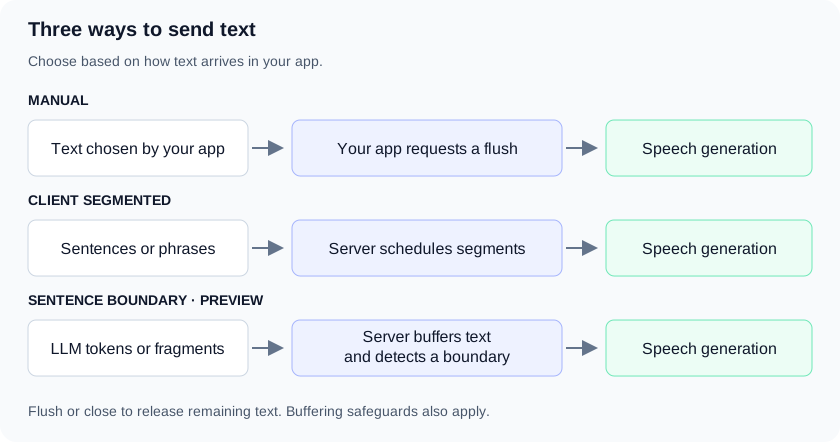
Set autoMode and autoModeStrategy in the create message when creating a context. Leave the buffering safeguards at their defaults for normal use.
Manual flushing
Use autoMode: false when you have a complete reply or want to decide how to batch text. Send text with sendText, then call flushContext to request speech generation. If you have no more text for this context, use closeContext instead.
To synthesize buffered text and keep the context open for more text, send:
ws.send(JSON.stringify({contextId: "reply-1", flushContext: {}}));Use flushContext between batches you want to control yourself. When finished, close the context to release any remaining text and finish receiving audio.
autoModeStrategy is ignored in this mode. See the runnable manual-flushing guide, which also covers interruptions and keeping LLM history aligned with what the user heard.
Client-segmented streaming
Use autoMode: true with autoModeStrategy: "CLIENT_SEGMENTED" when your app already splits text into sentences or phrases. Send each complete segment as it becomes available. The server controls flushing and can combine queued segments while earlier audio is streaming.
Auto-mode default: autoMode: true on its own selects CLIENT_SEGMENTED. Omitting autoModeStrategy, or setting it to AUTO_MODE_STRATEGY_UNSPECIFIED, has the same effect. To send unsplit LLM tokens, explicitly select SENTENCE_BOUNDARY.
See the runnable client-side sentence-splitting guide.
Server sentence-boundary streaming
Use autoMode: true with autoModeStrategy: "SENTENCE_BOUNDARY" to send text as your LLM produces it. The server buffers incoming fragments and detects sentence boundaries and complete break tags.
SENTENCE_BOUNDARY supports inworld-tts-2 and inworld-tts-2-flash where those models are available. Selecting it with auto mode enabled on an unsupported model returns INVALID_ARGUMENT.
The tail is the remaining buffered text that has not reached a confirmed boundary. When your text source finishes, close the context to release this remaining text. If you need to release the tail and continue using the same context, you can call flushContext instead. Auto mode does not use the buffer delay timer.
See the runnable LLM token-streaming guide.
Stream incremental text
This example uses an already connected, authenticated WebSocket. Each ws.send sends one message. In your application, send each fragment as your LLM produces it.
ws.send(JSON.stringify({
  contextId: "reply-1",
  create: {
    voiceId: "Ashley",
    modelId: "inworld-tts-2",
    autoMode: true,
    autoModeStrategy: "SENTENCE_BOUNDARY"
  }
}));

for (const text of ["Hello from ", "sentence boundary streaming.", " Next we will finish this thought"]) {
  ws.send(JSON.stringify({contextId: "reply-1", sendText: {text}}));
}

// The LLM has finished: synthesize remaining text and close this context.
ws.send(JSON.stringify({contextId: "reply-1", closeContext: {}}));
// Keep receiving audio until the server sends contextClosed.
Here is how the buffer changes as those messages arrive:
| Step | Your app sends | What happens on the server |
|---|---|---|
| 1 | "Hello from " | Text waits in the buffer. |
| 2 | "sentence boundary streaming." | The period may need more text to confirm a sentence boundary. |
| 3 | " Next we will finish this thought" | Hello from sentence boundary streaming. becomes eligible for synthesis. Next we will finish this thought stays buffered. |
| 4 | closeContext | The remaining text becomes eligible for synthesis, even without final punctuation. The server finishes sending audio, then sends contextClosed. |
A confirmed sentence is ready to be synthesized, but may be combined with other ready text while earlier audio is streaming.
Close a context in any mode
In all three modes, send closeContext when you have no more text for this context. It requests synthesis of any remaining buffered text and closes the context after the response finishes. You cannot send more text to that context after requesting close.
ws.send(JSON.stringify({contextId: "reply-1", closeContext: {}}));Wait for contextClosed before you stop receiving audio for that context. Sending closeContext begins closing it; audio may still be arriving. Closing the WebSocket immediately can cut off the remaining audio.
Advanced: synthesis batches and timestamps
The server can combine ready sentences while earlier audio is streaming, including when a flush or close releases the remaining text. Do not expect one audio response or flushCompleted event per sendText message or detected sentence.
flushCompleted marks the end of a synthesis batch (a flush). Alignment timestamps reset for the next flush.
Markup and unfinished input
With SENTENCE_BOUNDARY, a supported markup tag can span multiple sendText messages:
First message:   "[whis"
Second message:  "per] Hello."
Combined text: "[whisper] Hello."- An incomplete tag stays buffered; the server does not send a partial tag to synthesis.
- Instructions stay with the speech that follows them. See Voice steering for model-specific instruction support.
- Finish every markup tag before flushing or closing. Incomplete markup at end of input returns
INVALID_ARGUMENT. - Ordinary text does not need final punctuation: an explicit flush or close releases it.
A complete break tag, such as <break time="300ms"/>, provides a boundary and produces the requested pause.
Conversation context
Within a context, the server uses the text it has already synthesized as context for each later flush. This context helps it auto-detect the language of short text, such as Sí. or 123-456-7890, and normalize it. You don't need to resend earlier text to the same context.
A new context starts without that history. To give it the conversation so far, for example replies synthesized in an earlier context, set synthesisContext in the create message:
ws.send(JSON.stringify({
  contextId: "reply-2",
  create: {
    voiceId: "Ashley",
    modelId: "inworld-tts-2",
    synthesisContext: {
      previousRequests: [
        {text: "Hey, are you still free to meet on Thursday?"},
        {text: "We could do the morning instead if that's easier."}
      ]
    }
  }
}));- List up to 5 earlier texts, oldest first, with at most 2,000 characters combined. More returns
INVALID_ARGUMENT. - As the context synthesizes more text, its own recent text takes the place of the text you sent.
- Sending
updateConfigremoves the text you sent increate. The text that the context has already synthesized still counts. - Context text is not billed: only the text you send with
sendTextcounts toward your character usage. - When you set
language, the server doesn't detect the language, so context doesn't change it.
Text limits
| Limit | What it means for your app |
|---|---|
2,000 characters per sendText message | Split longer input across multiple messages. |
| UTF-16 character counting | Request limits and billed usage count UTF-16 code units. Most characters count as one; many emoji count as two. |
| Buffering safeguards | The server can flush accumulated text before your app requests it. In SENTENCE_BOUNDARY mode, safeguards can force a cut while keeping supported markup intact. Leave them at their defaults for normal use. |
| No buffer delay timer in auto mode | Explicitly flush or close when your text source finishes so short remaining text is not left waiting. |
For optional bufferCharThreshold and maxBufferDelayMs settings, see the API reference.
Have one large block of text? The Streaming API accepts up to 4,000 characters per request. For connection and concurrency limits, see Rate limits.
Timestamp transport strategy
When using timestamp alignment, you can choose how timestamps are delivered alongside audio using timestampTransportStrategy:
SYNC(default): Each chunk contains both audio and timestamps together.ASYNC: Audio chunks arrive first, with timestamps following in separate trailing messages. This reduces time-to-first-audio.
See Timestamps for details on how each mode works.
Language detection
Set language in the create message to fix a context's language. If the text can be in any of a few known languages, set languageSettings.candidates instead. Detection then chooses only from those languages for every message in the context. See Limiting detection to candidate languages for how the primary language and fallback work.
ws.send(JSON.stringify({
  contextId: "reply-1",
  create: {
    voiceId: "Ashley",
    modelId: "inworld-tts-2",
    languageSettings: { candidates: ["en-US", "es-MX"] }
  }
}));
To change the candidates in updateConfig:
- Send
languageSettingswith a new list. The new list replaces the old one; it isn't merged. - Send
languageSettings: {}or{ "candidates": [] }to remove the candidates. The context then useslanguageif set, and otherwise detects from every supported language. - Omit
languageSettingsto keep the current candidates.
contextCreated and contextUpdated don't echo languageSettings. The settings are still in effect.
Code examples
JavaScript
View our JavaScript implementation example
Python
View our Python WebSocket implementation example
WebSocket usage guides
Python guides for barge-in, auto mode and sentence-boundary streaming, with a local playground
API reference
Synthesize Speech WebSocket
View the complete API specification