Realtime API
WebSocket quickstart
Build a voice agent with the Inworld Realtime API over WebSocket, for server-side and proxied connections that need custom headers.
Build a browser-based voice agent that streams audio to the Inworld Realtime API using WebSocket.
Get Started
Create an API key
Create an Inworld account.
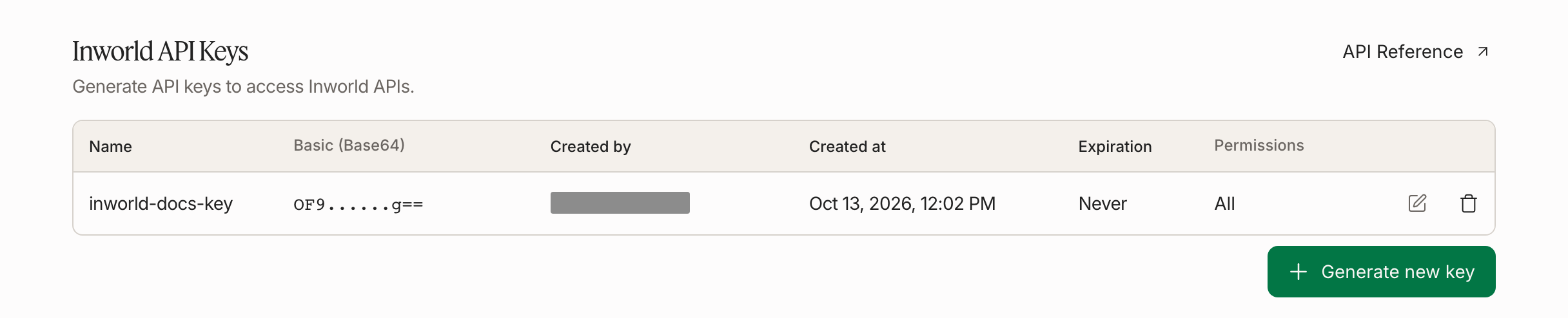
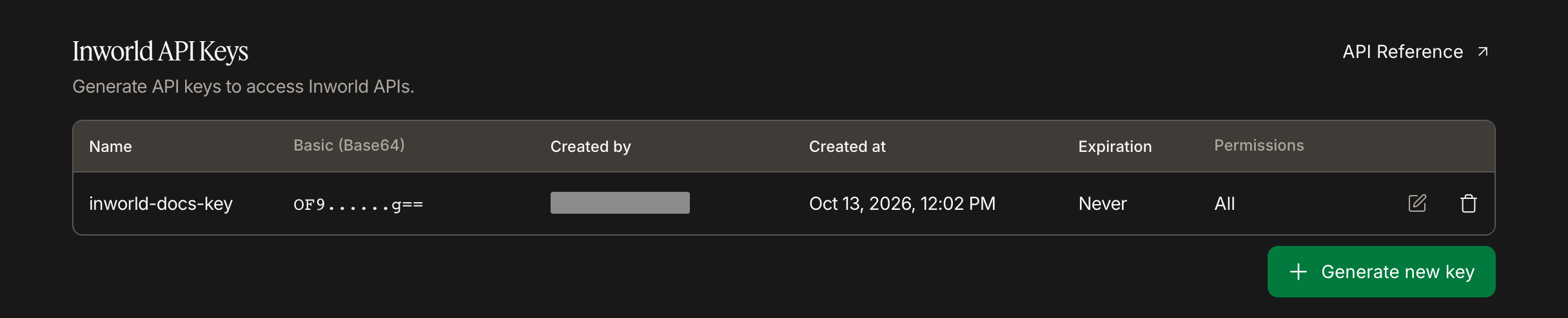
In Inworld Portal, open Manage > API Keys and click Generate new key. Choose the key type and permissions, click Generate, then copy Basic (Base64).
Set your API key as an environment variable.
export INWORLD_API_KEY='your-base64-api-key-here'setx INWORLD_API_KEY "your-base64-api-key-here"Create the server
Create server.js. It proxies WebSocket events between the browser and Inworld, configures the voice session, and triggers an initial greeting.
import { readFileSync } from 'fs';
import { createServer } from 'http';
import { WebSocketServer, WebSocket } from 'ws';

const html = readFileSync('index.html');
const server = createServer((req, res) => {
  res.writeHead(200, { 'Content-Type': 'text/html' });
  res.end(html);
});
const wss = new WebSocketServer({ server, path: '/ws' });

const SESSION_CFG = JSON.stringify({
  type: 'session.update',
  session: {
    instructions: 'You are a friendly voice assistant. Keep responses brief.',
  }
});

const GREET = JSON.stringify({
  type: 'conversation.item.create',
  item: { type: 'message', role: 'user', content: [{ type: 'input_text', text: 'Greet the user' }] }
});

wss.on('connection', (browser) => {
  let setup = 0;
  const api = new WebSocket(
    `wss://api.inworld.ai/api/v1/realtime/session?key=voice-${Date.now()}&protocol=realtime`,
    { headers: { Authorization: `Basic ${process.env.INWORLD_API_KEY}` } }
  );

  api.on('message', (raw) => {
    if (setup < 2) {
      const t = JSON.parse(raw.toString()).type;
      if (t === 'session.created') { api.send(SESSION_CFG); setup = 1; }
      else if (t === 'session.updated' && setup === 1) { api.send(GREET); api.send('{"type":"response.create"}'); setup = 2; }
    }
    if (browser.readyState === WebSocket.OPEN) browser.send(raw.toString());
  });

  browser.on('message', (msg) => { if (api.readyState === WebSocket.OPEN) api.send(msg.toString()); });
  browser.on('close', () => api.close());
  api.on('close', () => { if (browser.readyState === WebSocket.OPEN) browser.close(); });
  api.on('error', (e) => console.error('API error:', e.message));
});

let port = 3000;
server.on('error', (e) => {
  if (e.code === 'EADDRINUSE') { console.warn(`Port ${port} in use, trying ${++port}…`); server.listen(port); }
  else throw e;
});
server.listen(port, () => console.log(`Open http://localhost:${port}`));
This greeting asks the LLM to write it, so the wording varies from session to session. For a fixed greeting, replace GREET and the response.create with a single response.speak event, such as {"type":"response.speak","text":"Hi! How can I help?"}. It skips the LLM, so it costs less and starts without waiting for the LLM's first token, but the text is spoken verbatim.
Create the frontend
Create index.html in the same directory. It captures microphone audio, plays agent audio, and displays transcripts that fade after each turn.
<!DOCTYPE html>
<html>
<head><meta charset="utf-8"><title>Voice Agent</title></head>
<body style="display:flex;align-items:center;justify-content:center;height:100vh;margin:0">
  <button id="btn" onclick="go()">Start Conversation</button>
  <script>
    const btn = document.getElementById('btn');
    let ws, ctx, src, proc, source, stream, active = false, playing = false, nextPlayTime = 0;
    const queue = [];

    async function go() {
      if (active) { ws.close(); return; }
      btn.disabled = true; btn.textContent = 'Connecting…';
      ctx = new AudioContext({ sampleRate: 24000 });
      stream = await navigator.mediaDevices.getUserMedia({
        audio: { sampleRate: 24000, channelCount: 1, echoCancellation: true, noiseSuppression: true }
      });
      ws = new WebSocket(`ws://${location.host}/ws`);
      ws.onopen = () => {
        active = true;
        source = ctx.createMediaStreamSource(stream);
        proc = ctx.createScriptProcessor(2048, 1, 1);
        proc.onaudioprocess = ({ inputBuffer }) => {
          if (ws.readyState !== WebSocket.OPEN) return;
          const f = inputBuffer.getChannelData(0);
          const pcm = new Int16Array(f.length);
          for (let i = 0; i < f.length; i++) pcm[i] = Math.max(-32768, Math.min(32767, f[i] * 32768));
          ws.send(JSON.stringify({ type: 'input_audio_buffer.append', audio: b64(pcm.buffer) }));
        };
        source.connect(proc); proc.connect(ctx.destination);
      };
      ws.onmessage = ({ data }) => {
        const e = JSON.parse(data);
        if (e.type === 'response.output_audio.delta') {
          if (btn.disabled) { btn.textContent = 'Stop Conversation'; btn.disabled = false; }
          queue.push(Uint8Array.from(atob(e.delta), c => c.charCodeAt(0)).buffer);
          if (!playing) playNext();
        } else if (e.type === 'input_audio_buffer.speech_started') {
          stopAudio();
        }
      };
      ws.onclose = () => {
        active = false; stopAudio();
        proc?.disconnect(); source?.disconnect();
        stream?.getTracks().forEach(t => t.stop());
        btn.textContent = 'Start Conversation'; btn.disabled = false;
      };
    }

    function playNext() {
      if (!queue.length) { playing = false; return; }
      playing = true;
      const pcm16 = new Int16Array(queue.shift()), len = pcm16.length, fade = 48;
      const f32 = new Float32Array(len);
      for (let i = 0; i < len; i++) f32[i] = pcm16[i] / 32768;
      for (let i = 0; i < fade; i++) { f32[i] *= i / fade; f32[len - 1 - i] *= i / fade; }
      const buf = ctx.createBuffer(1, len, 24000);
      buf.getChannelData(0).set(f32);
      src = ctx.createBufferSource();
      src.buffer = buf; src.connect(ctx.destination);
      const t = Math.max(ctx.currentTime, nextPlayTime);
      nextPlayTime = t + buf.duration;
      src.onended = playNext; src.start(t);
    }

    function stopAudio() {
      queue.length = 0; playing = false; nextPlayTime = 0;
      try { src?.stop(); } catch {}
      src = null;
    }

    function b64(buf) {
      const b = new Uint8Array(buf); let s = '';
      for (let i = 0; i < b.length; i++) s += String.fromCharCode(b[i]);
      return btoa(s);
    }
  </script>
</body>
</html>
Install and run
npm init -y && npm pkg set type=module
npm install ws
node server.js
Open http://localhost:3000 and click Start Conversation. The agent greets you with audio.
How It Works
| Component | Role |
|---|---|
| Browser | Captures mic audio (PCM16, 24 kHz), plays agent audio |
| Server | Proxies events between browser and Inworld, holds the API key server-side |
| Inworld Realtime API | Handles speech-to-text, LLM processing, and text-to-speech in one WebSocket session |
Key events used:
input_audio_buffer.append— streams mic audio to Inworldresponse.output_audio.delta— agent audio chunks for playbackinput_audio_buffer.speech_started— triggers interruption (stops agent playback)